
Table of Contents
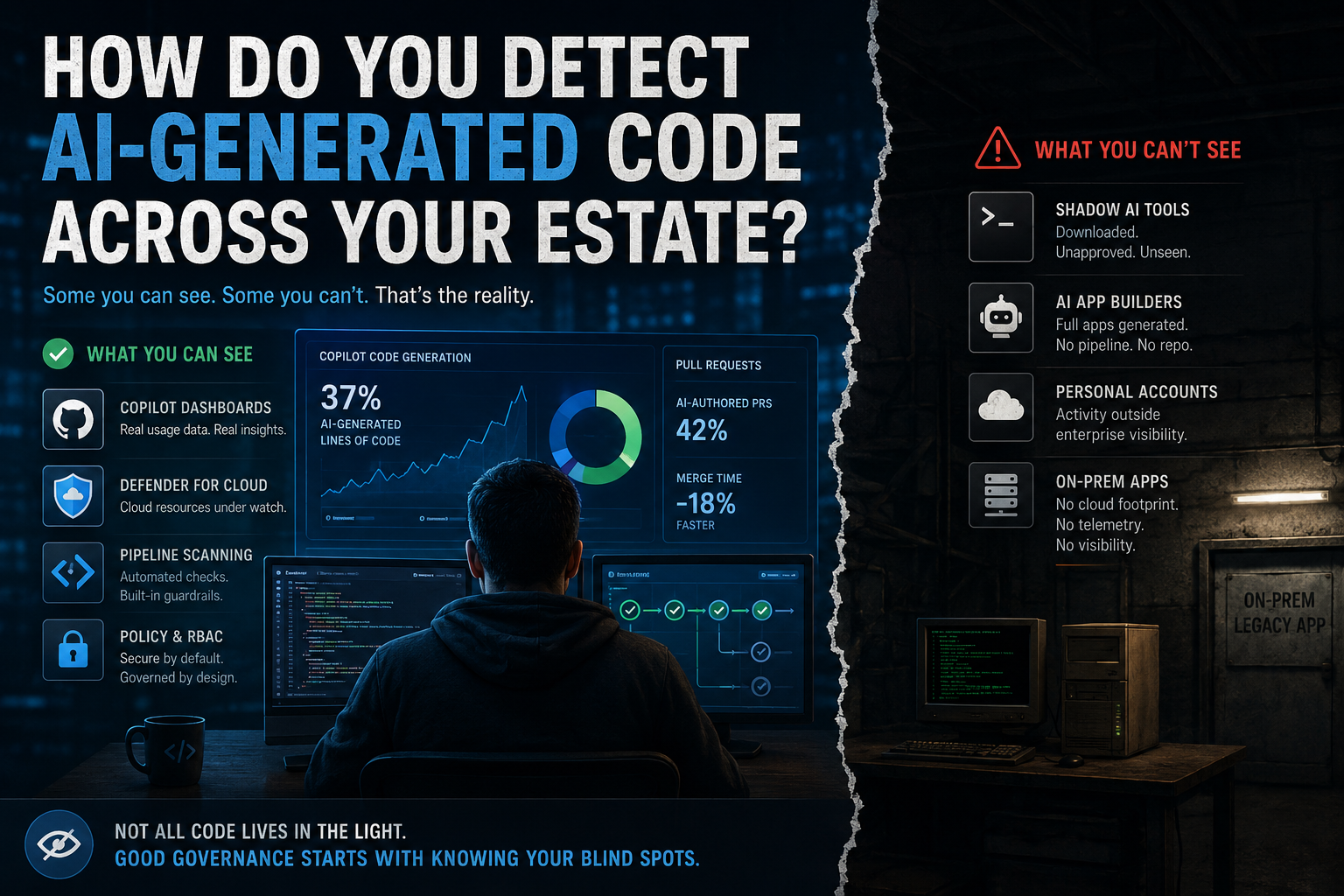
A team on our estate updated one of our in-house apps a few weeks ago. Nothing dramatic on paper, a handful of feature changes to something we have run for years. Except this app has no cloud footprint. No Azure resources, no CI/CD pipeline, no GitHub Actions workflow watching over it. It runs fully on prem, changes get built and deployed by hand, and it has done for a decade. If anyone on that team opened Claude Code or another AI assistant to get through the work faster, nobody would know either way, and that’s the shadow AI problem in miniature.
I don’t know if AI wrote any of that code. Nobody asked, because there was no gate to ask the question at. That gap is what this post is actually about.
There’s another gap sitting underneath that one, worth naming before we get into tooling. Every version of this story I hear starts with what the team gained: work finally moving after years stuck in a backlog, a change made in an afternoon that would once have taken a sprint. What I don’t hear, in that same excitement, is anyone asking whether the code that got them there actually meets the standard the rest of the estate is held to. Not maliciously skipped, just never raised, because the story being told is one of capability, not risk. A team thrilled to finally touch something they’ve been locked out of for years isn’t in the headspace to also be its own quality gate. That’s arguably a bigger governance gap than the visibility problem this post is about, and it’s one no dashboard fixes.
The first three posts in this series assumed a specific world. A repo in GitHub or Azure DevOps. A pipeline. Defender for Cloud watching the subscription. Copilot as the named tool doing the generating. Those are reasonable assumptions for a lot of a modern platform, and the scanning and governance work from post 3 depends on them being true. The moment they stop holding, everything else in this series stops helping too. Scanning a pipeline that doesn’t exist, or applying an Azure Policy to a subscription the app never touches, does nothing. This post is about what’s left once those assumptions fail.
What you can actually see, if you have the plumbing
Start with the part that does work, because it’s genuinely underused. GitHub rolled out organisation-level Copilot usage dashboards more widely earlier this year, and they go further than most teams realise. There’s a code generation dashboard that splits lines of code by whether they came from a user typing in the IDE or from agent-initiated activity, and pull request lifecycle metrics that let you compare Copilot-authored PRs against your overall PR flow, including merge times and review activity.
If you have Copilot licensed through GitHub and haven’t looked at this, it’s worth ten minutes. It’s the closest thing to a straight answer this post has: here is how much code Copilot is generating, here is who, here is what happens to it in review.
Read the merge time comparison carefully though. If Copilot-authored PRs are merging noticeably faster than the rest, don’t take that as a straightforward win. It might mean review kept pace. It might just mean the same excitement I mentioned earlier waved things through quicker than usual.
The catch is obvious once you say it out loud. This only tells you about Copilot, licensed through your GitHub org, with telemetry reaching GitHub. It tells you nothing about Claude Code, Cursor, ChatGPT pasted into a file, or anything running outside that specific licensing boundary. It’s real visibility into one tool, not visibility into “AI code” as a category.
Detection tools: pattern matching, not proof
There’s a small but growing market of tools that claim to detect AI-generated code after the fact, scanning an existing codebase and flagging sections that look machine-written. I haven’t run any of these myself, so I’m not endorsing a specific product here, but the category is worth knowing about because it’s the obvious next thing procurement will ask about once this post’s question comes up in a meeting.
Worth being honest about what they actually are. Even vendors in this space describe their own output as a governance and visibility signal, not enforcement, and not proof. Code has far fewer stylistic degrees of freedom than prose does, which makes AI authorship genuinely harder to detect in code than in an essay. A human refactoring AI-suggested code, or an AI cleaning up human code, blurs the signal further. Treat anything in this category as a probability, not a fact, and don’t build a governance process that assumes otherwise.
The tools you can’t gate
Here’s the harder problem. You can put a policy in place that says nobody uses unapproved AI tools. You cannot stop someone downloading Claude Code any more than you could ever stop someone downloading a text editor. This isn’t a Claude Code problem specifically, it’s a whole category now generally called shadow AI, and it’s bigger than code assistants.
Lovable is worth naming because it’s a good example of where this goes next. It’s an AI app builder that generates full working applications, frontend, backend, database schema, from a natural-language prompt, no pipeline required, no repo required unless someone chooses to sync one. It’s grown fast enough that Lovable now sells an enterprise tier with SSO, governance, and SOC2 controls aimed squarely at the ungoverned version of itself. That tells you something: the vendor building the shadow tool is also the one building the enterprise guardrails, because that’s where the money and the risk both are.
The scale here is bigger than most platform teams assume. Industry surveys put unapproved AI tool usage at over 80% of workers, and roughly one in five organisations report a breach already linked to unsanctioned AI use. One analysis of over 22 million enterprise AI prompts found more than 600 distinct generative AI tools in use, while only around 40% of the organisations involved had purchased any official AI subscriptions at all.
Two things worth building into how you think about this, not just this post:
- Banning doesn’t work. Studies on this consistently find that a meaningful share of employees keep using personal AI accounts after a ban, which just moves the activity somewhere with less visibility, not somewhere it doesn’t happen.
- Detection has to be layered. No single tool covers this. It’s a mix of network monitoring, SaaS discovery, endpoint tooling flagging unusual executables or CLI activity, and identity signals, working together rather than any one of them being the answer.
None of this is a solved problem. I’m naming it because pretending it doesn’t exist is worse than admitting the platform team’s visibility has real edges.
The on-prem gap, named honestly
Back to the app I opened with. No pipeline to scan. No cloud subscription for Defender to watch. No GitHub org to pull Copilot metrics from. Every tool and every signal in this post assumes at least one of those exists, and this app has none of them.
I don’t have a clean answer for this, and I’d rather say that plainly than invent one. What’s left, when the tooling doesn’t reach, is process: change control that actually gets followed, code review that isn’t rubber-stamped, and platform teams knowing their own estate well enough to ask the question directly instead of assuming a modern pipeline exists everywhere it doesn’t. That’s a weaker answer than a dashboard. It’s also the honest one.
Closing out the series
The thesis running through this whole series has been that AI-generated code isn’t the risk on its own, ungoverned platforms are. Posts 1 through 3 covered the parts you can build: golden paths, policy, RBAC, pipeline scanning. This post is the admission that visibility is patchy by design, not a checkbox you tick once. Some of your estate you can see clearly. Some of it you can see partially, through a probability score you shouldn’t fully trust. And some of it, like an on-prem app nobody’s touched a pipeline for in ten years, you can’t see at all yet.
Building a platform that assumes it has full visibility is how you end up finding out about a gap the hard way. Building one that knows where its blind spots are, and treats that as an ongoing job rather than a solved one, is what governance actually looks like in practice.