
Table of Contents
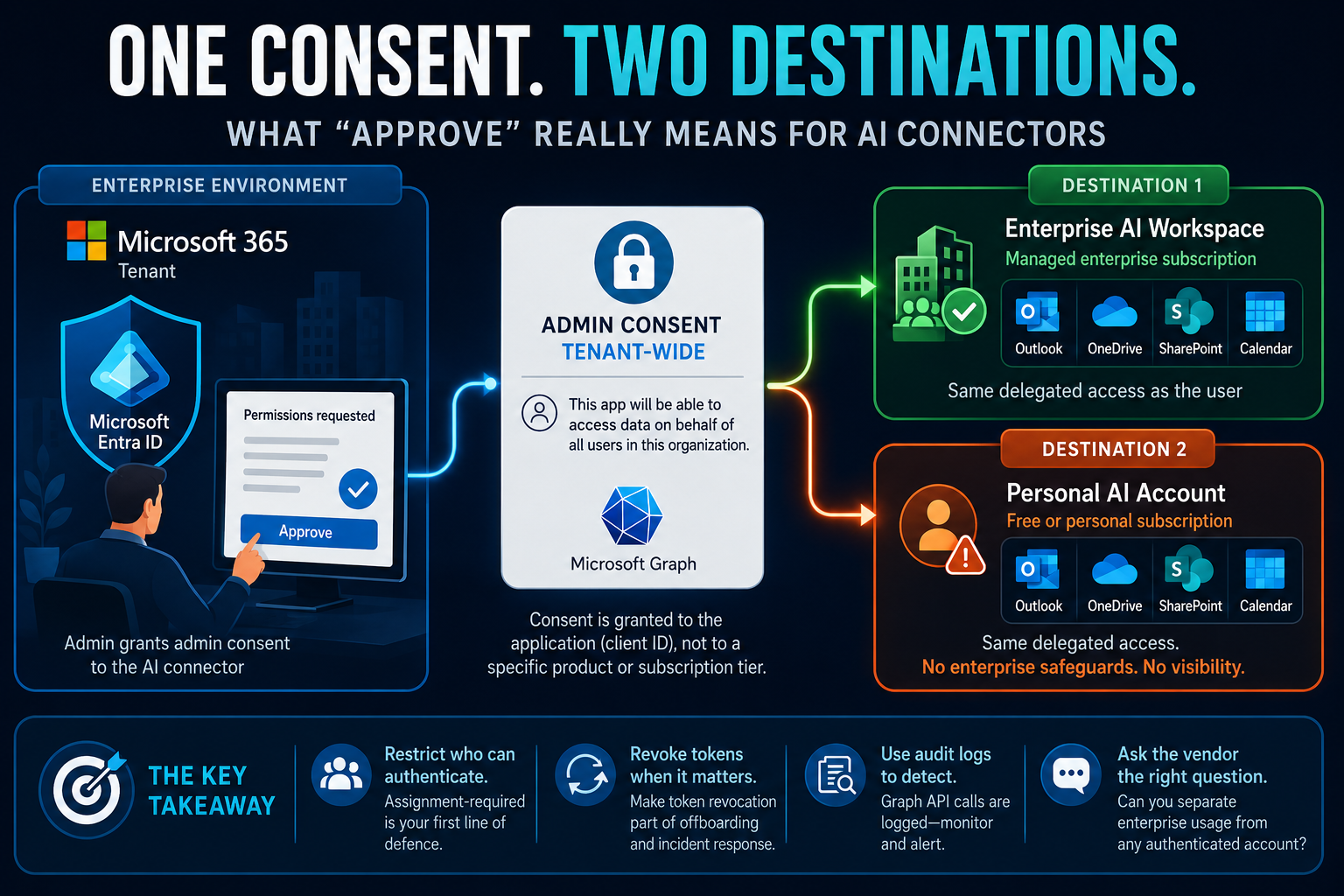
A few weeks into rolling out an AI connector for Microsoft 365, I sat down for a routine security review and found something that changed how I think about every AI connector approval since: someone had granted tenant-wide consent, assuming they were switching on access for the organisation’s managed AI product. What they’d actually done was open the door for any employee, on any instance of that AI tool, including a free account they’d signed up for on their own, to pull their own mailbox, calendar, and files into a system nobody in IT had visibility into.
Whilst this incident was directly linked to an AI tool, the same could be said for many SaaS solutions where you may have an ‘enterprise’ version of the tool, yet there is nothing stopping individuals setting up their own personal subscription which doesn’t have all the enterprise safeguards. Granting a SaaS product access to your tenant often authorises the tool itself, not just the specific enterprise instance you intended to approve.
Nobody did anything wrong, exactly. They followed the setup guide, clicked consent, and moved on. But the assumption baked into that click was simple: this control is scoped to the tool we sanctioned. That turned out to be wrong, and it’s wrong in a way that’s easy to miss if you haven’t looked closely at how these connectors actually authenticate.
The scope of tenant-wide consent isn’t the scope of the product
Most enterprise AI connectors that touch Microsoft 365 (Claude included, along with plenty of others) use a fairly standard pattern: two Entra app registrations, delegated Graph permissions, and a one-time tenant-wide admin consent that unlocks the integration for everyone in the directory. That consent step is what security teams are used to treating as the control. Grant it, and you’ve approved the tool.
Here’s the part that’s easy to miss: that consent lives on the app registration, not on the product tier sitting in front of it. Entra ID sees a client ID and a user. It has no concept of “this user is on our managed enterprise subscription” versus “this user signed up for a free personal account with the same corporate email.” If the app registration has tenant consent and the user hasn’t been explicitly restricted, both paths authenticate identically and get the same delegated access.
So the mental model “we approved the enterprise product” and the technical reality “we approved this app registration, for every account that can authenticate against it” are two different things, and the gap between them is exactly where shadow AI access lives.
The permissions aren’t the risk, the boundary is
To be fair to the underlying design: this isn’t a privilege escalation bug. Delegated permissions mean the connector only ever gets what the signed-in user already has, it can’t see a colleague’s mailbox, bypass SharePoint sharing, or reach beyond existing folder permissions. Nobody is getting more access than they started with.
What changes is the boundary the data crosses. A query that would normally stay inside your tenant, subject to your DLP policies, your retention rules, your audit configuration, now goes to a third party’s infrastructure under that vendor’s terms instead. On a sanctioned enterprise account, that’s a boundary your organisation has presumably reviewed and contracted around. On a personal account authenticated with the same corporate identity, it’s the same data crossing the same boundary, with none of that review behind it.
Why “just add device compliance” doesn’t close it
The obvious next move is to tighten Conditional Access: require a managed, compliant device before the connector can authenticate. It helps, but it helps less than it feels like it should, and the reason comes down to how these connectors actually operate once the initial handshake is done.
Most of them use an on-behalf-of (OBO) flow: the user authenticates once, and from then on the vendor’s backend, not the user’s device, holds the refresh token and makes the ongoing Graph API calls. Conditional Access is evaluated when a token is issued or refreshed, but the device-compliance and location signals it checks are the ones imprinted into that token at the original sign-in. The middle tier making subsequent calls isn’t a device Entra can re-evaluate. It’s a server, sitting in the vendor’s infrastructure, presenting a refresh token on the user’s behalf.
Practically, that means “require a corporate device” is a front-door control. It shapes who can ever get through the door. It does very little to constrain what happens on the other side of it once someone has.
What actually holds up
None of this is a reason to avoid these connectors, the productivity case is real, and the underlying permission model is sound. It’s a reason to put the controls in the right place:
- Restrict who can authenticate at all. Assignment-required on the app registrations, scoped to an approved group, is the highest-leverage control available. Everything downstream only matters for people who’ve already cleared this gate, so keep the gate narrow.
- Treat revocation as your real kill switch, not token expiry. Once a refresh token is issued to a vendor’s backend, natural expiry is your only passive defence, and it’s a weak one. Build “revoke refresh tokens for this app” into offboarding and incident response as a standing procedure, not an afterthought.
- Lean on audit logs for detection, not Conditional Access for prevention. Every Graph call these connectors make is logged with user, operation, resource, and timestamp. That’s a far more reliable place to catch anomalous use than trying to make CA do a job it isn’t built for at this layer.
- Ask the vendor the question Entra can’t answer. If separating “sanctioned enterprise usage” from “any authenticated account” matters to you, that distinction has to be enforced at the application layer, by the vendor. It’s a fair question to put to any AI tool you’re evaluating, and the honest answer might just be “we can’t do that yet”, which is useful information in itself.
The broader lesson
Don’t stop at this one connector. Run the same check against every enterprise SaaS tool your organisation already has live: does the admin consent or tenant-wide approval you granted actually scope to the enterprise instance you contracted for, or does it scope to the tool as a category, personal accounts included? The question worth asking before you approve any of them isn’t just “what permissions is it requesting”, it’s “what, exactly, does this consent apply to, and does that match what I think I’m approving.” Those two things are not always the same, and the gap between them is where most of the actual risk lives.