
Table of Contents
I’ve talked before about the Cloud Management and Well-Architected Frameworks, and why it’s important to think carefully about how governance standards are introduced into our Infrastructure as Code (IaC) deployments. When governance is applied heavy-handedly it creates friction; when it’s automated and embedded into existing workflows, it becomes almost invisible. Over time, it simply becomes how things are done.
“By the time your FinOps team notices the problem, you’ve been running an oversized SQL database for three months. The infrastructure works perfectly, it’s just costing £2,000 more per month than it should. This is the cost of discovering problems after deployment.”
One of the key foundations of the Cloud Adoption Framework is Cost Management, and in this post I want to show you a simple, and free, way to build cost awareness directly into your pull requests and IaC pipelines, without slowing teams down or introducing additional gates.
Infracost
Infracost describes itself as a tool that helps teams “shift costs left”. In practical terms, this means making infrastructure costs visible before resources are deployed.
Traditionally, cost management is a shift-right activity: infrastructure is deployed first, and costs are analysed later through billing reports or cost management tools. By the time an issue is identified, the resources already exist and money has already been spent.
By integrating Infracost into your DevOps IaC pipelines, we can surface the cost impact of infrastructure changes much earlier, during code review and pull requests. This allows engineers to understand the financial implications of their changes at the point decisions are being made, rather than after the fact.
Infracost isn’t trying to replace your FinOps platform or cost management tools. Instead, it fills a specific gap: giving engineers cost visibility at the point they’re making infrastructure decisions, not weeks later when reviewing billing reports. Used correctly, it complements existing cost management tooling rather than replacing it.
Why This Matters for Platform Teams
For platform teams, cost management is rarely about the absolute cost of individual resources. It’s about predictability, guardrails, and enabling teams to make good decisions without constant oversight.
In most organisations, platform teams sit uncomfortably between:
- engineering teams who want autonomy and speed
- finance teams who want control, forecasting, and accountability
Traditional cost controls tend to sit too far to the right, budgets, alerts, and post-deployment reporting. While these are necessary, they’re inherently reactive. By the time a platform team is involved, the infrastructure already exists and the conversation becomes one of remediation rather than design.
Embedding Infracost into IaC pipelines changes that dynamic.
By surfacing cost information during pull requests, platform teams can:
- make cost a design-time concern, not a retrospective one
- encourage better architectural trade-offs without blocking deployments
- standardise cost awareness across teams without enforcing rigid controls
- reduce the need for manual reviews, exceptions, and escalations
- avoid common mistakes such as over-sizing SKUs or selecting inappropriate service tiers
Crucially, this approach aligns with how platform teams should operate at scale. Instead of policing every deployment, the platform provides fast feedback and shared context, allowing product teams to self-correct early.
This is governance as a capability, not a checkpoint.
Infracost doesn’t replace budgets, cost alerts, or FinOps processes. It complements them by ensuring cost is considered before infrastructure decisions are locked in, when changes are cheap, conversations are easier, and autonomy can be preserved.
Here’s how to add Infracost to your pipelines.
Setting Up Infracost
Getting your API Key
The first step in the process is to setup a free account within Infracost. You can do this through their website, https://www.infracost.io/. You will just need your email address or to sign up with GitHub / Google. Once setup you need to get your free API Key.
Infracost works entirely from Terraform code and does not require access to your Azure subscription to calculate costs. The service hosts their own Pricing API (it works with multiple clouds – Azure, AWS, Google) and supports over 1100 Terraform resources. Note that not every single resource is visible yet but the list is always evolving.
To get your API key, sign in to your account, select Settings then Organisation Settings. Under the automation blade select API Tokens and copy the CLI and CI/CD token.

Storing The Key
We need to securely store our API key somewhere that our pipelines can access. The simplest place is within a DevOps Pipeline Library.
Within your DevOps project, browse to Pipelines and select Library. Create a new Variable Group, we will call ours InfracostSecrets.
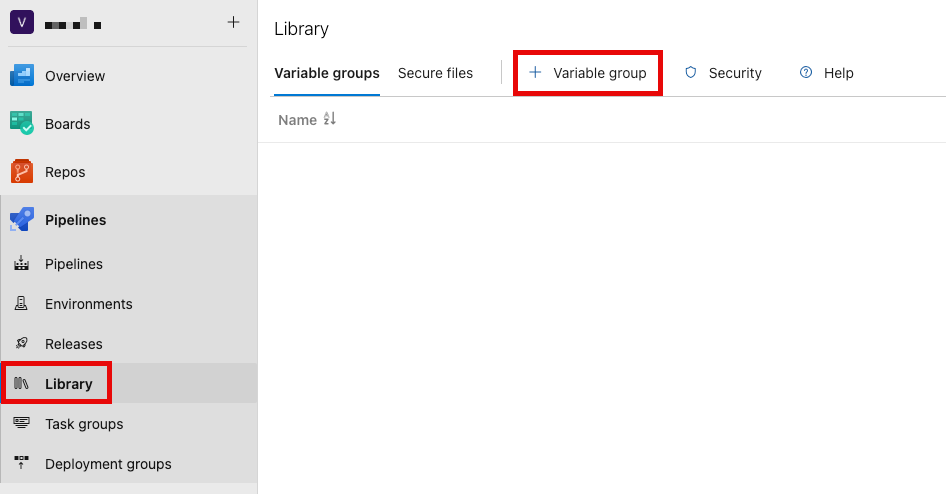
Within the Library, create a new variable called INFRACOST_API_KEY and add the API key as the value, marking it secure by clicking the padlock icon.
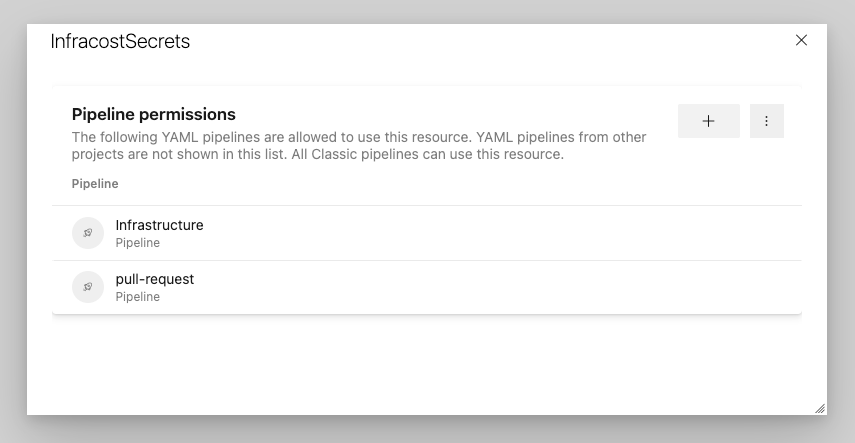
You need to authorise your pipelines to be able to use the Library Variable Group by clicking pipeline permissions and adding your pipelines to the approved list.
The Simple Terraform & Infracost Pipeline
Integrating Infracost into our existing pipelines is somewhat simple.
We first need to ensure our pipeline is using the Azure DevOps Variable Group from the library
variables:
  - group: InfracostSecrets
Then we need to install InfraCost to our DevOps Runners.
- bash: |
	curl -fsSL https://raw.githubusercontent.com/infracost/infracost/master/scripts/install.sh | sh
  	infracost --version
  displayName: Install Infracost
Then, we call Infracost (after the Terraform Init)
- bash: |
    infracost breakdown \
      --path . \
      --show-skipped \

   env:
     INFRACOST_API_KEY: $(INFRACOST_API_KEY)
   displayName: Infracost Breakdown
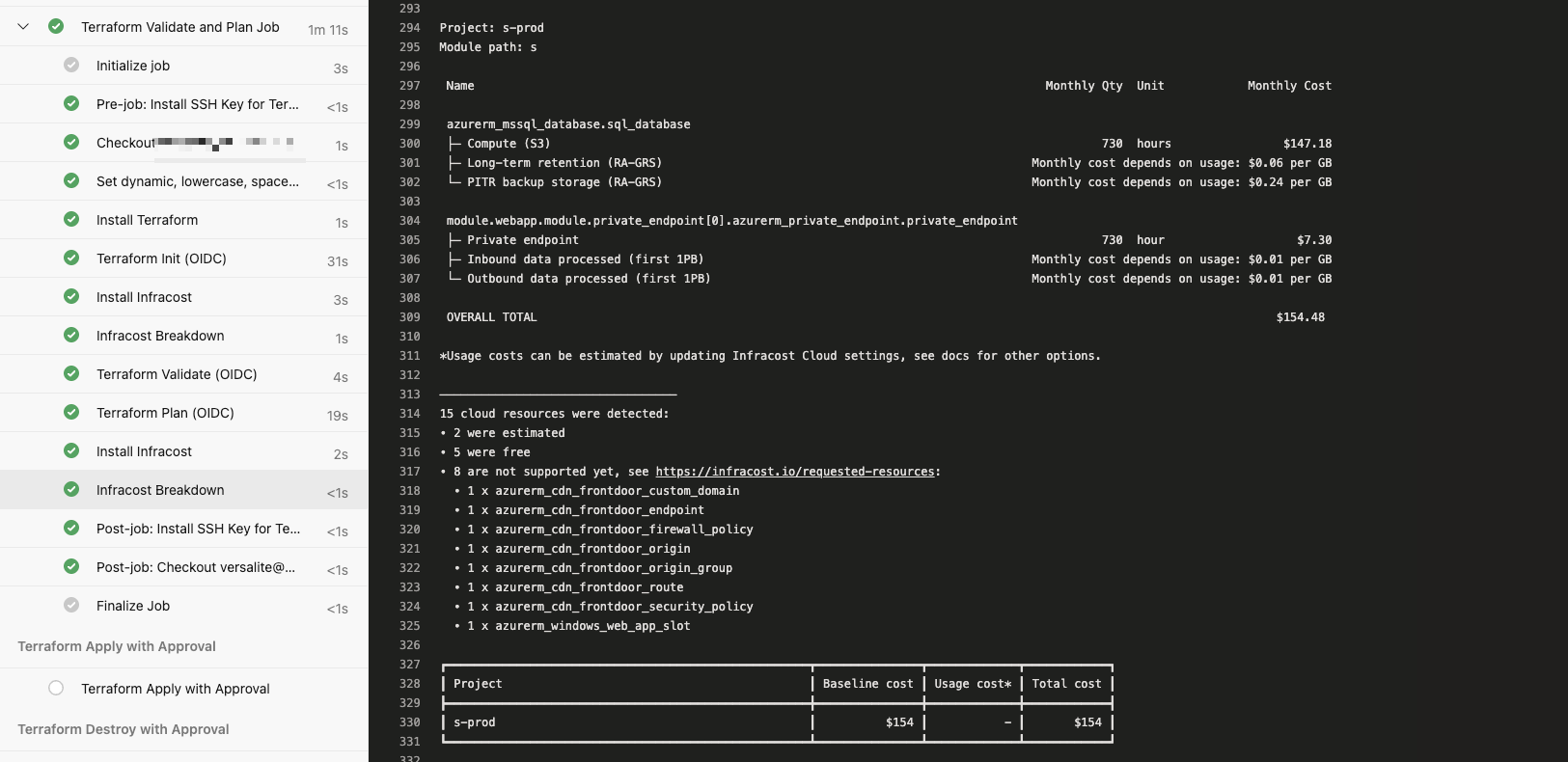
When we run the pipeline we can see a breakdown and summary table
The Pull Request Pipeline
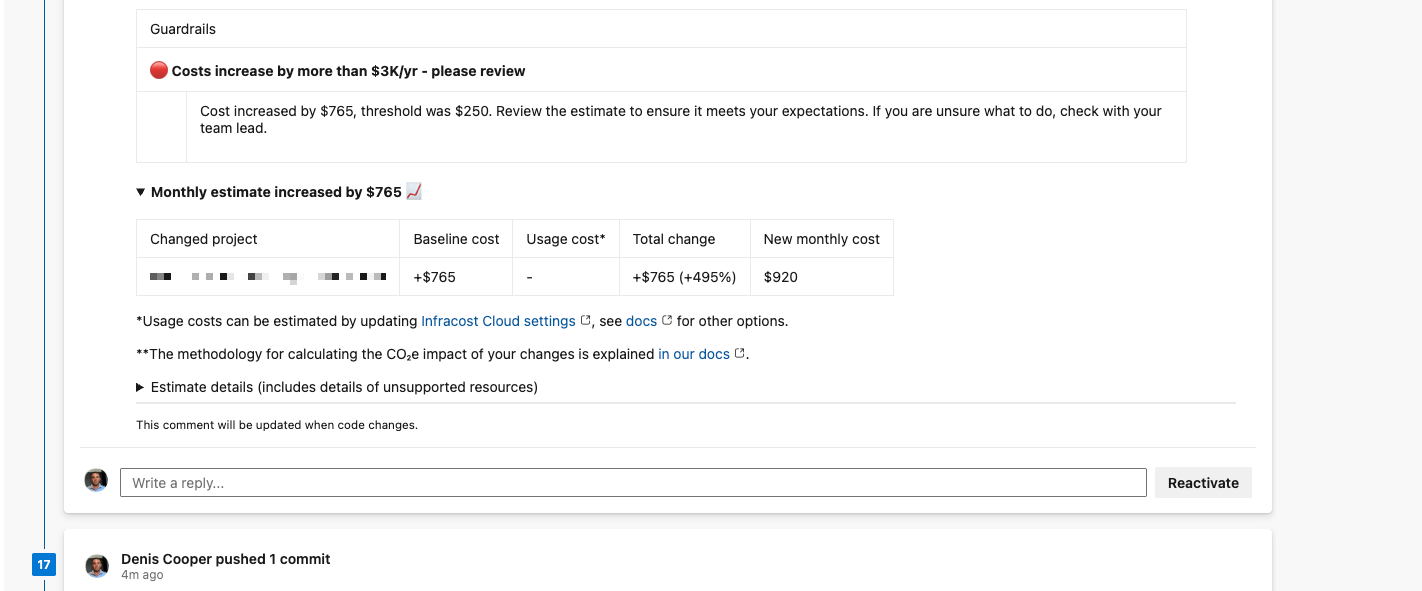
Whilst our simple pipeline is effective, integrating Infracost into our pull request allows us to compare the current costs (from the main branch) to the feature/working branch of our pull request. We can also update the pull request with the cost summary which acts as an additional data point for pull request validation and approval.
The flow is a little more involved and the process diagram shows the steps involved.

As you can see, the pull request pipeline gets trigged when we create a pull request. When the pipeline runs it checks out the main branch (remember the PR Pipeline runs from the feature branch). Once Main is checked out we run infracost and store the detail in a temporary json. We then revert back to the pull request and run Infracost again. We then compare both the outputs of Infracost and post a nice comment to the pull request.
The breakdown shows each resource’s monthly cost, highlighting which components are fixed (like compute) versus usage-based (like storage). Resources marked ‘not supported yet’ won’t have cost estimates but are still tracked.
Using Infracost Results Effectively
- Set informal thresholds (e.g., flag PRs that increase costs by >20%)
- Use it to compare SKU options during design
- Educate junior engineers on cost implications of architectural choices
- Don’t block deployments based on cost alone—use it as a discussion point
Ensure your DevOps Build Service has the ability to contribute to pull requests via the Repo Security blade otherwise Infracost won’t be able to post the comment!
The Full Pull Request Pipeline
trigger: none

pr:
  branches:
    include:
      - main

pool:
  vmImage: "ubuntu-latest"

variables:
  # Fixed, deterministic inputs for PRs
  - name: environment
    value: prod
  - name: location
    value: centralus

  - name: management-subscription-id
    value: "your-management-sub-id"
  - name: TFSTATE_RESOURCE_GROUP
    value: "state-resource-group"
  - name: TFSTATE_STORAGE_ACCOUNT
    value: "state-storage-account"
  - name: TFSTATE_CONTAINER_NAME
    value: "tfstate"
  - group: InfracostSecrets

stages:
  - stage: ValidateAndPlan
    displayName: "Terraform PR Validate and Plan"
    jobs:
      - job: TerraformValidateAndPlan
        displayName: "Terraform Validate and Plan (PR)"
        steps:
          - checkout: self
            persistCredentials: true
            fetchDepth: 0 # fetch all history for accurate diffs

          # Generate TFSTATE_KEY
          - script: |
              key=$(echo "${SYSTEM_TEAMPROJECT}_$(environment)_$(location).tfstate" | tr '[:upper:]' '[:lower:]' | tr -d ' ')
              echo "Generated TFSTATE_KEY: $key"
              echo "##vso[task.setvariable variable=TFSTATE_KEY]$key"
            displayName: "Set dynamic TFSTATE_KEY"

          # Install Infracost
          - script: |
              curl -fsSL https://raw.githubusercontent.com/infracost/infracost/master/scripts/install.sh | sh
            displayName: "Install Infracost"

          # Save current PR commit
          - bash: |
              PR_COMMIT=$(git rev-parse HEAD)
              echo "Current PR commit: $PR_COMMIT"
              echo "##vso[task.setvariable variable=PR_COMMIT]$PR_COMMIT"
            displayName: "Save PR commit SHA"

          # Generate baseline from main branch
          - bash: |
              echo "Switching to main branch..."
              git fetch origin main
              git checkout origin/main

              echo "Initializing Terraform for main..."
              terraform init \
                -backend-config="resource_group_name=$(TFSTATE_RESOURCE_GROUP)" \
                -backend-config="storage_account_name=$(TFSTATE_STORAGE_ACCOUNT)" \
                -backend-config="container_name=$(TFSTATE_CONTAINER_NAME)" \
                -backend-config="key=$(TFSTATE_KEY)" \
                -input=false

              echo "Running Infracost baseline..."
              infracost breakdown \
                --path . \
                --format json \
                --out-file /tmp/infracost-base.json
            env:
              INFRACOST_API_KEY: $(INFRACOST_API_KEY)
              ARM_USE_OIDC: true
              ARM_CLIENT_ID: $(ARM_CLIENT_ID)
              ARM_TENANT_ID: $(ARM_TENANT_ID)
              ARM_SUBSCRIPTION_ID: $(management-subscription-id)
            displayName: "Infracost baseline (main)"

          # Switch back to PR branch
          - bash: |
              echo "Switching back to PR branch..."
              git checkout $(PR_COMMIT)
            displayName: "Switch back to PR branch"

          # Shared terraform setup & init for PR branch
          - template: templates/terraform-setup.yml
            parameters:
              tfstateKey: $(TFSTATE_KEY)

          # Generate Infracost diff for PR
          - bash: |
              echo "Running Infracost diff for PR..."
              infracost diff \
                --path . \
                --compare-to /tmp/infracost-base.json \
                --format json \
                --out-file /tmp/infracost-diff.json
            env:
              INFRACOST_API_KEY: $(INFRACOST_API_KEY)
              ARM_USE_OIDC: true
              ARM_CLIENT_ID: $(ARM_CLIENT_ID)
              ARM_TENANT_ID: $(ARM_TENANT_ID)
              ARM_SUBSCRIPTION_ID: $(management-subscription-id)
            displayName: "Infracost diff (PR vs main)"

          # Display Infracost diff in table format
          - bash: |
              echo "Displaying cost difference..."
              infracost output \
                --path /tmp/infracost-diff.json \
                --format diff
            env:
              INFRACOST_API_KEY: $(INFRACOST_API_KEY)
            displayName: "Display Infracost diff table"

          # Post comment to PR
          - bash: |
              infracost comment azure-repos \
                --path /tmp/infracost-diff.json \
                --azure-access-token $(System.AccessToken) \
                --pull-request $(System.PullRequest.PullRequestId) \
                --repo-url $(Build.Repository.Uri) \
                --behavior update
            env:
              INFRACOST_API_KEY: $(INFRACOST_API_KEY)
            displayName: "Post Infracost comment to PR"
Summary
Cost management is a critical capability that is too often pushed to the post-deployment phase, where decisions are harder to reverse and costs have already been incurred. While Infracost does not replace the need for ongoing cost management and FinOps practices, it does enable teams to make more informed, intentional decisions earlier in the delivery lifecycle, and to catch costly mistakes before they reach production.
By introducing Infracost into the pull request process, cost awareness becomes part of the platform itself rather than an external control. Governance is embedded into existing workflows, feedback is delivered at the right time, and teams retain autonomy while operating within clear, well-understood guardrails.
This is cost governance done the right way: early, automated, and aligned with how teams already work.
Thank you so much for this breakdown of Infracost! It’s very important to keep an eye on cloud spend. Definitely going to give this a try on my next project.