
Table of Contents
In the last post, I walked through two real examples of AI-generated applications that made it to our platform team’s door in various states of readiness. Outdated base images, secrets bundled into a desktop app package, missing authentication checks, a security vocabulary without the underlying knowledge to back it up. The conclusion was that the AI didn’t fail. The governance did.
So what does better governance actually look like in practice? For this post, the answer is pipeline scanning. Specifically, what can we automate to catch the most common problems before they reach production?
I want to be upfront about the scope here. Automated scanning is one layer of the response, not the complete answer. There are classes of problem in AI-generated code that no scanner will ever catch, and I’ll cover those in the next post. But the scanning layer is where most platform teams should start, because it’s repeatable, it’s enforceable, and it doesn’t rely on anyone remembering to do it.
The Three Things You Need to enable Pipeline Scanning
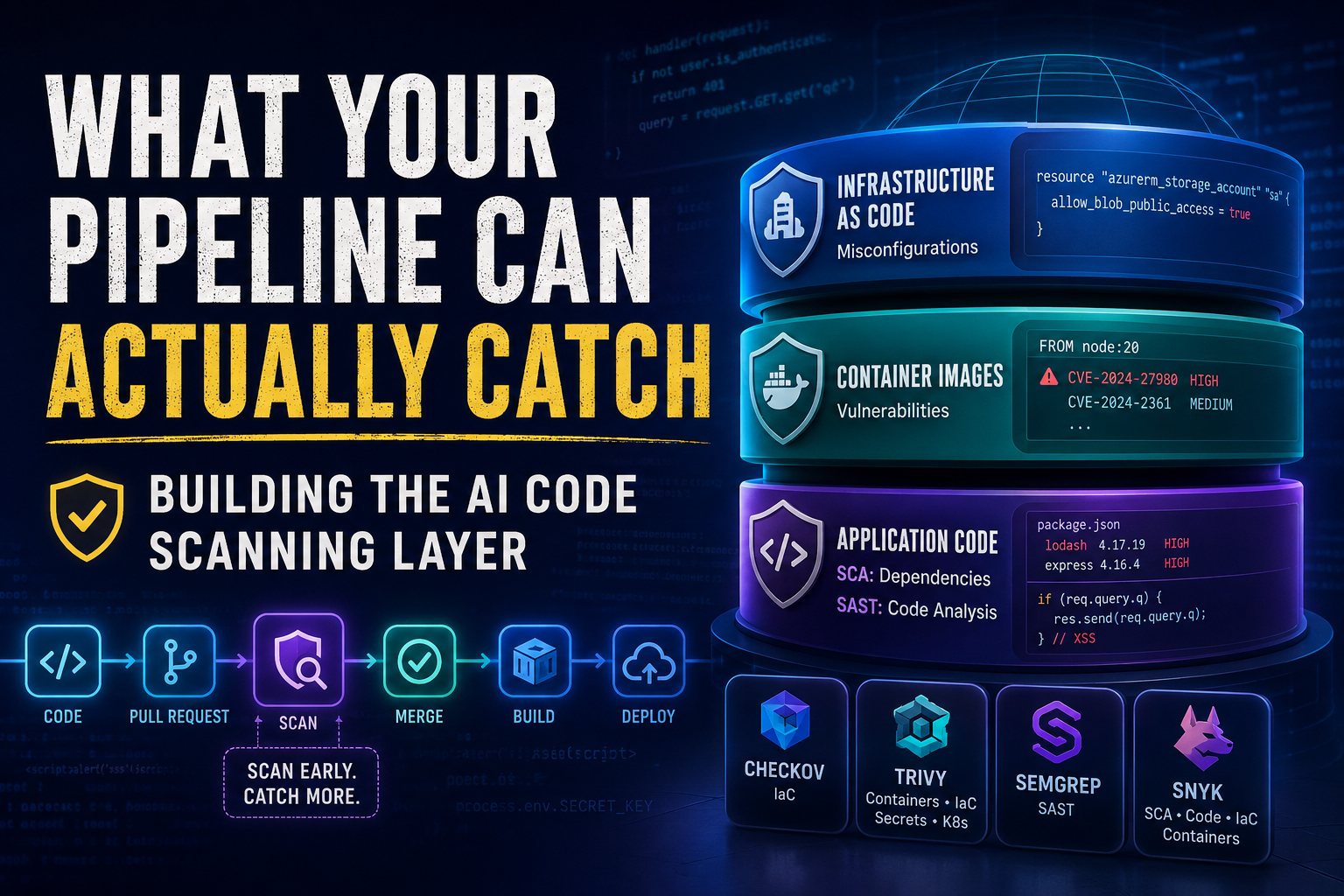
When AI tools generate code, the security risk doesn’t sit in one place. It spans three distinct layers, and you need to be thinking about all three.
Infrastructure as Code is where your Terraform, Bicep, Kubernetes manifests, and Dockerfiles live. This is the layer most platform teams already have some scanning coverage on. Misconfigurations here, overly permissive network rules, missing encryption, public storage accounts, are the kind of thing AI tools reproduce reliably because they’re optimising for something that deploys, not something that’s secure.
Container images are where dependency and vulnerability risk lives. The Node 20 example from the last post sits here. The base image the AI chose wasn’t wrong in the sense that it wouldn’t run, it was wrong because it was end of life and no longer receiving security patches. Scanning at this layer tells you whether the image your pipeline is about to push has known CVEs before it gets anywhere near a registry or a cluster.
Application code is the layer most platform teams haven’t got to yet, and it splits into two distinct concerns that are easy to conflate but need different tools.
The first is Software Composition Analysis (SCA): scanning your dependency manifests, package.json, requirements.txt, and equivalents, for outdated or vulnerable open-source packages. AI tools tend to pull in whatever package versions they were trained on, which can be significantly behind current. This is a different problem from the base image issue in the container layer. An image can pass a Trivy scan and still have a package.json full of vulnerable dependencies. SCA catches what’s inside the application, not the image it runs on.
The second is Static Application Security Testing (SAST): analysing the custom code itself for vulnerability patterns like the stored XSS and missing authentication checks we found in the first post. This is where the gap between “it works” and “it’s secure” is hardest to close without tooling, because these are logic flaws in code the AI wrote confidently and the developer had no reason to question.
Both matter. They’re different tools solving different problems.
If you’re only covering one or two of these layers today, you have gaps. AI-generated code introduces risk across all of them simultaneously.
Start With What You Already Have
Before reaching for additional open-source tools, it’s worth checking what’s already available in your existing platform. If you’re in the Microsoft ecosystem, you may have access to scanning capabilities you haven’t fully switched on yet. The picture does differ between Azure DevOps and GitHub though, and it’s worth being clear about those differences rather than treating them as equivalent.
Microsoft Defender for Cloud
If you connect your Azure DevOps or GitHub organisation to Defender for Cloud’s DevOps Security, you get a centralised view across both platforms: repository inventory, security posture assessments, security recommendations, and compliance visibility all in one place. For organisations running both ADO and GitHub alongside Azure subscriptions and AKS clusters, this “single pane of glass” is genuinely valuable. Security teams can see infrastructure risks, container vulnerabilities, and code-level findings together rather than switching between systems.
What that view contains, however, depends heavily on what scanning tooling is connected to each platform. And this is where GitHub and Azure DevOps diverge significantly.
GitHub has the richer native security ecosystem. If you’re on GitHub Enterprise with GitHub Advanced Security (GHAS) enabled, you get code scanning via CodeQL, native secret scanning with push protection, and dependency review via Dependabot, all feeding into Defender for Cloud. CodeQL is worth understanding specifically: unlike pattern-matching tools, it builds a queryable database of your code and traces data flow across functions and files, which means it can catch injection vulnerabilities, authentication bypasses, and logic flaws that simpler scanners miss. GHAS is licensed per active committer and recently split into two separately purchasable products, Secret Protection and Code Security, so you can license only what you need. If your organisation is already on GitHub Enterprise, it’s worth knowing what you’re already entitled to.
Azure DevOps requires more moving parts to reach a comparable position. Historically, Microsoft Security DevOps (MSDO) filled some of the gaps. MSDO is a pipeline extension (a task in ADO, an action in GitHub) that orchestrates a set of open-source tools including Checkov, Trivy, Bandit, and Template Analyzer, normalises their output into SARIF format, and feeds results into Defender for Cloud. It’s an orchestrator, not a scanner in its own right, and the value is the consolidated reporting back into Defender for Cloud rather than the individual tools, which you could run independently. One thing worth knowing: the secrets scanning capability within MSDO (CredScan) was deprecated in 2023. Microsoft now directs Azure DevOps users toward GitHub Advanced Security for Azure DevOps (GHAzDO) for secrets and code scanning instead.
GHAzDO brings CodeQL code scanning and secret scanning with push protection to Azure DevOps repositories. It’s a separate licensed product from GHAS on GitHub, but covers the same core functionality. So for ADO shops wanting depth in code and secret scanning, it’s the recommended path, it just requires additional licensing and integration rather than being built into the platform natively.
To put it plainly: GitHub plus GHAS plus Defender for Cloud gives you the richest experience. Azure DevOps plus GHAzDO plus Defender for Cloud gets you to a comparable place but with more setup. Azure DevOps plus MSDO alone plus Defender for Cloud is useful but leaves gaps, particularly around secrets, application code scanning depth, and software supply chain security.
The Open-Source Layer
Whether or not you’re using MSDO or GHAS, the open-source tooling is worth understanding in its own right, because these are the engines doing the actual scanning in many cases, and you may want to run them independently with more control over configuration.
Checkov is where I’d start for IaC scanning, and it’s what I use. It’s open source under the Apache 2.0 licence, maintained by Palo Alto Networks, and ships with over 1,000 built-in policies covering Terraform, CloudFormation, Kubernetes, Helm, ARM templates, Bicep, and Dockerfiles. What sets it apart from simpler scanners is graph-based cross-resource analysis: it doesn’t just check individual resource attributes in isolation, it validates relationships between resources. It maps to CIS, SOC 2, HIPAA, and PCI DSS compliance frameworks, which matters if you’re operating in a regulated environment. Custom policies can be written in Python or YAML if the built-in library doesn’t cover something organisation-specific.
Trivy is the natural choice for container image scanning, though there’s an important caveat I’ll come to. It started as a container vulnerability scanner and has expanded into a single binary that covers IaC, filesystems, container images, secrets detection, and Kubernetes cluster auditing. It absorbed the entire tfsec check library when Aqua Security deprecated tfsec, so if you’re currently running tfsec, Trivy now covers everything tfsec did and more. If you want one tool across multiple scanning layers, Trivy is the practical choice. On that note: tfsec is now deprecated with no new features. Terrascan was officially archived by Tenable in November 2025. If either are in your pipeline today, it’s worth planning your migration sooner rather than later.
Semgrep is what I’d add for application code scanning. It’s a static analysis tool that supports a wide range of languages and lets you write custom rules on top of a community rule library. For platform teams dealing with AI-generated Node, Python, or TypeScript applications, Semgrep gives you a scanning layer that Checkov and Trivy don’t cover. It’s faster to configure than CodeQL and easier to write custom rules for, though CodeQL’s dataflow analysis is deeper for catching complex vulnerability chains. For teams not on GitHub Enterprise, Semgrep is the practical free alternative for application code scanning.
For teams with budget, Snyk is worth evaluating. It covers IaC, container images, application dependencies, and code in a unified platform, with automated fix pull requests and polished IDE integrations. It won’t replace the need to understand what you’re scanning for, but it reduces the friction between finding a vulnerability and fixing it.
There’s no single correct toolchain here. The right choice depends on what platforms you’re already on, what budget you have, and which scanning layers have the biggest gaps today. What matters is that you’re covering all three layers, not which specific tool you use to do it.
A Word on Trusting Your Security Tools
Here’s something that doesn’t get written about enough. Your security tooling is itself part of your attack surface.
In March 2026, the Trivy GitHub Action was compromised as part of the TeamPCP supply chain attack. Attackers force-pushed malicious commits to existing GitHub Action tags and distributed compromised releases containing credential-stealing malware. If your workflows referenced Trivy using version tags rather than immutable commit SHAs, you could have been exposed to the compromised versions.
The lesson isn’t that Trivy is untrustworthy. It’s that GitHub Action tags are fundamentally trust-based references. If an attacker can move a tag, every workflow consuming that tag inherits the compromise. The fix is to pin actions to immutable commit SHAs rather than version tags. It’s one of those practices that feels overly cautious until the day it isn’t.
It’s also worth noting that MSDO, which can use Trivy under the hood, inherits the same supply-chain considerations. The scanning tool itself becomes part of your attack surface, which means pipeline dependencies deserve the same scrutiny as any other dependency in your estate.
This extends beyond Trivy. Any third-party action in your pipeline is a potential vector. Treat your pipeline dependencies with the same scepticism you’d apply to any other dependency in your estate.
Consistency Is the Point: Template Pipelines and Reusable Workflows
Here’s the thing about scanning tools: they only work if they actually run. And in most organisations, if you leave it to individual teams to add scanning steps to their own pipelines, you’ll get inconsistent coverage at best and none at worst. The AI-generated code you’re worried about will sail through pipelines that don’t have scanning configured.
The answer is the same one I’ve written about before in the context of Terraform deployments: centralised pipeline templates.
If you’re in Azure DevOps, this means reusable YAML templates that your platform team owns and maintains, with scanning steps baked in. Teams reference the template; they don’t define the scanning themselves. The scanning runs because the template runs, not because someone remembered to include it.
If you’re in GitHub Actions, this means reusable workflows that centralise the same logic. The pattern is identical in intent even if the implementation differs between platforms.
This matters beyond consistency. When a new vulnerability class emerges, or a tool gets deprecated, or a supply chain incident means you need to update how you’re pinning your actions, you make the change in one place and it propagates everywhere. That’s the platform engineering argument for centralised templates, and it applies just as strongly to security scanning as it does to Terraform deployments.
If you haven’t read my earlier posts on building production-grade pipeline patterns in Azure DevOps and improving your Terraform pipelines, those are worth revisiting with this scanning layer in mind. The template structure I’ve covered there is exactly where these scanning steps should live.
Where Scanning Fits in the Pipeline
Scanning shouldn’t be a single step at the end of the pipeline. It should run at multiple points, and different tools belong at different stages.
IaC scanning belongs at the pull request stage, before code is merged. Catch the misconfiguration when it’s cheapest to fix, not after it’s been reviewed, approved, and deployed. In Azure DevOps this means your PR pipeline runs your IaC scanner as a blocking step. In GitHub Actions this means a workflow triggered on pull request does the same.
Container image scanning belongs before the image is pushed to your registry. Scanning a freshly built image in the pipeline, before it goes anywhere near Azure Container Registry or any downstream system, means vulnerabilities don’t compound. An image with known CVEs shouldn’t make it into your registry, let alone your cluster.
Application code scanning belongs alongside your existing code quality checks, also at PR time. The earlier in the workflow it runs, the less expensive the fix.
None of this requires a sophisticated setup to get started. The principle is simple: scan early, scan on every change, and make the pipeline the enforcement mechanism rather than relying on individuals to remember.
What This Doesn’t Catch
I want to close with an honest acknowledgement, because it matters for how you think about this layer.
Automated scanning will catch a meaningful proportion of what AI-generated code introduces. Outdated dependencies, known CVEs in base images, common IaC misconfigurations, secrets in code, standard vulnerability classes in application code. That’s genuinely valuable and worth building.
But it won’t catch an architectural decision made without understanding the implications. It won’t flag that someone bundled secrets into an Electron app because they didn’t know Key Vault existed. It won’t identify that the authentication model assumes a specific infrastructure configuration that might not always be in place. And it won’t tell you who owns the application, how it will be patched in six months, or whether it meets your governance standards.
Those are platform design and governance problems, and they need a different kind of response. That’s what the next post is about.
—
This is part two of a series on securing AI-generated code in your platform pipeline. Part one covers why this matters. Next up: what scanning can’t catch, and how platform design fills the gap.