
Table of Contents
In the first post in this Platform Design series, I shared two real examples of AI-generated applications that landed on our platform team’s desk in very different states of readiness. In the second post, I covered the scanning layer: Checkov, Trivy, Semgrep, CodeQL, and the native tooling available through Defender for Cloud and GitHub Advanced Security. That layer catches a genuinely useful proportion of what AI tools get wrong.
But I was careful to end that post with an honest caveat. Scanning catches what’s broken. It doesn’t catch what’s allowed to exist in the first place.
The Electron app from the first post is the clearest illustration. Nothing about bundling encrypted secrets into a desktop application is a misconfiguration a scanner would flag in isolation, it’s an architectural decision made by someone who didn’t know Key Vault existed, working with a tool that had no reason to suggest it. No amount of scanning fixes a decision made in the absence of the right option being visible in the first place.
This post is about that gap. How do you design a platform, and steer the AI tools operating against it, so that the secure path is also the easiest path?
Two Different Problems, Two Different Responses
I want to split this clearly into two halves, because they’re solving different problems and most platform teams only think about one of them.
The first half is platform design: the guardrails, golden paths, and governance that apply regardless of who, or what, is writing the code. This is the layer you’d need even if every line of code in your estate was written by a senior engineer. AI tooling makes it more urgent, but it doesn’t change what good platform design looks like.
The second half is newer and more specific to this moment: actively shaping what the AI tools themselves suggest, before a human ever has to make a decision about it. This is the layer that didn’t exist as a concept eighteen months ago, and it’s the part of this post I suspect most readers haven’t built yet.
Part One: The Platform Layer
I’ve written before about the three layers of governance in Azure: Azure Policy, RBAC, and Defender for Cloud. They don’t change because AI tooling exists, but it’s worth being explicit about how each one applies to the specific failure modes from the first post in this series.
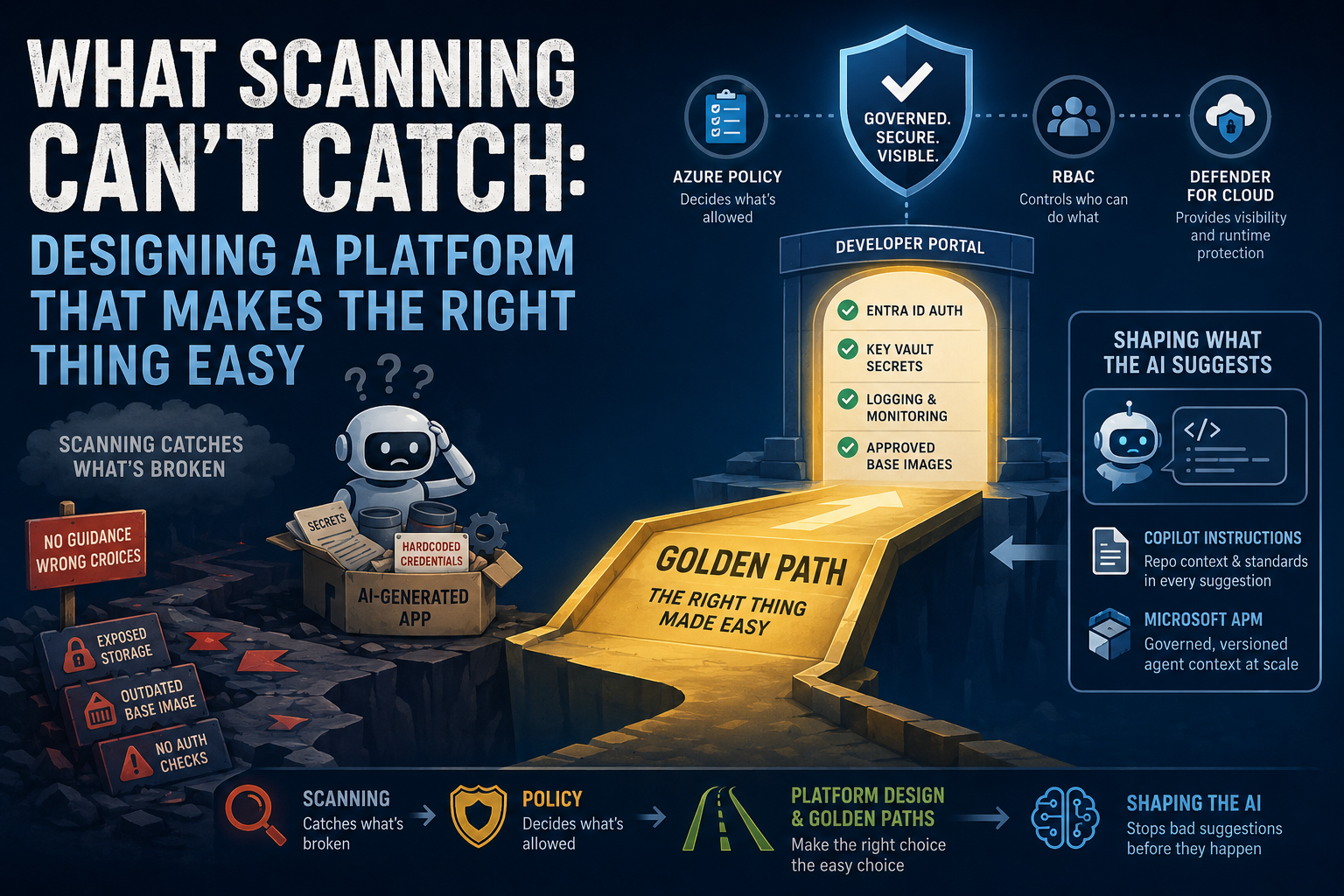
Azure Policy is your enforcement backstop, regardless of who or what generated the request. Policy applies to everything, portal, CLI, Terraform, API, irrespective of how the deployment got there. If your policy set denies public storage accounts, it doesn’t matter whether a senior engineer or an AI-assisted citizen developer tried to deploy one, it gets blocked. This matters specifically in the AI context because Policy doesn’t care about intent or understanding. It’s the layer that catches the thing nobody, human or AI, thought to ask about. As I’ve said before, design for “Block” over “Allow”, it’s a smaller, more manageable list to maintain, and it means new AI-suggested patterns you haven’t anticipated are denied by default rather than silently permitted.
RBAC determines whether someone can even reach the point of making the mistake. Going back to Story One from the first post, the developer was able to build and distribute an Electron app entirely outside platform team visibility because nothing in our RBAC model required them to touch infrastructure the platform team controlled. The code lived in a repo, the app was built locally, and it was shared directly. RBAC, scoped tightly and assigned through groups rather than individuals, with PIM for anything privileged, doesn’t stop someone building something locally. But it does mean that the moment they need real infrastructure, Entra ID configuration, production resource access, a deployment target, they hit a boundary that requires going through the platform team rather than around them.
Defender for Cloud is your visibility and runtime protection layer once something is actually live. It’s worth being clear about scope here, because it’s easy to think of it narrowly as an Azure tool. It isn’t. Defender for Cloud’s CSPM plan secures Azure, AWS, and GCP environments, and it extends specifically into the areas most relevant to this series: container security from code to runtime across all three clouds, and AI workload security. It can discover deployed generative AI workloads, build a picture of your AI Bill of Materials covering application components, data, and AI artefacts, and identify vulnerabilities in the libraries those workloads depend on, things like TensorFlow, PyTorch, and Langchain, by scanning the underlying IaC and container images for misconfigurations and known CVEs. Given that a meaningful share of AI-assisted development is now AI building things that are themselves AI-adjacent, retrieval systems, agents, model-serving APIs, this is genuinely relevant territory, not a tangential feature.
For the specific failure modes from the first post in this series, Defender for Cloud’s DevOps Security capability, which I covered in the previous post, is the piece that matters most. It gives you visibility into repos and pipelines, not just running infrastructure. Connecting your ADO and GitHub organisations to it means new repositories, new pipelines, and new findings surface centrally rather than relying on someone telling the platform team a project exists. In the second story from the first post, the gap wasn’t a security control failing, it was that nobody on the platform team knew the application existed until the developer came asking questions they couldn’t answer. Visibility tooling doesn’t fix that on its own, but it closes part of the distance between “this exists” and “we know it exists,” and the broader CSPM and container coverage means that once something is running, however it got there, you have a real chance of seeing it.
Golden Paths and the Developer Portal
Policy, RBAC, and Defender for Cloud are restrictive layers, they tell you what’s not allowed and give you visibility into what’s happening. They’re necessary but not sufficient on their own, because a platform that’s only restrictive pushes people toward exactly the kind of workaround we saw in the first post. Someone hits a wall, the platform team can’t move fast enough, they go around it.
The complementary piece is making the approved path the path of least resistance. This is the golden path concept: a pre-approved, opinionated, ready-to-use pattern for the thing someone is trying to do, so that doing it properly is no harder than doing it badly.
Concretely, this means a developer portal or internal service catalog where someone wanting to deploy a web app doesn’t start from a blank AI prompt, they start from an approved template that already has Entra ID authentication wired in, secrets pulled from Key Vault by default, logging and monitoring configured, and the right base image pinned. If the platform team has done the work of making that the fastest way to get something running, it competes directly with “ask the AI to build it from scratch.”
This is the single highest-leverage thing a platform team can do in response to what we saw in the first post. The developer in Story Two wanted to use Entra ID authentication. They had the right instinct. What they didn’t have was a pattern to follow that would have answered the questions about secrets storage and rotation before they were ever asked. A golden path closes exactly that gap; it doesn’t rely on the developer knowing what they don’t know, it makes the correct answer the default one.
Part Two: Shaping What the AI Actually Suggests
This is the newer territory, and it’s worth treating separately because it’s not about restricting access or providing templates for humans to find. It’s about influencing the AI tooling itself, so that when someone asks an AI coding assistant to build something, the suggestions it makes are already aligned with your platform standards.
GitHub Copilot custom instructions are the most accessible starting point if your estate is on GitHub. You can create a .github/copilot-instructions.md file at the root of a repository, written in plain Markdown, that gives Copilot context on how your organisation builds software, what your standards are, and how to validate its own output. Copilot reads this automatically and applies it to every chat request and, where supported, to code review and the coding agent. For more granular control, .instructions.md files under .github/instructions let you scope rules to specific file paths, so you could have different standards for your Terraform directory versus your application code. There’s also support for an AGENTS.md file at the repository root, which is an emerging open convention now used across multiple AI coding tools, not just Copilot, meaning the same instructions file can guide Claude Code, Codex, and others working in the same repo.
What you put in these files is the difference between an AI suggesting node:20-alpine and an AI suggesting your organisation’s currently approved base image. A line as simple as “always use the base images listed in our internal registry, never assume a public tag is current” or “secrets must always be referenced from Key Vault, never bundled into application packages” directly addresses the failure modes from the first post. The documentation is honest that this isn’t deterministic. Copilot may not follow every instruction perfectly every time, and clear, specific instructions work better than vague ones. But it’s a meaningfully different starting point than an AI tool with zero context about your organisation’s standards.
For Azure DevOps specifically, GitHub’s documentation confirms AGENTS.md works across multiple AI coding agents and isn’t limited to repositories hosted on GitHub, so the same approach can be applied to instruct any AI tooling your developers are using against an ADO-hosted codebase, provided the tool in question supports reading it.
APM, Microsoft’s Agent Package Manager, is a more structured answer to the same problem at organisational scale. Rather than every team maintaining their own instructions file by hand, APM treats AI agent configuration as a dependency you can declare, version, and govern centrally, in the same way you’d manage npm packages or Terraform modules. A single apm.yml manifest can declare instructions, skills, and MCP servers a project depends on, and apm install reproduces that exact configuration for every developer, across whichever AI tool they’re using, Copilot, Claude Code, Cursor, Codex, and others.
The part that matters most for a platform team is the governance layer. APM supports an apm-policy.yml file that lets a security team define which sources, scopes, and primitives an organisation will allow, enforced automatically on every install, with policy inheriting from enterprise to organisation to repository on a tighten-only basis. In practice, that means a platform team could centrally define and distribute the equivalent of the golden path content discussed above, directly into the context every AI coding tool in the organisation uses, rather than hoping individual teams maintain their own instructions files correctly and keep them current.
I’d treat APM as something to evaluate rather than adopt wholesale tomorrow; it’s a young, fast-moving project, and the right level of investment depends on how much AI-assisted development is already happening in your estate. But the direction it represents, agent context as a governed, centrally distributed dependency rather than an unmanaged file scattered per repository, is exactly the shape of problem this series has been building toward.
Here is a short summary table of the options and use cases.
| Governance Tier | Mechanism | Primary Audience | Core Value | Major Trade-off |
|---|---|---|---|---|
| Repo-Specific (Siloed) |
.github/copilot-instructions.md
| GitHub Copilot | Quick to spin up; file-path granular control. | Vendor lock-in; prone to configuration drift across teams. |
| Ecosystem-Open (Standardized) |
AGENTS.md
| Cross-tool agents (Claude Code, Cursor, Codex) | High portability; acts as a “README for machines.” | Still relies on manual repository-by-repository upkeep. |
| Fleet-Scale (Governed) |
Microsoft APM (apm.yml)
| Platform & Security Teams |
Versioned dependencies; central apm-policy.yml inheritance.
| Bleeding-edge tooling; requires evaluation and pipeline integration. |
Policy as Code: The Layer That Decides What’s Allowed, Not Just What’s Broken
There’s a useful distinction worth being explicit about here. Scanning tools, the subject of the last post, verify what gets deployed: is this Dockerfile using a base image with known CVEs, does this Terraform plan introduce an exposed storage account. Policy as code verifies what’s allowed to be deployed in the first place, independent of whether any individual resource is technically broken.
If you’re an Azure-first shop, Azure Policy is your starting point, and I’ve covered the mechanics of it in earlier posts. It’s JSON-authored and groups into initiatives for broader compliance objectives. It’s worth being precise about where it actually sits though: Azure Policy enforces at the Azure control plane, at the point a resource is actually created or modified, regardless of whether that request came from the portal, the CLI, an ARM template, or a Terraform apply. That’s different from a pipeline pre-flight check like Checkov or Conftest, which evaluate a plan before anything is sent to Azure. Azure Policy is your backstop after that point: even if a Terraform plan sails through every pipeline check, the deployment can still be denied or auto-remediated by Policy at apply time if it breaches what’s allowed. Its biggest strength for the AI tooling problem specifically is that it doesn’t care how a deployment was authored or what generated the request. An AI-generated Terraform plan and a hand-written one are evaluated identically once they hit the control plane.
If your estate extends beyond Azure, or you’re working with Kubernetes, Open Policy Agent, used via Conftest, is the open standard worth knowing. Conftest evaluates Rego policies against Terraform plan JSON, Kubernetes manifests, and Dockerfiles, and ships as a single binary that drops into a pipeline in a few lines of YAML. The advantage over Azure Policy is portability: the same Rego rules apply regardless of cloud provider, which matters if AI-generated code in your estate isn’t guaranteed to stay within Azure.
I’d mention HashiCorp Sentinel only briefly, and only if you’re running Terraform Cloud or Enterprise. It’s tightly integrated into that ecosystem and lets you evaluate policy at the plan stage before anything applies, but it’s not the right starting point if you’re on Terraform OSS with Azure DevOps pipelines, which is where most of this series’ audience sits.
The principle that ties this back to the series: a policy engine doesn’t need to know or care that a Terraform configuration was AI-generated. It only needs to know whether the configuration is allowed. That’s precisely the kind of enforcement that doesn’t rely on anyone, human or AI, getting it right unprompted.
Bringing It Together
None of these layers are new ideas on their own. Azure Policy, RBAC, Defender for Cloud, golden paths, policy as code, these are platform engineering fundamentals that predate AI coding tools by years. What’s changed is the volume and speed at which code is being generated by people who don’t necessarily understand the platform they’re deploying into, which makes the absence of any one of these layers more costly than it used to be.
The newer half of this post, shaping what AI tools themselves suggest through custom instructions and tools like APM, is the part that’s genuinely specific to this moment. It won’t replace any of the platform fundamentals. But it closes a gap none of the older tooling was ever designed to address: influencing the suggestion before a human has to decide whether to accept it.
Scanning catches what’s broken. Policy decides what’s allowed. Platform design and golden paths make the right choice the easy choice. And shaping the AI tooling itself means some of the bad suggestions never get made at all.
Put together, that’s a platform team’s actual answer to the question the first post in this series posed: the AI didn’t fail, the governance did. This is what governance that accounts for AI tooling actually looks like.
—
This is part three of a series on securing AI-generated code in your platform pipeline. Part one covers why this matters, and part two covers the scanning layer. Next up: governance and visibility, how do you actually know AI-generated code is entering your estate in the first place?