
Table of Contents
Over the coming weeks I’m going to cover all five pillars and how they apply to real Azure Platform Design decisions:
Azure Well Architected Framework Series
This week, we are talking about Reliability.
Moving Beyond Uptime Metrics
Reliability isn’t just about designing a 5 9’s system, it’s about understanding how your system works and, more importantly, how it fails. Understanding why failures occur defines how quickly you can respond and fix them. Teams often obsess with ensuring systems are built with no single point of failure, focused purely on uptime statistics. While these are important, thinking about uptime without recovery is where disasters happen.
Reliability isn’t about uptime. Your system can be available 24/7 and still unreliable – serving stale data, losing transactions, or silently corrupting state. Reliability is about predictability: knowing how your system fails, designing for graceful degradation, and recovering to a known-good state. Availability is a prerequisite, but reliability is the discipline.
In this post, I’m covering the Well-Architected Framework Reliability pillar: what it actually means, how to design for it, and how to recover when systems inevitably fail.
The Reliability Mindset Shift
The shift from prevention to recovery changes everything. Instead of obsessing over preventing failures, design systems that recover from them predictably.
Most teams think about reliability backwards. They focus on prevention – trying to build systems that never fail. But failures are inevitable. What matters is having documented recovery strategies in place. When you accept that systems will fail and you have a plan to address those failures, your systems become genuinely reliable.
This same mindset applies to security, which we’ll cover next week. We don’t build systems on the premise they’re 100% secure. We build them with the understanding that something, somewhere will be breached. The question isn’t “if,” it’s “when”, and have we prepared for it?
Another common misconception is that running resources in the cloud automatically makes them reliable and redundant. While the cloud has many tools at our disposal to address failure concerns, they’re rarely part of the out-of-the-box offering. I’ve written about this in more detail in my earlier post Is the Cloud Really Fault-Proof?
RPO and RTO are your guiding factors. Recovery Point Objective (RPO) defines how much data loss you can tolerate. Recovery Time Objective (RTO) defines how long you can afford to be down. These should drive your reliability design. If your RTO is 3 days, why spend money on 99.999% uptime? It sounds obvious, but it’s regularly overlooked. Teams obsess over eliminating single points of failure and end up spending large amounts on resources that were never needed in the first place.
Every design, every solution, every deployment should answer the fundamental questions: What’s our RTO and RPO? Let those answers guide how available and reliable your systems need to be.
Reliability vs. Availability
These terms are used interchangeably, but they mean different things. It’s worth calling out the distinction.
Reliability – Does the system do what it’s supposed to when it runs?
- It covers a spectrum of correctness – it’s not binary
- Measured by error rates, data consistency, and recovery capability
- Focuses on trustworthiness: can you rely on it when it’s running? Does it recover predictably?
- Example: “Our API is available 99.95% of the time, but when it’s up, it corrupts transactions 0.1% of the time”
Availability – Is the system running right now?
- Binary: UP or DOWN
- Measured in uptime percentage
- Focuses on how often the system is accessible
- Example: “Our API is available 99.95% of the time”
You can have high availability with low reliability – the system is always up, but it’s not doing what it’s designed to do. Conversely, you can have high reliability with low availability – the system works perfectly when it runs, but it rarely runs.
The WAF pillar calls this “Reliability,” but it really covers both reliability and availability. Understanding the difference matters because it changes how you design.
Redundancy That Actually Works
I’ve talked about single points of failure before and covered them in detail in my Is the Cloud Really Fault-Proof? post. The fact is, SPOFs are very often hidden elements out of your direct control. Referencing a third-party API or service means you’re dependent on their infrastructure. If something on their system fails, it often leads to failure in yours. This is why reframing the discussion from “building for reliability and availability” to “building with failure in mind and understanding how to recover in different failure scenarios” matters.
We can absolutely build our systems to be resistant to single points of failure. The question isn’t “can we?” It’s “should we?”
The Redundancy vs. Resiliency Gap
You can build multi-zone, multi-region, even multi-cloud solutions. But here’s the uncomfortable truth: redundancy doesn’t automatically equate to resilience.
Redundancy is architecture. Resiliency is behaviour.
A database replicated across three regions still fails if your application doesn’t know how to route around the failed region.
A load balancer with multiple backends still causes cascading failures if there’s no circuit breaker logic to shed traffic from unhealthy instances.
You can have all the redundancy in the world and still go down.
Real-world scenario: You deploy your API across two zones with a load balancer in front. Zone A fails. The load balancer detects it (eventually) and routes traffic to Zone B. But Zone B was sized for 50% of normal load, not 100%. It gets overwhelmed, starts timing out, and your entire service degrades. You had redundancy, but your system wasn’t resilient to the failure.
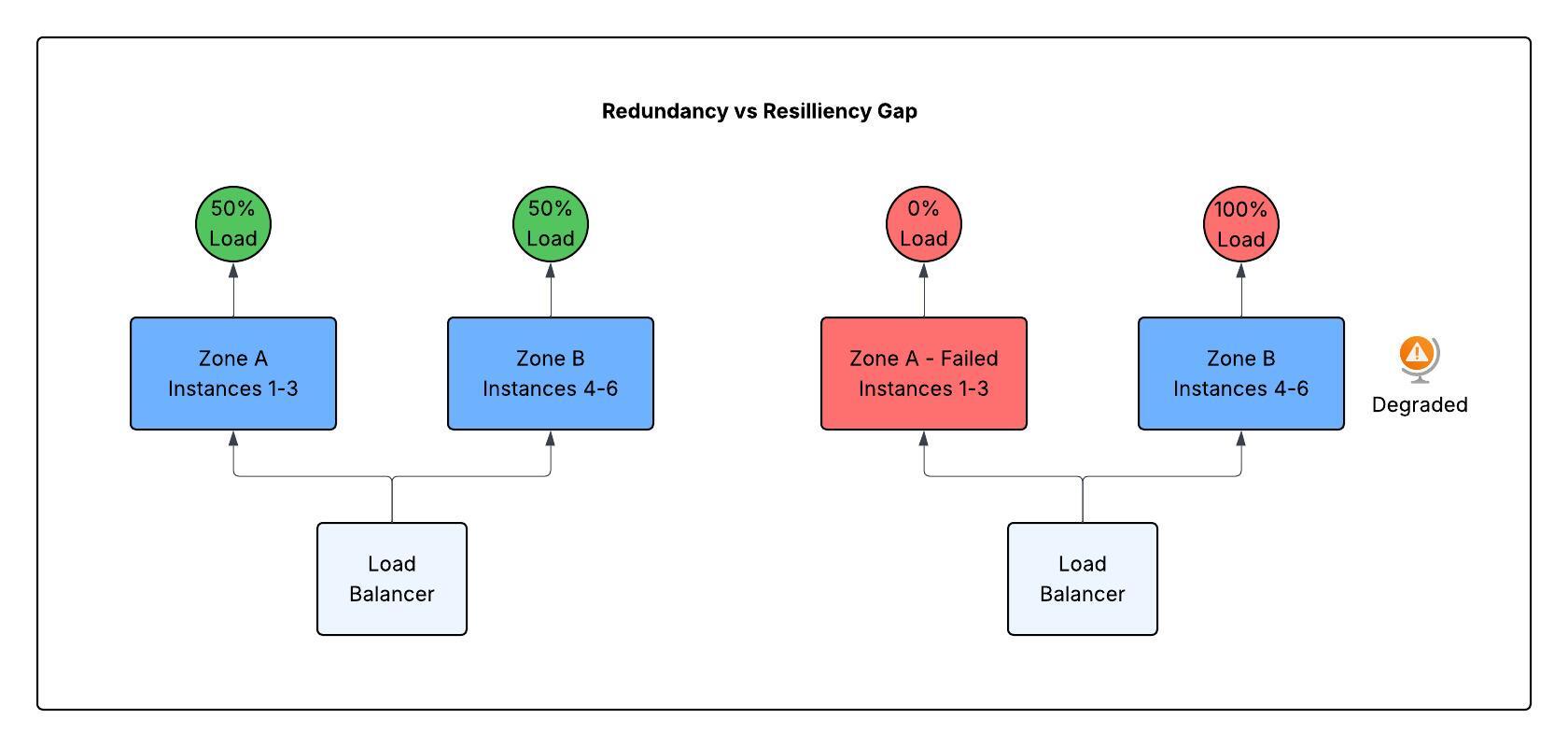
The gap is usually one of these:
- Detection – You didn’t know Zone A was down until users complained
- Routing – The load balancer didn’t shift traffic fast enough
- Capacity – Zone B couldn’t handle the full load
- Dependency chain – Zone B depends on a shared database in Zone C, which is now overloaded
Build to Your Failure Scenarios
Not every failure needs multi-region redundancy. A 3 AM regional outage every 10 years might justify the cost for your payment processing system. It probably doesn’t justify it for your internal reporting dashboard.
This is where the “should we?” question becomes financial.
Start by asking: What’s the actual failure mode?
- Will your third-party auth provider fail? (No redundancy available – you’re dependent on their SLA)
- Will your Azure region fail? (Unlikely, but possible – plan for multi-zone at minimum)
- Will a single virtual machine fail? (Certain – design for it from day one)
- Will your database become unavailable? (Possible – backup and recovery is your insurance)
Each failure has a different cost/benefit tradeoff. Your architecture should reflect the ones that matter.
Practical Redundancy Patterns
Single-zone with fast recovery (for non-critical systems)
- Automated backups, documented recovery procedures, alert thresholds to trigger human action
- Cost: Low | Downtime: Hours | Best for: Internal tools, dev/test environments
Multi-zone, single region (for most production systems)
- VMSS across availability zones, managed databases with zone-redundancy, Application Gateway or load balancer distributing across zones
- Cost: Moderate (roughly 2x compute) | Downtime: Minutes | Best for: APIs, web applications, most workloads
- Key consideration: Your application must handle zone failures gracefully. If one zone fails, your system should degrade, not crash
Multi-region (for critical revenue-impacting systems)
- Active-active or active-passive across regions, depending on RTO/RPO requirements
- Cost: High (roughly 2–3x compute + data replication) | Downtime: Seconds (if well-architected) | Best for: Payment processing, identity services, anything that directly affects revenue
- Key consideration: Cross-region failover introduces complexity. Test it regularly, or it won’t work when you need it
The Hidden Cost of Redundancy
Every layer of redundancy adds complexity:
- More regions = harder to debug failures (which region is the problem in?)
- More zones = more network latency considerations
- More replicas = eventual consistency problems (which copy is the source of truth?)
- More instances = more things to patch, update, and monitor
This is why the question “should we?” matters more than “can we?” You’re not just paying for redundancy. You’re also paying for ongoing operational burden and potentially introducing technical debt.
Dependency Management – Your Real SPOF
You build a resilient multi-zone API, but it depends on a single third-party payment gateway. You build a multi-region application, but all regions depend on a centralised identity provider that’s only deployed in one region. You have redundant compute, but a single shared database that hasn’t been thought through for failover.
These issues will hit you. Spend time upfront understanding what they mean.
Identifying them: Use Application Insights, Service Map, or just ask teams “what do we call?” to build a dependency graph.
Isolating failures: Circuit breakers, queues, and async patterns so one slow dependency doesn’t drag everything down.
Testing failures: Chaos engineering – literally take dependencies offline and watch what happens. Azure Chaos Studio can help here. I’ll cover this in an upcoming post.
Preferring managed services: Azure SQL with geo-replication, Azure Managed Redis with geo-replication, managed Event Hubs – these abstract away some of the complexity.
Don’t Solve Redundancy in Isolation
Redundancy is part of the reliability equation, but it’s not the whole equation. It only works if you also have:
- Monitoring that detects failures fast
- Runbooks and automation to respond to failures
- Regular testing of your recovery procedures
- A team trained on the failure scenarios
Redundancy without observability fails silently. Redundancy without tested recovery fails anyway. The later sections on monitoring, testing, and change management are just as critical as the architecture itself.
Disaster Recovery in Azure
Having backups of your systems or DR runbooks in place is great. If you don’t test them, they’re worthless.
These terms are often used interchangeably, but they represent fundamentally different things.
Backup is a copy
A backup is a point-in-time copy of your data, stored in one or more locations. It helps mitigate:
- Accidental deletion
- Data corruption (caught after the fact)
- Ransomware (if you have immutable backups)
- Logical errors in your application
Backups don’t protect against:
- System failures that need recovery right now
- Large-scale regional outages where entire systems need to be made available
- The time it takes to restore and rebuild
Reality check: You back up your database nightly. At 2 AM, data corruption occurs. You discover it at 9 AM. You restore from the 11 PM backup. You’ve lost 10 hours of data. That’s the backup covenant: you get your data back, but maybe not all of it, and maybe not quickly.
Disaster Recovery is a plan
DR is a documented, tested procedure for recovering an entire system to a known-good state after catastrophic failure. It includes backups, but it’s much more than that. A DR plan protects against:
- Complete system failure
- Regional outages
- Application bugs that corrupt data
- Infrastructure failure
DR requires various infrastructure components, built according to your RTO and RPO objectives. I often see teams say “we replicate all our backups to the cloud, so our DR is to restore to the cloud if on-premises fails.” In reality, many have never tried to restore more than one or two systems from backups at a time. What they have is a redundant backup process, not a DR plan.
Reality check: Your entire Azure region fails at 2 AM. Your DR plan says: “Failover to secondary region, restore from geo-replicated backup, update DNS.” RTO is 30 minutes. You’re back online by 2:30 AM with data current to within 5 minutes. That’s DR.
Testing Reliability
Observability
It’s simple: you can’t fix what you can’t see, and you don’t know what you don’t know. To build available and reliable systems, you need visibility into what’s happening, how they respond under normal workloads, and how to detect when something isn’t responding normally.
Azure Monitor and Application Insights give you the detail you need to understand your systems. But they can only show you what’s happening. You have to understand how your systems should work and build dashboards and reports against your RPO and RTO objectives. This ensures you’re reporting to the business on what’s important and what’s required.
Monitoring without action is noise. Alerts should go to a system owner – not a group, not a shared mailbox. One or two system owners who will own the alert through its lifecycle. This removes the “I thought you were doing it” scenarios.
Don’t create alerts for the sake of it. Alerts should be meaningful, triggered at relevant thresholds. Otherwise, people start ignoring them, which is when real problems happen. If a threshold is no longer relevant, update the alert. Better still, build automation into your recovery processes. Have alerts generate an automated response – through automation runbooks, Azure Functions, or Azure Logic Apps. Alerts should only fire when automation can’t fix the problem or the response requires human review.
Chaos Engineering
Chaos Engineering is the process of creating and testing failure scenarios by throwing different failure modes at your system. This could mean simulating resource failures, regional failures, or even load testing – throwing increasing numbers of API calls and seeing how your systems respond.
Chaos engineering gives you insight into how your systems respond to stress and failure. It allows you to focus your efforts on the most important or concerning areas for availability and reliability. Tools like Azure Chaos Studio support this. I’ll cover it in a future post.
Graceful Degradation Under Load
Once you know how your systems should perform under ideal scenarios and have alerts and monitoring dashboards in place, you should understand what steps you may need to take to gracefully degrade.
Graceful degradation means your system sheds non-critical functionality under stress rather than crashing entirely. It’s not elegant. It’s not ideal. But it beats the alternative.
Real scenario: Your API depends on three services: authentication, inventory, and recommendations. Under normal load, all three respond in milliseconds. At 2 AM, the recommendation service starts timing out. Without graceful degradation, every request that calls recommendations hangs, and your entire API becomes unresponsive. With degradation, you skip recommendations, return core data, and users can still place orders.
The Three Patterns
Circuit breakers stop calling a failing dependency after a threshold of failures. If the recommendations service is timing out, the circuit opens – you stop sending requests to it. This prevents cascading failure. When the service recovers, the circuit closes and traffic resumes.
Bulkheads isolate resources so one failing component doesn’t starve others. Reserve thread pools, connection limits, or memory for each dependency so that a slow recommendation service doesn’t exhaust resources meant for auth or payments.
Queues and async patterns decouple fast and slow operations. Instead of synchronously calling a slow service, queue the request and return immediately. Process it asynchronously when capacity allows. Users get a response; the work happens later.
When to Use Each
- Use circuit breakers (like load balancers with health probes) for external APIs and services you don’t control. They fail unpredictably.
- Use bulkheads for shared infrastructure (databases, caches, thread pools). They prevent resource starvation by isolating capacity in advance
- Use queues for non-critical operations (analytics, notifications, recommendations). They reduce coupling and improve resilience.
The Cost of Degradation
Graceful degradation requires architectural decisions upfront. You can’t add it retroactively to a monolithic system. You need:
- Async patterns (queues, event buses)
- Service isolation (separate databases, APIs)
- Retry logic and timeouts configured correctly
- Dashboards showing what’s degraded and why
This complexity has a cost. Simple systems don’t need it. But high-traffic systems do. Understanding your systems and the impacts when something isn’t right helps you design to meet those requirements.
When Things Go Wrong
Even in the best-designed systems, things will go wrong. When they do, you have a choice: let the same failure happen again, or learn from it.
Get your teams into the habit of blameless postmortems. Understand why something broke without blaming anyone, any team, or any resource. This is how you prevent the same thing happening twice.
When people fear blame, they hide problems. When they know it’s blameless, they surface issues early. This is how you improve.
Document the scenario. Detail what broke and why. Set owners and timescales for fixes. Review status regularly. This turns failures into system improvements rather than organisational friction.
Change is the Biggest Threat
Most outages aren’t caused by bad designs or system failures. They’re caused by deployment mistakes.
Changes to existing infrastructure or application code often have unexpected outcomes. This is where cloud governance plays its role. Change management in the cloud should be treated differently from traditional on-premises change management.
Build your change management into your processes. I’ve written about how to do this with Infrastructure as Code deployments and CI/CD pipelines. Reference my earlier article on improving Terraform pipelines. The same principles apply to application code changes. Adopt a DevOps mindset – change control and approvals should be integral to any deployment.
Azure provides multiple options to support scaled rollouts. Adopt deployment scenarios like Blue/Green or Canary. Make sure you have a well-defined and documented rollback strategy.
Summary
Most systems don’t fail because they lacked redundancy. They fail because no one designed how they would behave when things broke.
Each system and solution is different. Designs need to match the requirements of that system. Don’t assume everything needs 99.999% uptime and 99.999% reliability. Often, different components need different requirements and have different failure thresholds. Focus on these eight key areas of the reliability pillar when factoring decisions into your designs:
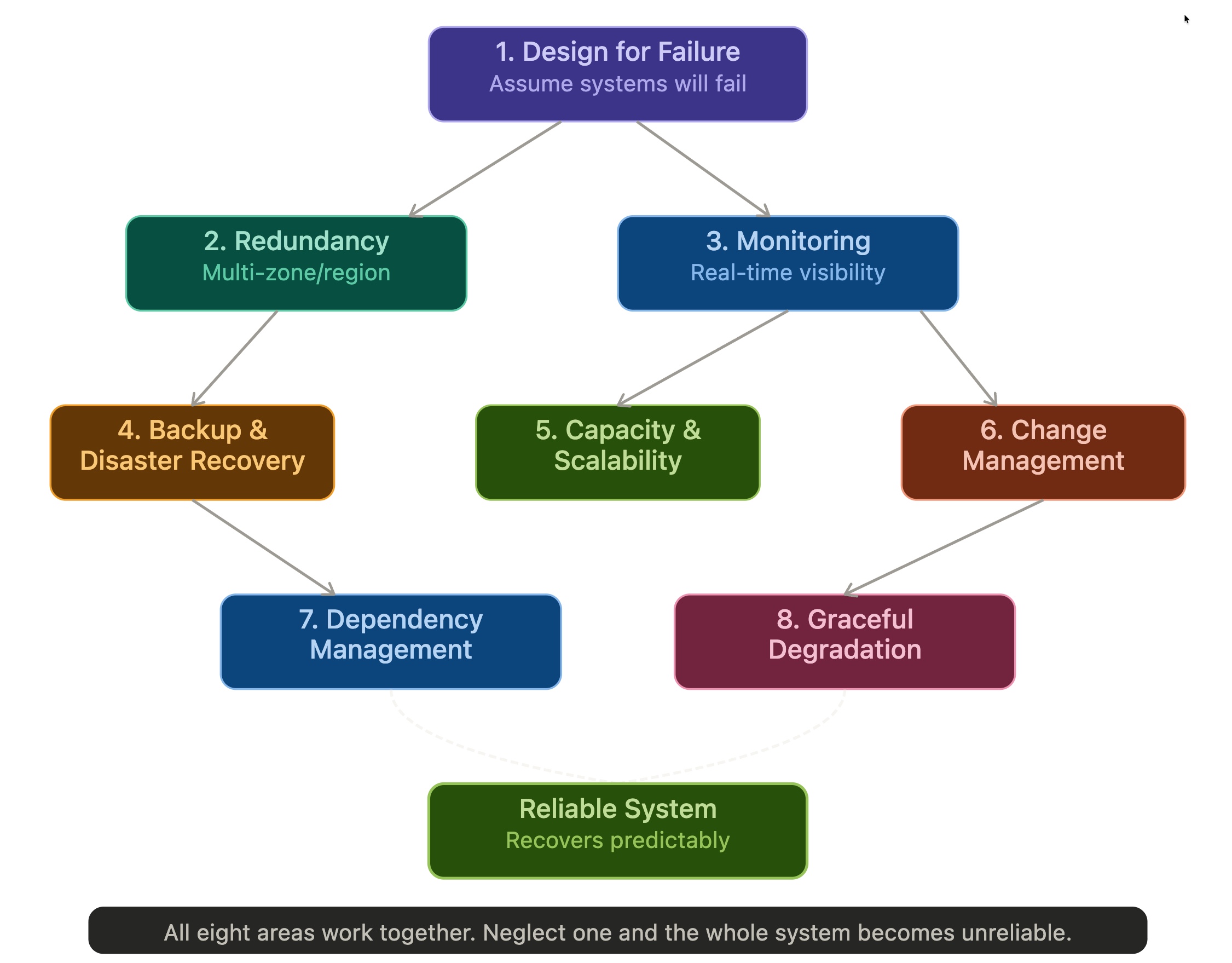
1. Design for Failure – Assume systems will fail. Build stateless services, fault-tolerant architectures, and use managed services with built-in SLAs.
2. Redundancy & High Availability – Eliminate single points of failure through multi-zone/multi-region deployment, data replication, and failover mechanisms.
3. Monitoring & Observability – Real-time visibility into system health. You can’t fix what you can’t see.
4. Backup, Recovery & Disaster Recovery – Define RTO/RPO per workload. Test restores regularly. Backup is not recovery until tested.
5. Capacity & Scalability – Avoid exhausting resources. Design for scale-out, not scale-up. Use autoscaling and queue-based load levelling.
6. Change Management & Testing – IaC + CI/CD pipelines + chaos testing. Reliability is operational discipline, not luck.
7. Dependency Management – Map and isolate dependencies so failures don’t cascade. Use queues, retries, circuit breakers, and bulkheads.
8. Graceful Degradation – Shed non-critical functionality under stress rather than crashing entirely.
We’ve covered a lot in this post and yet only touched the surface of the reliability pillar. But this should give you a framework for thinking about reliability as a designed discipline, not a checkbox to tick once and forget.