
Table of Contents
In Part 1 we moved PaaS traffic off the public internet. Private endpoints in place, DNS resolving the privatelink zones correctly from every spoke, the hub and on-prem, and public network access switched off. That’s a good place to be, but it isn’t the finish line.
A private endpoint is just an IP address in your network. Anything that can route to that address can try to connect to it, and in a typical hub and spoke that means every peered spoke and most of on-prem. Part 1 also left a loose end: depending on where your private endpoints are deployed and how your VNets are connected, traffic may bypass your central firewall entirely. A default route pointing at the firewall doesn’t guarantee every private endpoint connection will go through it.
This becomes more important when a shared hub connects multiple business groups, each with their own spokes, applications and data services. Those networks might share a platform, but that doesn’t mean every workload should have network access to every other workload’s Key Vault, storage account or database. Private connectivity is one thing. Segmentation is another.
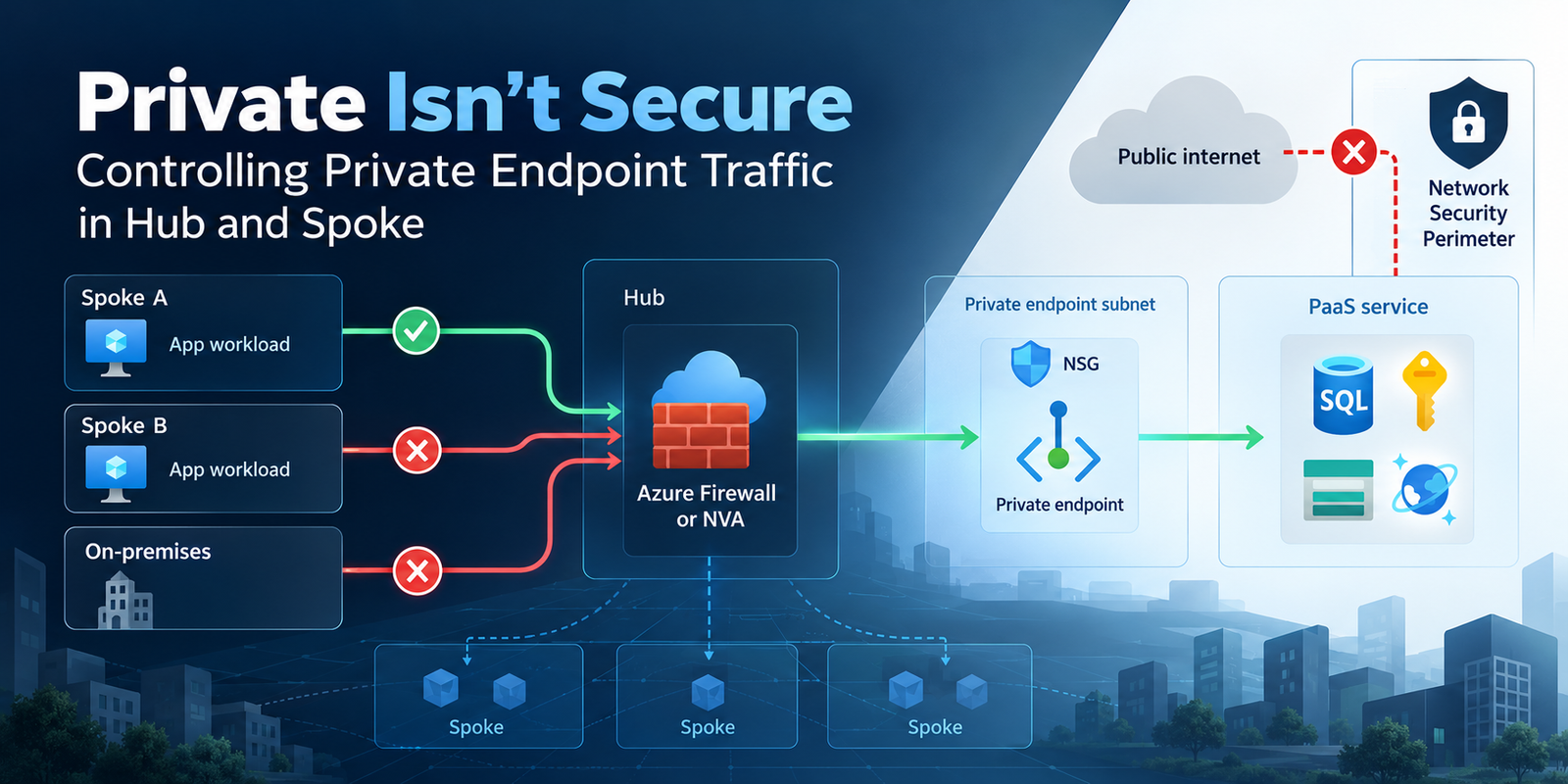
This post covers three controls, and the question each one actually answers:
- NSGs on private endpoint subnets: who inside my network can reach this endpoint?
- An NVA or Azure Firewall in the path: what’s allowed centrally, and can I see it?
- Network Security Perimeter: who can reach the service through its public endpoint, and where can the service itself send data?
They solve different problems, and putting all three in place doesn’t automatically give you a secure design. You still need to decide where each belongs.
Network policies are off until you turn them on
The first trap. By default, NSGs and route tables attached to a subnet don’t apply to the private endpoints in it. You can attach an NSG to a private endpoint subnet, write careful rules, and none of them touch the endpoints. Other resources in the same subnet are filtered as normal, which makes it easy to assume it’s all working.
The subnet property privateEndpointNetworkPolicies controls this, and it takes four values:
| Value | NSGs apply to PEs | UDRs can override PE routes |
|---|---|---|
| Disabled (default) | No | No |
| NetworkSecurityGroupEnabled | Yes | No |
| RouteTableEnabled | No | Yes |
| Enabled | Yes | Yes |
It’s set per subnet and applies to every private endpoint in that subnet.
One thing to watch with Azure CLI. The older --disable-private-endpoint-network-policies parameter only accepts true or false, and some Microsoft documentation still describes that limitation. The newer --private-endpoint-network-policies parameter supports all four values, including NSG-only and route-table-only.
az network vnet subnet update \
  --resource-group rg-network \
  --vnet-name vnet-spoke \
  --name snet-pe \
  --private-endpoint-network-policies Enabled
In Terraform it’s a single argument on the subnet:
resource "azurerm_subnet" "private_endpoints" {
  name                 = "snet-pe"
  resource_group_name  = azurerm_resource_group.spoke.name
  virtual_network_name = azurerm_virtual_network.spoke.name
  address_prefixes     = ["10.20.4.0/24"]

  private_endpoint_network_policies = "Enabled"
}
Before you flip it on an existing subnet, check what’s already configured. If there’s an NSG attached, its rules start applying to the endpoints. And if source subnets have UDRs that meet the private endpoint route override requirements, those routes can start directing traffic towards their configured next hop. Both might be what you want eventually, but not as a surprise.
For new deployments, my preference is to enable both policies from the start. That doesn’t mean every private endpoint needs to pass through a firewall, but I want the option to enforce that without having to change the subnet configuration later.
More importantly, I’d make this part of the Terraform module and platform baseline, not something the deployment engineer remembers to configure. For existing environments, I’d use Azure Policy to audit exceptions before moving towards enforcement. Turning a control on is easy. Understanding what it will affect is the harder part.
NSGs on private endpoint subnets
With network policies enabled, an NSG on the subnet filters inbound traffic to the endpoints. It works, but there are a few things that behave differently from a VM NIC:
- The default rules won’t help you.
AllowVnetInBoundpermits theVirtualNetworkservice tag, which can include peered VNets and on-premises prefixes learned through your network configuration. An NSG with only the default rules changes almost nothing. You need explicit allows for the sources that should reach the endpoint, then a deny forVirtualNetworkabove the default allow. - Only inbound matters. A private endpoint doesn’t initiate connections back into your network, so outbound rules on the endpoint side aren’t a meaningful control.
- Source ports are ignored. Source port filtering is treated as
*. Filter on source address, destination and destination port. - You can’t check it in the portal. Effective security rules and effective routes aren’t shown for a private endpoint’s NIC. Test from the source instead.
- NSG flow logs won’t capture it at the endpoint. Traffic to private endpoints can be captured at a supported source VM, but not directly at the private endpoint itself.
- ASGs work, with a ceiling. You can put private endpoints into application security groups, but there’s a limit of 50 IP configurations per ASG associated with the private endpoint subnet’s NSG. Beyond that, connections can fail.
- Some services want wide port ranges. Microsoft calls out Cosmos DB as potentially needing all destination ports open, depending on the service’s connectivity requirements.
A simple rule set for a spoke with an app subnet and a private endpoint subnet looks like this:
| Priority | Name | Source | Destination | Port | Action |
|---|---|---|---|---|---|
| 100 | Allow-App-To-SQL | 10.20.1.0/24 | asg-pe-sql | 1433 | Allow |
| 110 | Allow-App-To-KeyVault | 10.20.1.0/24 | asg-pe-kv | 443 | Allow |
| 4000 | Deny-VNet-Inbound | VirtualNetwork | Any | Any | Deny |
This isn’t a complete production rule set, but it illustrates the principle. Allow the sources that should connect, then block the general VNet access that the default rules would otherwise permit.
Be careful with that final deny. Test legitimate connectivity before enforcing it, particularly where shared services, monitoring or hybrid workloads need access.
One caveat before going further. If you send this traffic through a firewall that SNATs it, which the next section covers, the source the private endpoint’s NSG sees is the firewall, not the app subnet.
There’s also a SQL caveat. The example assumes Azure SQL Database is using the Proxy connection policy, which operates over port 1433. If you’ve never changed the connection policy, that’s likely what you have: Microsoft states that private endpoints on the Default policy use Proxy, so 1433 is all you need until you opt into Redirect.
Redirect requires connectivity over ports 1433–65535 between the client and private endpoint. Microsoft recommends Redirect with Private Link for lower latency and improved throughput, but you need the NSG and any firewalls in the path to support it. Don’t open the full range across your estate without considering the source, destination and connection policy.
Testing the rules
Since you can’t inspect effective NSG rules on the private endpoint NIC, test connectivity from a workload in the source subnet.
For example, from a Windows VM:
Resolve-DnsName myvault.vault.azure.net

Test-NetConnection `
  -ComputerName myvault.vault.azure.net `
  -Port 443
Or from Linux:
nc -vz myvault.vault.azure.net 443
Run the test from an authorised spoke, then repeat it from one that should be denied. First verify that DNS resolves to the expected private IP, then that the permitted connection succeeds and the denied connection fails.
A successful TCP connection only proves network reachability, not that the application has permission to use the service. For that you still need an application-level test.
What about logging?
Microsoft is retiring NSG flow logs on 30 September 2027, and new NSG flow log creation is no longer supported. For new deployments, I’d use Virtual Network flow logs instead.
VNet flow logs can capture private endpoint traffic at a supported source VM, including the private endpoint resource ID, but they still can’t record traffic directly at the private endpoint itself. And not every Azure workload supports VNet flow logging, so check the service limitations.
That means your logging approach may need several sources: VNet flow logs where supported, firewall or NVA logs for inspected connections, and service-side audit logs for application activity.
Forcing private endpoint traffic through an NVA
A quick recap from Part 1. A private endpoint creates a /32 InterfaceEndpoint system route. That route is available within the endpoint’s VNet and can propagate across directly configured VNet peerings.
This matters because of longest prefix match. If an application and its private endpoint are in the same VNet, or in directly peered VNets, the /32 route takes precedence over your 0.0.0.0/0 UDR. Traffic goes directly to the endpoint rather than through the firewall.
But that’s not necessarily what happens between two spokes connected only through a hub.
VNet peering isn’t transitive. If Spoke A hosts an application and Spoke B hosts the private endpoint, and both are peered only with the hub, Spoke A doesn’t automatically inherit Spoke B’s /32 endpoint route. Its existing 0.0.0.0/0 UDR may already send the connection through the firewall, provided no more-specific route takes precedence.
The hub is a different matter. It’s directly peered with every spoke, so its own subnets, including the GatewaySubnet, do see each endpoint’s /32. That’s why on-premises traffic needs separate attention, which I’ll come to below.
So before adding routes, check the effective routing from the source. If the endpoint’s /32 route is present and bypassing the firewall, you’ll need private endpoint route policies enabled on the endpoint subnet and a sufficiently specific UDR on the source subnet to override it. If the traffic already follows the firewall route, you may not need an additional endpoint-specific UDR.
The requirement isn’t simply to create more routes. It’s to make sure the traffic follows the intended path.
Where you do need to override it, that takes two things:
RouteTableEnabled(orEnabled) on the subnet containing the private endpoint.- A UDR on the relevant source subnets pointing the private endpoint address range towards the firewall.
The detail that matters is the prefix length. With private endpoint route policies enabled, Azure permits a UDR to override the /32 private endpoint route when the UDR prefix is at least as specific as the address space of the VNet containing the endpoint.
For example, suppose the private endpoint lives in a VNet with address space 10.20.0.0/16. A UDR for 10.20.4.0/24 pointing at the firewall can override its /32 route. A UDR for 10.20.0.0/16 can too. A broader summary like 10.0.0.0/8, or your default route 0.0.0.0/0, won’t.
This is a specific exception to normal longest-prefix-match behaviour, which is why enabling private endpoint route policies matters.
To check it’s working, ask Network Watcher what the next hop is from a source VM:
az network watcher show-next-hop \
  --resource-group rg-app \
  --vm vm-app-01 \
  --source-ip 10.20.1.4 \
  --dest-ip 10.20.4.5
If it reports InterfaceEndpoint for the private endpoint IP, the /32 is still winning and your firewall isn’t in the path. You should see VirtualAppliance and the firewall’s IP instead. The effective routes on the source VM’s NIC show the same thing, even though the private endpoint’s own NIC doesn’t.
Where your private endpoints live decides how painful the routing becomes.
Dedicated private endpoint VNet
One option is to put private endpoints into a dedicated VNet. Wherever a source can see those endpoint routes, such as a directly peered VNet or the hub’s GatewaySubnet, a single route for that VNet’s address space sends them all to the firewall.
Microsoft recommends this pattern for scalable central inspection, and it’s not difficult to see why. You avoid adding an individual route for every new private endpoint.
The downside is the separation between the application and its endpoint. You need clear ownership of the endpoint, its DNS configuration and its lifecycle.
Private endpoints inside workload spokes
The other option is to keep private endpoints with their applications. That makes sense from an ownership perspective. The application team deploys its services and the private endpoints needed to reach them.
But clients in the same VNet see each endpoint’s /32 directly, and so does the hub. If you’re centrally inspecting that traffic, you may need UDRs for individual endpoint subnets or individual /32 addresses in those places. The route tables grow as services are added, and Azure route tables have a limit of 400 routes.
This is the trade-off between simplifying central routing and keeping application infrastructure together. Neither answer is automatically right.
My preference is to make this a deliberate platform architecture decision. Some shared services justify centralised private endpoint connectivity. Application-specific resources may be better kept with the workload, provided the routing and security controls support that arrangement.
On-premises traffic
Traffic arriving over ExpressRoute or VPN needs the same consideration. Depending on the gateway and routing design, you may need a UDR on the GatewaySubnet steering private endpoint traffic through the firewall. Don’t assume it’s being inspected simply because it crosses the hub.
ExpressRoute FastPath deserves particular attention because it bypasses the gateway in the data path. GatewaySubnet UDR support with FastPath is only available on ExpressRoute Direct circuits, not provider circuits. FastPath to private endpoints is a limited GA, again ExpressRoute Direct only, and requires enrolment for a short list of services and regions. If you’re using Azure Firewall with FastPath, Microsoft’s guidance is to deploy it in the same VNet as the ExpressRoute gateway, with the UDR on the GatewaySubnet.
FastPath traffic also bypasses the gateway for flow logging, so it won’t appear in logs captured on the GatewaySubnet.
What actually counts is the traffic path from on-premises to the private endpoint, including the return path, not just whether the expected route exists in a table.
Keeping the routing symmetric
Getting traffic to the firewall is only half the job. Return traffic from a private endpoint doesn’t behave exactly like traffic from a VM. Microsoft describes the private endpoint data plane as variable and recommends SNAT on the appliance so responses come back through the same device.
Without it, the firewall can see one side of the conversation, the return traffic can bypass it, and the session fails. How you handle this depends on what’s doing the inspection.
Azure Firewall application rules
Azure Firewall application rules always SNAT, which is why Microsoft prefers them for private endpoint traffic. The firewall becomes the source of the connection towards the endpoint, and the return traffic goes back through the firewall.
The catch is SQL. FQDN filtering for Azure SQL Database using application rules requires the Proxy connection policy on port 1433. That can add latency compared with Redirect, so you need to decide whether the additional filtering capability justifies the connection policy trade-off.
Azure Firewall network rules
Network rules don’t SNAT traffic to private address ranges by default. If you’re using network rules for private endpoint inspection, Microsoft recommends configuring Azure Firewall to always SNAT. You can do that using 255.255.255.255/32 in the firewall policy’s private IP address ranges configuration.
But this setting affects SNAT behaviour for every network rule on the firewall policy, not just your private endpoints. In a shared hub, that could change how other private traffic appears to downstream services and firewalls. It’s not something I’d change without understanding the other flows using that firewall.
Third-party NVAs
With a third-party NVA, you have another option. Microsoft supports disabling the SNAT requirement for private endpoint traffic through an NVA using the case-sensitive tag disableSnatOnPL = true, applied to the NVA’s NIC, or to the relevant virtual machine scale set as documented by Microsoft.
This tells the Azure platform to support the private endpoint traffic path without requiring the NVA to translate the original source address. The original client IP can survive through the appliance, which is useful for logging and source-based filtering.
It’s a specific Azure Private Link capability, not a replacement for designing the rest of your routing correctly. Enabling it also causes a one-time reset of long-running private endpoint connections through the NVA, so plan the change for a maintenance window.
The SNAT trade-off
Once traffic is SNATed, the private endpoint sees the firewall’s address as the source. That has two knock-on effects.
First, the NSG on the private endpoint subnet can no longer tell the app spoke apart from anything else that came through the firewall. Its rules effectively become “allow the firewall, deny everything else”, and the per-source decisions move into the firewall policy. That’s fine if you design it that way. It’s a surprise if the NSG rules were written first.
Second, service-side logs that record the connection source may show the firewall’s translated IP instead of the original client. If anyone relies on those logs for investigations, they’ll need to correlate them with the firewall logs. Your firewall logs become part of the audit trail, not just something you use when troubleshooting connectivity.
Does every private endpoint need firewall inspection?
Not necessarily. This is where I think it’s easy to over-engineer the solution.
Central inspection gives you a consistent enforcement point, policy management and traffic visibility. For some environments, particularly where compliance requires central traffic logging or filtering, that’s exactly what you need.
But it also introduces latency, additional network hops, potential bottlenecks, cost and operational dependencies on the shared firewall infrastructure.
And routing encrypted HTTPS traffic through an NVA doesn’t automatically mean you’re inspecting its contents. Unless the appliance supports and is configured for the relevant protocol inspection, you may only be enforcing network-level or FQDN-based rules.
For a workload with a well-defined set of clients, an NSG restricting access to the private endpoint might provide the segmentation you need without forcing the traffic through a central firewall. For more sensitive services, central inspection may be justified.
I wouldn’t make “all private endpoint traffic goes through the firewall” an automatic platform rule. I’d define which traffic requires inspection, which can use subnet-level controls, and what evidence is required to demonstrate that the controls are working.
Network Security Perimeter
NSGs and firewalls govern your network. Network Security Perimeter (NSP) governs the public connectivity of supported PaaS services. It’s generally available across Azure public cloud regions, although support for individual resource types varies.
A perimeter is a logical boundary around supported PaaS resources:
- Resources in the same perimeter can communicate through supported intra-perimeter paths, subject to the service’s authentication and authorisation requirements.
- In Enforced mode, public inbound and outbound traffic is denied unless a perimeter rule allows it.
- Inbound rules can match source IP ranges or subscriptions, with service tag support in preview.
- Outbound rules match FQDNs.
- Rules are allow-only and are grouped into profiles, so one perimeter can hold resources with different access requirements.
The key point for this series: private endpoint traffic isn’t evaluated by Network Security Perimeter. It continues to use the private connectivity path regardless of perimeter access rules. NSP doesn’t replace anything earlier in this post. It covers a different part of the service’s connectivity.
And being in the same perimeter doesn’t grant application permissions. You still need managed identities, RBAC and whatever authorisation the service requires.
Why use NSP if you’ve already gone private?
Two reasons.
First, not every application or integration can use a private endpoint. You might have a third-party SaaS integration sending data to Event Hubs, or a service that needs to be accessible from infrastructure outside your private networks. Rather than maintaining separate public access lists on each supported resource, NSP gives you a common place to define those exceptions.
Second, NSP can restrict outbound public connectivity initiated by associated PaaS resources. That’s a path the NSGs and firewalls inside your VNets don’t necessarily see, because the traffic originates from the managed service rather than your workload subnet.
That distinction matters. A private endpoint controls how clients reach the service. It doesn’t automatically control every external connection the managed service might make. NSP gives you another layer of control over those supported public traffic paths.
Moving from Transition to Enforced
New resource associations normally start in Transition mode, previously called Learning mode. The idea is to understand existing access before enforcing a new policy.
In Transition mode, perimeter rules are evaluated, but connections that aren’t permitted by those rules can still fall back to the resource’s existing firewall rules and trusted service settings, subject to its public network access configuration.
With diagnostic logging enabled, you can see whether a connection was approved by the perimeter or by the existing resource configuration. That tells you which access rules you still need.
I’d watch the logs over a representative operating period, ideally one to two weeks, and make sure you’ve captured scheduled processes and less frequent integrations before switching.
In Enforced mode, perimeter rules become authoritative for public access. The resource’s individual firewall rules and trusted service exceptions no longer provide fallback access.
There’s a configuration detail here worth understanding. publicNetworkAccess and the perimeter association’s accessMode are separate settings. The public network access property can be Enabled, Disabled or SecuredByPerimeter, while the perimeter association uses Transition or Enforced.
SecuredByPerimeter allows a resource to be locked down even before it’s associated with a perimeter. Once associated, NSP controls the permitted public traffic according to the configured mode and rules.
An Enforced perimeter can also permit public traffic through its access rules even where the resource’s public network access setting was previously Disabled. Don’t assume that disabling public access before adding NSP guarantees the same behaviour afterwards. Review the combination of settings and test it.
Supported services and the gotchas
Check the supported list before planning a deployment.
At the time of writing, Storage, Key Vault, Event Hubs, Service Bus, Azure AI Search, Azure Monitor and Microsoft Foundry have generally available NSP support. Azure SQL Database, Cosmos DB, Azure OpenAI and Event Grid are still in preview. Azure App Configuration also has preview support.
The perimeter feature being generally available doesn’t mean every PaaS service integration is production-ready. There are also limitations worth knowing about:
- Trusted services: the existing trusted-service bypass isn’t supported in Enforced mode. You need an explicit supported access path, such as an appropriate perimeter rule or a private endpoint.
- SAS tokens: shared access signature authentication isn’t supported for intra-perimeter traffic or inbound subscription-based rules.
- Microsoft Sentinel: Log Analytics workspaces enabled for Sentinel aren’t supported. Associating one with NSP can automatically disable its analytics rules.
- Azure Backup: Azure Backup isn’t supported for storage accounts associated with a perimeter.
- Resource names: the portal’s association naming behaviour can cause problems when resource names exceed 44 characters.
- Basic service endpoints: traffic can be denied even when an NSP inbound rule allows
0.0.0.0/0. Microsoft recommends private endpoints for IaaS-to-PaaS traffic with NSP. - Scale: Microsoft lists recommended limits of 100 perimeters per subscription and 1,000 associated PaaS resources per perimeter, with a hard limit of 200 inbound and 200 outbound rule elements per profile.
That basic service endpoint limitation is particularly relevant to Part 1. I described service endpoints as a reasonable stepping stone towards private connectivity. They still have their uses, but combining basic service endpoints with an Enforced NSP isn’t necessarily going to work the way you expect.
Standard service endpoints
Part 1 promised I’d come back to these.
A standard service endpoint builds on the service endpoint model by introducing a network identifier. That identifier is a public IP address associated with service endpoints on your subnets. It’s used to identify the source network to NSP; it isn’t a NAT address or an IP the traffic is routed through. The perimeter then authorises that traffic using an inbound IP rule matching the identifier.
You can reuse the same identifier across multiple subnets and VNets, including across subscriptions within the same tenant and region. That removes the need to maintain individual subnet ACLs on every supported PaaS resource.
The feature supports Azure Storage, Key Vault, SQL Database and Cosmos DB, although you still need to check the NSP support status and limitations of the target service. Unlike basic service endpoints, standard service endpoints are a paid feature.
There are several things to remember:
- They require NSP and the appropriate network identifier configuration.
- They don’t give the service a private IP address.
- They don’t provide an on-premises connectivity path.
- Adding or changing a network identifier can reset active connections.
They’re useful where you want service endpoint simplicity at scale, with centrally managed access through NSP. They’re not a replacement for private endpoints, particularly where private IP connectivity, on-premises access or tighter network isolation is required.
How the layers stack
| Control | Where it acts | What it answers | Sees PE traffic? |
|---|---|---|---|
privateEndpointNetworkPolicies
| Private endpoint subnet | Do NSGs and UDRs apply at all? | N/A |
| NSG and ASGs | Inbound to private endpoint | Which sources can reach this endpoint? | Yes |
| Azure Firewall or NVA | Traffic routed through appliance | What’s centrally allowed and logged? | Only if routed there |
| Network Security Perimeter | PaaS public connectivity | What public traffic can enter or leave? | No |
| Public network access disabled | PaaS public access configuration | Is the public endpoint closed? (NSP can reopen it.) | No |
None of these replace identity. A spoke that can reach an endpoint still needs RBAC, managed identity or keys to do anything useful with the service.
Network controls reduce who gets to try. Identity and application authorisation determine what they’re allowed to do when they get there.
Who owns the controls?
There’s one final problem with all of this, and it isn’t technical.
Who decides which application is allowed to reach a private endpoint? Who owns the NSG rules? Who decides whether traffic must cross the firewall? Who manages the perimeter profiles and approves exceptions?
In an enterprise hub-and-spoke environment, these responsibilities can easily end up split between the platform team, network security and individual application teams.
My preference is for the platform team to own the network policy baseline, supported routing patterns and controls around shared infrastructure. Application teams should own the decision about which workloads legitimately need access to their services, within those centrally defined guardrails.
The actual rules should be declared in Terraform, reviewed through pull requests and enforced through the deployment process. If every new application requires someone to manually add a firewall rule, adjust an NSG and update a perimeter profile, you’ve moved the problem rather than solved it.
This ties back to platform ownership and responsibility. The technology only scales when the operating model around it does.
Private is where the design starts
Private endpoints solve an important problem, but they don’t solve every network security problem.
They give a service a private address and remove the need to expose it publicly. They don’t decide which applications should reach it, whether traffic needs inspecting, or who owns those decisions. That’s what the other layers are for.
NSGs provide local segmentation, firewalls and NVAs provide central control where it’s needed, and Network Security Perimeter governs supported services’ public connectivity.
The difficult part isn’t turning any of these features on. It’s deciding which ones belong where, and making those decisions repeatable through the platform rather than configuring them differently for every application.
Private is where the design starts. Secure is what you build around it.
—
Sources
- Manage network policies for private endpoints
- Azure CLI subnet reference
- What is a private endpoint? (Limitations)
- Azure Firewall scenarios to inspect traffic destined to a private endpoint
- Azure Firewall SNAT private IP address ranges
- Disable SNAT requirement for private endpoint traffic through NVA
- Azure SQL Database: Private Link connectivity
- Virtual Network flow logs
- Troubleshoot private endpoint connectivity failures
- Azure ExpressRoute FastPath
- What is a Network Security Perimeter?
- Transition to a Network Security Perimeter
- What is a standard service endpoint?
- ExpressRoute virtual network gateways