
Table of Contents
Over this series on GitHub Actions Terraform deployments on Azure, we’ve covered a lot of ground. We started with the fundamentals of GitHub Actions workflows, worked through securing secrets and environment variables, connected to Azure without storing credentials using OIDC, deployed our own self-hosted runners inside a private VNet, and built reusable composite actions to standardise how our teams work. Each post was designed to stand alone, but they were always building toward this one.
This post is the capstone. The goal isn’t to introduce new concepts, it’s to show how everything fits together into a production-grade Terraform pipeline running on GitHub Actions. Think of it as a reference pattern you can take into a real project.
What a Production Pipeline Actually Needs
Most of the “GitHub Actions + Terraform” content you find online covers the basics: install Terraform, run plan, run apply. That’s fine for getting started, but it’s not what you’d actually put in front of a production workload.
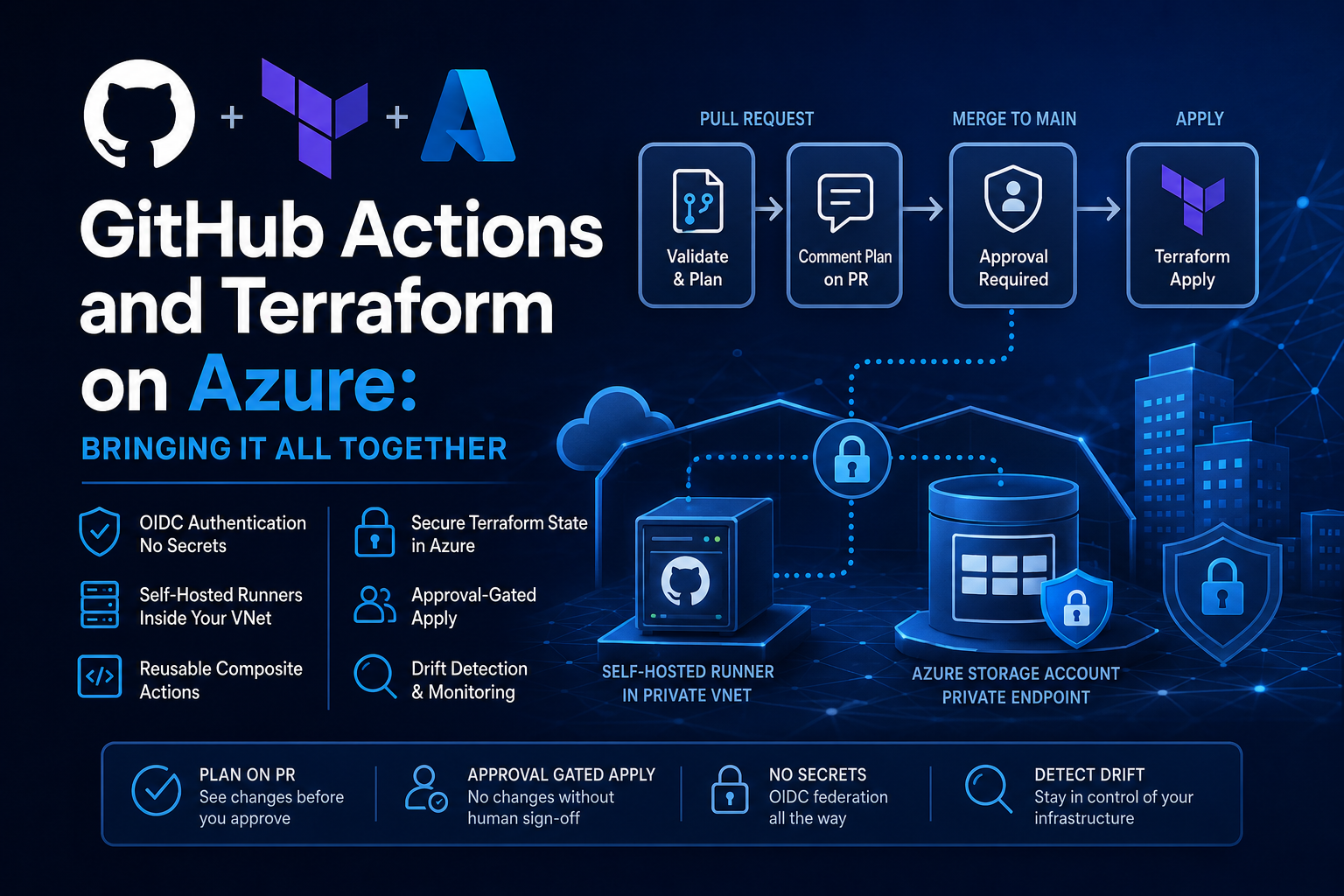
In a real platform environment, your pipeline needs to do more than that. It needs to run a plan on every pull request so reviewers can see exactly what will change before they approve. It needs a gate between plan and apply so nothing gets deployed without human sign-off. It needs to authenticate to Azure without storing any credentials in GitHub. And it needs to run on a self-hosted runner that sits inside your private network, so it can reach your state backend and any private endpoints your infrastructure depends on.
These aren’t nice-to-haves. They’re the difference between a pipeline you can trust and one that will bite you at the worst possible moment.
Authentication: No Secrets, No Excuses
I covered OIDC federation in depth in the OIDC to Azure post and the Entra Workload Identities post, so I won’t repeat all of that here. The short version is: GitHub Actions has its own OIDC identity provider, and you can configure Entra ID to trust tokens issued by it. That means your workflow can request a short-lived access token at runtime, authenticate to Azure, and run Terraform without a single secret ever being stored in GitHub.
For a Terraform pipeline, you set id-token: write on the job permissions block and use the azure/login action with federated credentials. From that point, Terraform picks up the authentication context automatically when you set use_oidc = true in your provider block.
This is the correct pattern. If your pipeline is still using a client secret stored as a GitHub secret, that’s the first thing to fix. Service principals with long-lived secrets are a security liability, and there’s no good reason to use them when federated identity is this straightforward.
Runners: Staying Inside the Private Boundary
The self-hosted runners post explained why you need your runner inside your VNet. The core reason is that your Terraform state backend is almost certainly locked down. If you’ve followed the guidance in my Secure Terraform State post, your storage account has public access disabled and is only accessible through a private endpoint or network rules. A GitHub-hosted runner can’t reach that. A self-hosted runner deployed into the right subnet can.
The same applies to any private endpoints your Terraform code is deploying or managing. If your runner can’t resolve and reach those endpoints, your pipeline will fail in ways that are frustrating to debug.
For the capstone pipeline pattern, I’m assuming a self-hosted runner registered with the label azure. Your workflow targets it with runs-on: [self-hosted, azure]. How you deployed and registered that runner is covered in the earlier post, so refer back to that if you haven’t set it up yet.
Reusable Setup with Composite Actions
In the custom actions post we built a composite action for Azure OIDC login. The same principle applies to Terraform setup. Rather than repeating terraform init configuration across multiple workflows, wrap it in a composite action that handles the consistent parts: installing the right Terraform version, configuring the azurerm backend with the correct variables, and running init.
This matters more than it might seem. When you have multiple pipelines, maybe one for your networking layer, one for your compute layer, one for your landing zone foundations, they all need Terraform initialised the same way. A composite action gives you one place to update when something changes, rather than hunting through every workflow file.
The composite action lives in your deniscooper/github-actions repo, versioned with a semantic tag, and called from any workflow that needs it. Application teams consume it the same way they consume your OIDC login action.
State Management
I’ve written separately about securing Terraform state in Azure and the approach doesn’t change just because we’ve moved from Azure DevOps to GitHub Actions. You still want state in an Azure Storage Account, with public access disabled, Entra ID authentication enforced (access keys disabled), and blob versioning enabled as a safety net.
What does change is how you pass the backend configuration into the pipeline. Rather than hardcoding values, inject them at runtime through environment variables or workflow inputs. This keeps your backend configuration flexible across environments without duplicating workflow files.
State locking is handled automatically by the azurerm backend via blob leases, so concurrent runs won’t corrupt your state. That said, GitHub Actions doesn’t have a native equivalent of Azure DevOps environments with deployment locks, so it’s worth thinking about how you prevent two workflow runs from attempting an apply at the same time. Using concurrency groups at the workflow level is the practical answer here.
The Pipeline Shape
The overall flow for a production Terraform pipeline on GitHub Actions looks like this:
On a pull request, run terraform validate and terraform plan. Publish the plan output back to the pull request as a comment. Reviewers can see exactly what will change before they approve and merge.
On merge to master, run the apply. But don’t run it automatically. Use a GitHub Environment with a required reviewer configured as a protection rule. The apply job targets that environment, which means GitHub will pause execution and wait for a named approver before proceeding.
This maps closely to the approval-gated pattern I use in the Azure DevOps Terraform pipeline, just implemented using GitHub’s primitives rather than Azure DevOps Environments and stage gates. The outcome is the same: no apply runs without a human reviewing the plan and confirming it’s safe to proceed.
Drift Detection
Once you have a working deployment pipeline, drift detection is a natural extension. I covered this in detail in the Terraform drift post in the context of Azure DevOps. The same logic applies in GitHub Actions: a scheduled workflow that runs terraform plan -detailed-exitcode against your production state and raises an alert if the exit code indicates changes.
The key detail is -detailed-exitcode. Exit code 0 means no changes. Exit code 2 means changes detected. Exit code 1 means the plan itself failed. Your drift detection workflow needs to handle all three correctly, otherwise you’ll either miss real drift or get flooded with false alerts.
Repo Structure
I won’t go deep on folder structure here because this will be covered in the accompanying repo for this series, but the principle is the same one I’ve applied across the ADO posts: split your Terraform files by resource type rather than dumping everything into main.tf, keep your tfvars organised by environment and region, and keep your workflow files under .github/workflows with clear, descriptive names that make it obvious what each one does.
Wrapping Up the Series
That’s the first part of the GitHub Actions for Platform Engineers series done. We’ve gone from the basics of how a workflow is structured all the way through to a production-grade Terraform pipeline with OIDC auth, private runners, composite actions, gated approvals, and drift detection.
If you’ve been following along and building this out in your own environment, I’d love to hear how you’ve adapted it. Drop a comment below.
Next up, I’m going to step back from the series format and look at something a lot of platform teams are being asked about right now: Azure DevOps Pipelines vs GitHub Actions, a proper like-for-like comparison from someone who’s used both in production. Beyond that, I’ll be going much deeper on platform engineering as a whole, covering the patterns, practices, and tooling that platform teams actually need to operate at scale. If that’s the kind of content you want more of, make sure you’re subscribed so you don’t miss it.