

Table of Contents
There’s a constant theme I hear from organisations right now: they need to deploy faster, more efficiently, and with fewer people.
Azure and DevOps platform teams often end up being perceived as a bottleneck in this process. Developers, power users, and infrastructure teams all want to consume cloud services, but they don’t necessarily have the depth of cloud knowledge required to deploy secure, scalable, and well-governed solutions.
At the same time, platform and DevOps teams genuinely want to enable the business. They want teams to move quickly and make effective use of the cloud, but there’s a very real concern that simply opening the doors to Azure will lead to a governance nightmare.
If you’re a platform engineer tired of being a deployment factory, or a DevOps lead trying to scale your team’s impact without hiring an army, this series is for you.
Over the years, I’ve built scalable, reusable, almost boilerplate Infrastructure-as-Code modules, usually with Terraform, which have reduced deployment times from weeks to days.
The problem is that even with this level of automation, platform teams are still the bottleneck. Demand continues to flow through a small number of people responsible for deploying, reviewing, and supporting everything.
We don’t hear ITIL talked about as much these days, but many of its principles are still highly relevant, particularly for organisations that want IT to operate as a value stream rather than a cost centre.
One of the key components of ITIL is the Service Catalog: a single place where users can request pre-approved, pre-defined resources, tools, applications, and systems. These offerings are carefully designed by platform teams so the business can safely consume them.
If something isn’t available in the catalog, a demand process is triggered, covering security, cost, fit-for-purpose, and strategic alignment, before a new offering is introduced.
That led me to a simple question: what if we applied this model to Azure?
What if teams with little or no Azure knowledge could request cloud infrastructure and services through a self-service catalog, backed by the Infrastructure-as-Code modules and templates we’ve already spent years building?
In this series, we’re going to explore different ways of building exactly that: a self-service Azure Service Catalog that integrates with existing landing zones, governance controls, and Infrastructure-as-Code.
The Concept
This series is intentionally exploratory. Rather than presenting a polished, production-ready solution, the aim is to experiment, learn, and validate what works and what doesn’t.
You can think of this as a proof of concept or a minimum viable product (MVP). I don’t expect to arrive at a flawless, fully formed system. Instead, the focus is on exploring the art of the possible by combining native Azure capabilities with custom tooling and platforms.
Even the tooling choices I make are part of the experiment. While I’ll be opinionated about certain decisions, I’m testing assumptions along the way rather than prescribing a definitive blueprint. The goal is to understand how far we can realistically go in enabling self-service, without compromising on governance, security, or operational discipline.
If things don’t work, we’ll explore why. If they do work, we’ll examine the trade-offs and constraints that come with them.
What This Series Will Cover
Principles and foundations first
- What a good Azure Service Catalog looks like, and what it doesn’t
- What we should realistically offer through a service catalog
- The core platform foundations required to support self-service
- Custom vs hybrid vs native approaches
The building blocks
- Tooling choices: what we need versus what we want
- Turning Terraform modules into consumable services
- Abstracting Azure DevOps away from end users
- Workflows, approvals, and control points
The interface
- How teams interact with the service catalog
- Hosting considerations and ongoing maintenance
Governance without friction
- Policy-as-Code versus human approval
- Cost controls and budget enforcement
- RBAC and access requirements
- Security baselines
- Auditability, traceability, and approvals
Operating the catalog
- Moving from concept to a supported offering
- Supporting and maintaining the catalog
- Measuring success and adoption
The reality check and lessons learned
- Does a service catalog work in a real-world environment?
- Constraints and limits of a self-service model
- What shouldn’t be self-service
Principles and Foundations First
What Makes a Good Azure Service Catalog
An Azure Service Catalog should not be seen as a replacement for platform teams. If anything, it should amplify their impact.
The platform team remains deeply embedded in the Azure environment, owning the landing zone, governance model, and architectural standards. The Service Catalog becomes the conduit between non-cloud-savvy teams and the Cloud Platform Team.
Rather than running deployments themselves, platform teams build and maintain Infrastructure-as-Code solutions. These are then exposed through the service catalog as reusable, opinionated offerings that the business can safely consume.
So what do we actually want our Service Catalog to be?
A good Azure Service Catalog should:
- Provide a user-friendly, intuitive interface that guides users toward the right solution
- Be technology-agnostic where possible, avoiding tight coupling to a single platform or tool
- Enable informed decision-making, including visibility into scalability, cost, and ongoing operational overhead
- Support both manual and policy-driven approvals and workflows
- Reuse existing investments such as Terraform modules, DevOps pipelines, and custom automation
- Deploy complete solutions, not just raw resources
- For example, provisioning a virtual machine should optionally include backup, disaster recovery, monitoring, and ongoing maintenance by default
- For example, provisioning a virtual machine should optionally include backup, disaster recovery, monitoring, and ongoing maintenance by default
The focus is not on offering everything, but on offering the right things, in a way that aligns with platform standards and organisational strategy.
These principles will guide the decisions we make throughout this series:
- Opinionated by design
- Secure by default
- Limited but extensible
- Built for consumption, not engineering
- Governed primarily by policy
- Operated like a product
- Clear ownership boundaries
We’ll judge success by outcomes rather than activity: fewer platform tickets requesting deployments, faster lead times for teams, and platform engineers gaining time to improve the platform and invest in their own development.
We’ll also look at softer metrics like user satisfaction and time-to-productivity for teams consuming the catalog.
What Our Azure Service Catalog Shouldn’t Be
Understanding what we don’t want to build is just as important as defining what we do.
A portal where anyone can deploy anything
I’ve seen this approach before: custom tools that attempt to deploy everything from individual virtual machines to entire landing zones. These platforms quickly become too broad, too complex, and ultimately deliver little value.
Our Service Catalog will offer a curated subset of pre-approved services deployed into existing landing zones. Think standard virtual machines deployed into established hub-and-spoke networking, or Azure File Shares with RBAC and policy enforcement. These are services we know teams will need and use.
A replacement for cloud engineers
Automation and AI don’t replace platform teams, they change how their time is spent.
Reducing manual deployments frees platform engineers to improve the platform, evolve governance, adopt new services, and build new capabilities. Organisations that attempt to replace engineers almost always revert to a hybrid model.
A UI for Infrastructure-as-Code
Infrastructure-as-Code underpins everything we do, but simply placing a UI in front of Terraform or Bicep doesn’t address the real problem.
The Service Catalog must do more than trigger deployments. It should guide decisions, set expectations, and surface the cost and operational impact of running services in the cloud. If someone requests a VM that gets denied, they need to understand why and what they can do differently.
A ServiceNow for Azure resources
ITSM tools can expose service catalogs, but they don’t solve the enablement and learning gap faced by teams without deep cloud expertise. The Service Catalog we’re building needs to act as a bridge, not just a request mechanism.
Something that removes the need for governance
The Service Catalog is not a governance tool. Governance, policy, and standards underpin how the catalog works, what it can deploy, and how it deploys resources. They don’t disappear because of it.
What Are We Going to Build?
We’ll start with a deliberately narrow scope: enabling teams to request the deployment of a virtual machine into an existing Azure Landing Zone.
This allows us to validate backend workflows, integrate Infrastructure-as-Code with approvals, and prove the overall model before expanding it.
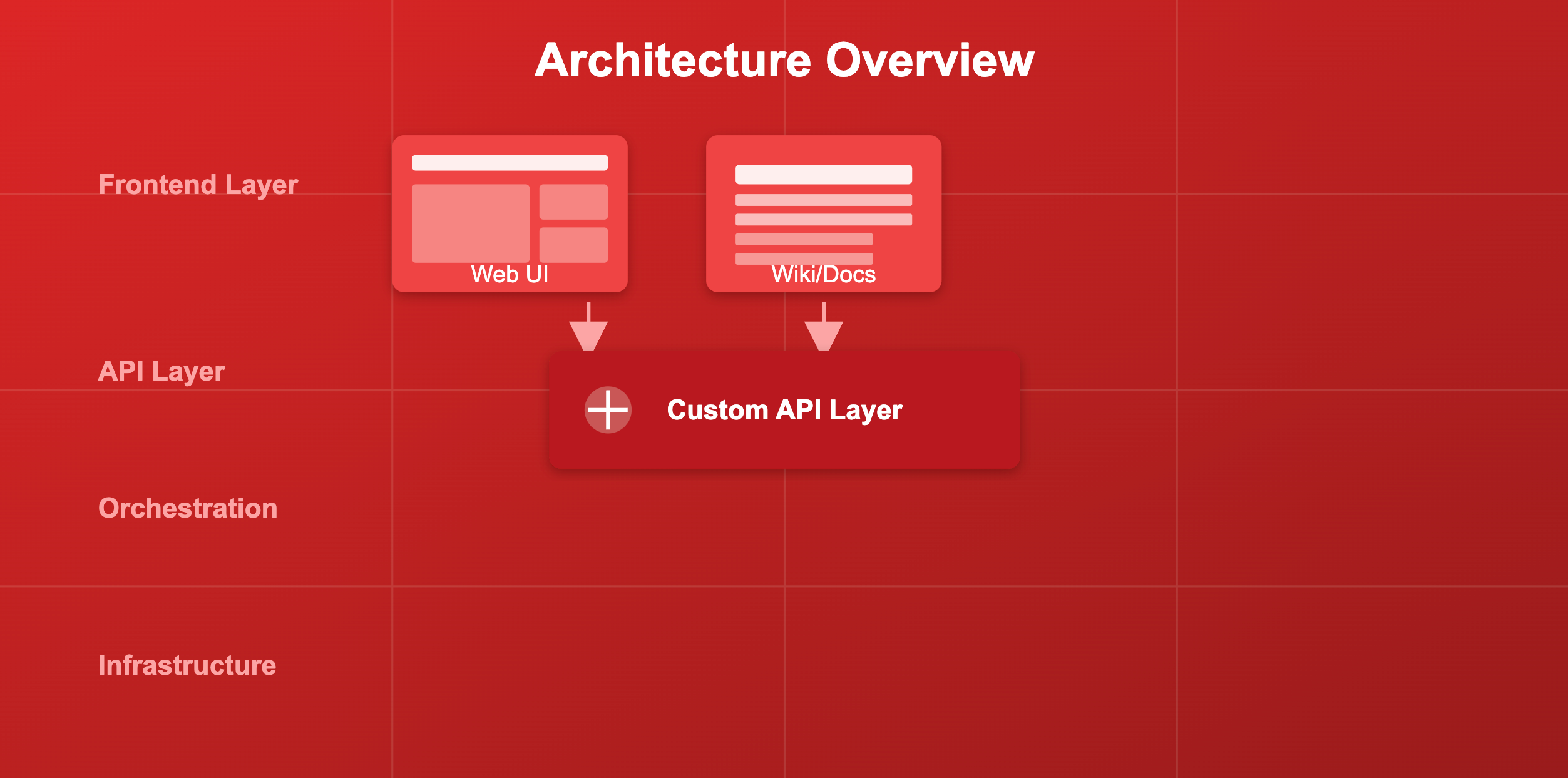
We’ll focus first on backend automation using Terraform and Azure DevOps. Once that foundation is in place, we’ll explore different frontend options, from simple Wiki-based workflows to a fully custom user interface.
Policy-as-Code will be used to automatically approve or escalate requests based on defined criteria.
Tooling
I’m choosing Azure DevOps as the backend orchestration layer for this experiment primarily because it’s prevalent in enterprise environments and many organisations already have significant investment in it. This isn’t a hard dependency of the approach – the same patterns could work with GitHub Actions, GitLab, or other CI/CD platforms. However, for the purposes of this series, Azure DevOps gives us a realistic foundation that mirrors what many platform teams are already working with.
Backend services:
Azure DevOps
- Pipelines, Repositories, Work Items, Service Connections
Terraform
- Custom-built modules
A custom API layer
- Acting as the integration point between frontend and backend services
Frontend services:
- Azure DevOps Wiki as a baseline option
- A custom-built web interface for a richer user experience
Next Week
This post sets the context and principles for what we’re trying to achieve, but it’s only the starting point.
Over the rest of this series, we’ll move from theory into practice. We’ll test assumptions, make trade-offs, and explore what actually works when you try to turn self-service into a real operating model rather than just another tool.
Some decisions will feel opinionated. Others will be pragmatic compromises. Not everything will scale perfectly, and that’s intentional. The value here is in understanding the constraints, the failure modes, and the lessons learned along the way.
In the next post, we’ll take a deeper look at the backend tooling and how we can abstract the functionality of Azure DevOps into a tool that can be used as part of our deployment workflows.
If you’re responsible for an Azure platform, a DevOps practice, or enabling teams to move faster without losing control, this is where the real work begins.