

Table of Contents
What is the Well-Architected Framework?
The Well-Architected Framework is Microsoft’s set of five design pillars — Reliability, Security, Cost Optimisation, Operational Excellence, and Performance Efficiency — that guide practical decisions when building and operating cloud platforms on Azure. You can get the detailed guidance here.
Over the coming weeks I’m going to cover all five pillars of the Well-Architected Framework and how they apply to real Azure Platform Design decisions:
Azure Well Architected Framework Series
This week, we focus on Security.
Security in the Cloud
Security in the cloud isn’t about building walls, it’s about building visibility and control. Unlike on-premises, where physical boundaries define the perimeter, cloud security requires a different mindset, one rooted in shared responsibility, layered defences, and continuous verification. Trying to replicate on-premises security concepts with cloud resources will either limit the benefits of your cloud services, or not provide the desired layer of security.
Thinking beyond the network boundary
In on-premises infrastructure, the network perimeter was the primary security boundary. Secure the network, secure your resources. Cloud changes that entirely. With services distributed across providers, whether IaaS, PaaS, or SaaS, the network boundary becomes a small piece of a much larger puzzle. Cloud security pivots from perimeter defence to identity-centric control. The network still matters, but it no longer defines the perimeter.
The focus for cloud security shifts strongly towards protecting and securing the user, the network and the device state become signals in the descision when approving access to cloud resources.
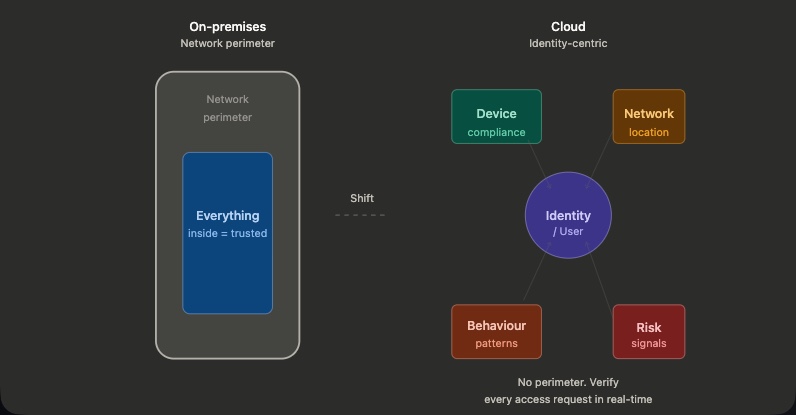
A quick call out here around SaaS and IaaS / PaaS services. When running systems within Azure, we rely on various resources, such as Virtual Machines, Storage Accounts, KeyVaults etc. We should always create these resources within a managed private network, avoiding the public access that is often the default with these services. However putting these resources on a private network, using private endpoints, network security groups etc is only a small part of the solution. It controls where these resources can be accessed from – not who can access them. With a SaaS solution, take Office365 for example, we often don’t want to put these on a private network – whilst possible using tools like Express Route with Public Peering, it often removes the key drivers and benefits for moving towards a cloud offering for these solutions. As such we don’t protect the network, but we do protect the perimeter of these systems through identity controls.
The Shared Responsibility Shift
A common misconception is that the cloud automatically makes things secure. The cloud absolutely does give us layers of build in security, and Microsoft are pushing for a secure by default approach, however we must ensure we understand our responsibility in securing our workloads.
In Azure and M365, Microsoft are responsible for the management and securing the platforms. They are not responsible for securing or protecting our data, or configuring the platforms to meet our security guidelines. That is our responsibility.
Microsoft gives us the tools to secure our systems. It’s our responsibility to configure them to our requirements. This sounds straightforward until you inherit a deployment with Storage Accounts publicly accessible, Key Vaults without RBAC, and no audit logging. ‘Secure by default’ means nothing if default settings aren’t enforced across your platform
Understanding Zero Trust
We hear the words zero-trust, but what does that really mean when it comes to securing our cloud workloads?
I like to think of zero-trust exactly as the name suggests: assume everything is, can be, or has been compromised. When you shift into that mindset, you start to see security differently. Let me show you what I mean with a real example…
Company A drives a new security initiative to protected their highly sensitive intellectual data held in SharePoint online. The initiative directs that only approved devices from approved locations can access SharePoint Online. It doesn’t state any changes to existing identity controls which currently only enforce the use of MFA.
An approach like this on the face of it seems sensible, secure the devices and secure the network – users already need to use MFA to access M365 services. But what this solution really is doing, is treating all types of data in the same way, and giving a false sense of security. Should highly sensitive company data be treated and controlled in the same way the office Christmas party photos are?
It doesn’t take into account that a device or network perimeter could be compromised – it just assumes because they are corporate they are secure and trusted. Device state and compliance are valid signals, but not the only ones we should care about. It’s making assumptions that the devices or networks can’t be breached. This is the opposite of zero trust thinking.
In a zero trust model we shift the belief that a device or network is secure and trusted, instead we define what type of access that particular session, at that exact time, is allowed to receive.
Always assume something can be or has been breached and build frameworks around it.
Trust Signals
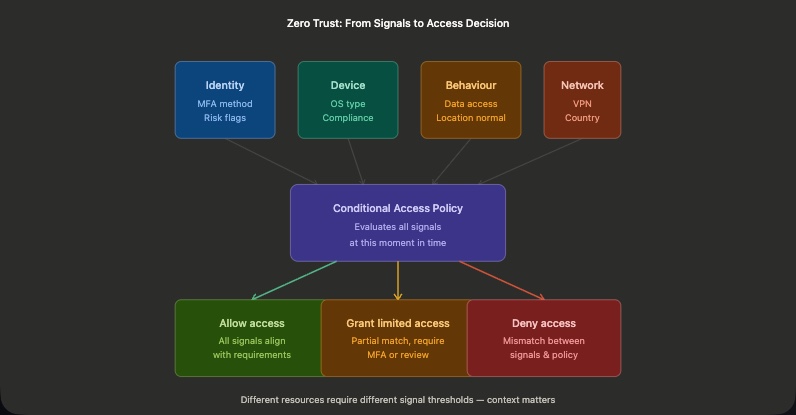
In a zero trust model, we take signals from various tools and systems to define what that user session is allowed to access.
Identity
The identity signals comprise of inputs from the identity and sign in / authentication layer. What method of MFA was used? Is the user flagged as risky?
Device
The device itself will present valuable input signals, what type of device is it – Windows, Mac, iPhone, Android etc? Is the device domain joined? Does the device meet our compliance checks? Is the device compliant with your company baseline security standards?
Behaviour
The behaviours signals factor in user behaviour. For example, what is the user doing – are they downloading or uploading lots of data? Is the users location normal for them?
Network
The network signals give us information on where somewhere is coming from. Are they in a company site? Are they connected to VPN? Which country are they logging in from?
All these signals help build a picture of the session at that time. They don’t assume anything, and alone they don’t control what a user can or cannot do – they simply inform.
Conditional Access
This is where everything starts to come together.
We’ve got all these signals – identity, device, behaviour, network, but on their own they don’t actually do anything. They just inform.
Conditional Access is what turns those signals into a decision.
I like to think of it like going through an airport.
Your ticket tells the airline where you’re trying to go. Your passport proves who you are. Your luggage represents what you’re bringing with you. Then you go through security, where everything is checked again, along with how you’re behaving.
None of those things, on their own, get you on the plane.
But together, they determine whether you’re allowed through.
That’s exactly how Conditional Access works. It doesn’t enforce security by itself, it evaluates whether access should be allowed, based on the full picture of that session at that moment in time.
And importantly, not every flight has the same level of scrutiny.
Accessing email might require MFA and a compliant device. Accessing sensitive data might require every signal to align.
That’s the key point:
Not all resources carry the same risk, and they shouldn’t be treated the same.
Protecting Azure Resources
Now that we understand zero trust as a philosophy, we need to translate it into practice. Azure security operates across distinct layers: the management plane (who can administer resources), the data plane (who can access data), and the enforcement mechanisms that tie them together.
The key insight: these layers are separate and require different controls. You can lock down your data plane perfectly, but if anyone in your organisation can configure resources through the management plane, you’re still exposed.
Management Plane vs. Data Plane
The Azure Management Portal is public and accessible from anywhere. We use Conditional Access to gate access, requiring strong MFA, phishing-resistant authentication, or compliant devices. But we rarely restrict it through network boundaries. Once authenticated, an admin can manage resource configuration.
The critical point: managing a storage account is different from accessing data within it. The management plane controls the former; the data plane controls the latter.
For data access, you want tighter boundaries. Azure makes it dangerously easy to expose data publicly (wide-open storage, public SQL endpoints, etc.). The recommendation: restrict data to private endpoints only. A private endpoint injects your resource into your virtual network, giving you network-level control through routing, NSGs, and perimeter firewalls. See my Azure DevOps with Private Endpoints post for a deeper look at the data plane / control plane distinction in practice.
Identity, Access Control, Enforcement, Detection & Monitoring
RBAC: Start with least privilege
When granting access to Azure resources, always use role-based assignment through groups, not individuals. Grant only what’s needed for someone’s role. But here’s the catch: standing access is a liability. An admin with permanent Contributor role is a risk, even if they only use it occasionally.
PIM: Make privilege temporary
Link RBAC with Privileged Identity Management to make access time-bound. My approach: create a PIM-enabled security group in Entra and make administrators eligible for it. When they need to carry out daily tasks, they elevate into the group.
Benefits: it reduces elevation fatigue (one activation covers multiple roles), works with non-Entra systems (M365, Purview), and simplifies access management. You don’t grant standing privileged roles like Global Admin or Owner to this group, those get separate, more restrictive elevation.
The philosophy: access should be granted when needed, for as long as needed, then revoked. Nothing more.
For best practice, implement Entra Access Reviews to regularly validate who has access to what roles and confirm that the level of access is still required and relevant.
Azure Policy: Make non-compliance impossible
Azure is a huge landscape with many teams at different levels. Without enforcement, you get security gaps and inconsistent standards. Azure Policy is your centralised control layer.
Apply policies at the management group level and they cascade across your entire tenant. Use them to block risky deployments (no public IPs, no unencrypted storage, no legacy protocols) or automatically remediate (enforcing tags, audit logging, encryption). Start small and keep it simple, only policies you actually need and actively monitor. A policy no one enforces becomes a signal that policies don’t matter.
For deeper thinking on balancing enforcement with autonomy, see When Guardrails Become Walls.
Defender for Cloud: See and respond
Enable Defender for Cloud on all subscriptions. It provides threat detection, compliance checks, and recommendations backed by continuous assessment. It also integrates with Azure Policy to automate remediation.
But here’s the reality: turning it on without an operational model is expensive theatre. Defender generates alerts only valuable if someone’s actually reviewing and acting on them.
Make Monitoring Operational
Security features are only useful if you monitor and respond to what they tell you. This isn’t optional, it’s foundational.
Enable Defender for Cloud at subscription level. It centralises threat detection, compliance insights, and policy-driven recommendations into a single console.
Centralise logging: send Activity logs, Sign-in logs, and security logs to a central Log Analytics workspace. Don’t just turn on diagnostic logging for everything. Make an informed choice: if you need the data and have a process to act on it, ingest it. If not, don’t. Log ingestion is expensive and costs balloon fast with indiscriminate logging.
Route alerts to people: alerts must go to an owner or, better, a ticketing system (ServiceNow, etc.). A distribution list doesn’t work; alerts disappear into “I thought someone else was handling that.”
Audit continuously: logs alone don’t protect you. You need people reviewing findings, triaging alerts, and closing the loop. Security is a practice, not a feature you switch on.
Summary
We’ve only really touched the surface of the security WAF pillar. It’s a huge undertaking which needs careful thought and upfront (as well as ongoing) design. The cloud comes with a mindset shift, we no longer focus on securing the perimeter, we secure access based on risk, context and continuous verification.
Security in the cloud isn’t about building walls it’s about building visibility and control. The network perimeter no longer defines security; identity and continuous verification do.
Shared responsibility is real. Microsoft secures the platform; you secure your data and configuration. “Secure by default” means nothing if you don’t enforce it across your platform.
Zero trust means assuming everything can be compromised. Design systems where every access request, regardless of device, network, or past trust, is verified against current signals (identity, device compliance, behaviour, location).
Conditional Access policies are your gate. They don’t enforce security alone; they inform access decisions by combining multiple signals. Different resources warrant different thresholds.
Identity is the new perimeter. Private networks control where resources can be reached from; identity and RBAC control who can access them and what they can do. Both are essential, neither is sufficient alone.
We’ve covered the foundational security layer: identity, access, enforcement, and monitoring. As cloud platforms become smarter and workloads increasingly involve AI and machine learning, security considerations shift. In an upcoming post, we’ll explore how these principles apply to securing AI workloads in Azure, from securing training data and model access to monitoring inference pipelines.
What are the areas of security in the cloud you have concerns with?