

Table of Contents
In the previous posts in this series, I’ve highlighted the benefits of using Infrastructure as Code (IaC), and more specifically integrating Terraform with DevOps CI/CD pipelines and optimising pipelines with pull requests and automatic tagging. As we’ve seen, using IaC is a reliable way to deploy and manage resources in Azure, giving us consistency, repeatability, and confidence in what we’re running.
One area we haven’t yet addressed is what happens when changes occur outside of IaC. When deployed workloads become inconsistent with Terraform state, we call this configuration drift.
In this final part of the series, we are going to tackle one of the most common challenges teams face when adopting IaC: Drift. I want to explain how configuration drift happens, what we can do to prevent it, and how we can detect and respond to it when it does occur.
Terraform State
In simple terms, Terraform state is how Terraform knows what it has built. Without state, Terraform would have no way to calculate what needs to change. Each run would effectively be treated as a clean environment.
This differs from tools such as ARM or Bicep, which don’t maintain an external state file. Instead, they evaluate the deployed resources against the declared template at deployment time to determine what has changed.
Remote State
In our workloads, we store Terraform state in a remote backend using an Azure Storage Account. This allows teams to work collaboratively. As long as everyone references the same state, Terraform can accurately calculate what needs to change.
Remote state is foundational to running Terraform safely at scale.
What Is Included in Terraform State?
The Terraform state file (.tfstate) contains information about resources Terraform has deployed or resources that have been brought under management via imports. This includes:
•	Resource IDs
•	Current configuration values
•	SKU sizes and names
•	Dependencies between resources
•	Outputs used by downstream modules
It’s important to understand that Terraform state does not contain every possible configuration value for a resource — only what Terraform is aware of and manages. This distinction becomes critical when reasoning about drift.
Drift
Drift occurs when deployed resources no longer match the Terraform state. This most commonly happens when teams have the ability to modify resources through methods other than Terraform.
One of the key benefits of IaC is that the code becomes our documentation and our source of truth. The moment someone jumps into the Azure portal to add a “temporary” firewall rule, or reacts to an incident by manually changing a SKU, the deployed environment no longer matches the IaC repository. Drift is introduced.
Running terraform plan refreshes state from the provider and compares it to your configuration, highlighting any differences.
Preventing Drift
Preventing drift is primarily an organisational and process problem, not a technical one.
To fully benefit from IaC, it needs to be adopted as a working method — not just a deployment tool. IaC should act as our deployment mechanism, our documentation, and a key part of governance and change control. This only works when we actively prevent changes outside of IaC.
RBAC
When IaC is integrated with CI/CD pipelines, the only identity that needs permission to modify resources is the DevOps service connection.
Administrators and developers shouldn’t be making ad-hoc changes outside of IaC, so why give them the ability to do so? Using RBAC, we can grant read access for troubleshooting and visibility while preventing direct modification of resources. This forces all changes through code and pipelines.
For urgent break-glass scenarios, this isn’t always practical. In these cases, we can allow temporary access by integrating RBAC with Privileged Identity Management (PIM) and Just-In-Time (JIT) access, ideally requiring leadership approval. This provides a controlled escape hatch without normalising manual changes.
Terraform Lifecycle Blocks
Terraform lifecycle blocks, specifically ignore_changes, can be useful and sometimes necessary. However, they also prevent drift from being detected.
Use lifecycle ignores sparingly, and only when you fully understand and accept the drift you are choosing to ignore.
Detecting Drift
Detecting drift becomes far simpler once preventative controls are in place. With fewer manual changes, terraform plan becomes a reliable signal rather than constant noise.
Running Terraform plan on a regular schedule — typically daily — allows us to detect drift early and respond before it becomes a larger problem.
terraform plan -detailed-exitcode
Using the -detailed-exitcode option causes Terraform to return one of three exit codes:
•	0 – Succeeded with no changes
•	1 – Error
•	2 – Succeeded with changes detected
We can use these exit codes in a scheduled pipeline to generate alerts or fail the pipeline when drift is detected.
The Drift Detection Pipeline
The drift detection pipeline is a simple scheduled pipeline that runs terraform plan with the -detailed-exitcode option.
If Terraform returns an exit code of 2, it means the plan completed successfully but detected changes. We intentionally fail the pipeline in this case so we can hook into Azure DevOps’ native notification mechanisms and alert the team that investigation is required.
⚠️ Important: Exit code 2 indicates a difference between Terraform code and deployed resources. While this often indicates drift, it could simply mean code has been updated but not yet applied through the pipeline.
trigger: none

schedules:
  - cron: "0 6 \* \* \*" # Daily at 6 AM UTC
	displayName: Daily Drift Detection
	branches:
	  include:
- main
	always: true

variables:
  management-subscription-id: "xxxxxxxx"
  TFSTATE\_RESOURCE\_GROUP: "rg-gen-terraform"
  TFSTATE\_STORAGE\_ACCOUNT: "tfstate"
  TFSTATE\_CONTAINER\_NAME: "tfstate"

stages:
  - stage: DriftDetection
	displayName: "Terraform Drift Detection"
	jobs:
	  - job: TerraformDriftDetection
		displayName: "Terraform Drift Detection Job"
		steps:
		  - script: |
			  key="$$\{SYSTEM\_TEAMPROJECT}\_prod\_centralus.tfstate\" | tr '\[:upper:]' '\[:lower:]' | tr -d ' ')"
			  echo "##vso\[task.setvariable variable=TFSTATE\_KEY]$key"
			displayName: "Set TFSTATE\_KEY"

		  - template: templates/terraform-setup.yml
			parameters:
			  tfstateKey: $(TFSTATE\_KEY)

		  - task: AzureCLI@2
			displayName: "Terraform Validate (OIDC)"
			inputs:
			  azureSubscription: "Federated-Azure-Connection-$(System.TeamProject)"
			  scriptType: bash
			  scriptLocation: inlineScript
			  inlineScript: terraform validate

		  - task: AzureCLI@2
			displayName: "Terraform Plan (Drift Detection, OIDC)"
			inputs:
			  azureSubscription: "Federated-Azure-Connection-$(System.TeamProject)"
			  scriptType: bash
			  scriptLocation: inlineScript
			  inlineScript: |
          terraform plan -detailed-exitcode \
            -var="environment=prod" \
            -var="location=centralus" \
            -var-file=environments/centralus/prod.tfvars \
            -out=tfplan.out || export PLAN_EXIT_CODE=$?

          if [ "$PLAN_EXIT_CODE" == "2" ]; then
            echo "##vso[task.logissue type=error]Terraform drift detected in prod/centralus. Investigation required."
            exit 1
          elif [ "$PLAN_EXIT_CODE" == "0" ]; then
            echo "No drift detected."
          else
            echo "##vso[task.logissue type=error]Terraform plan failed with exit code $PLAN_EXIT_CODE."
            exit $PLAN_EXIT_CODE
          fi
Sending Email Notifications
Azure DevOps includes built-in notification capabilities that can be used to send email alerts when a pipeline fails.
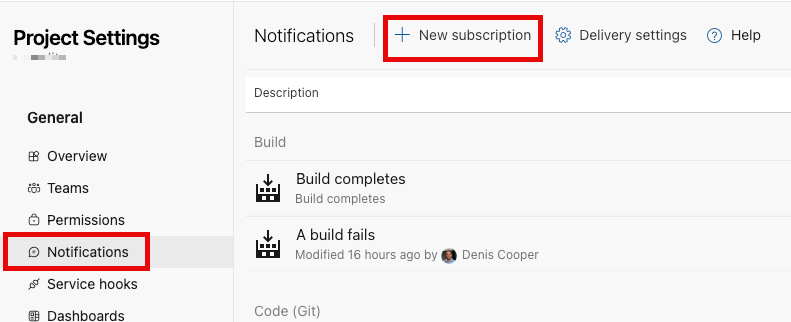
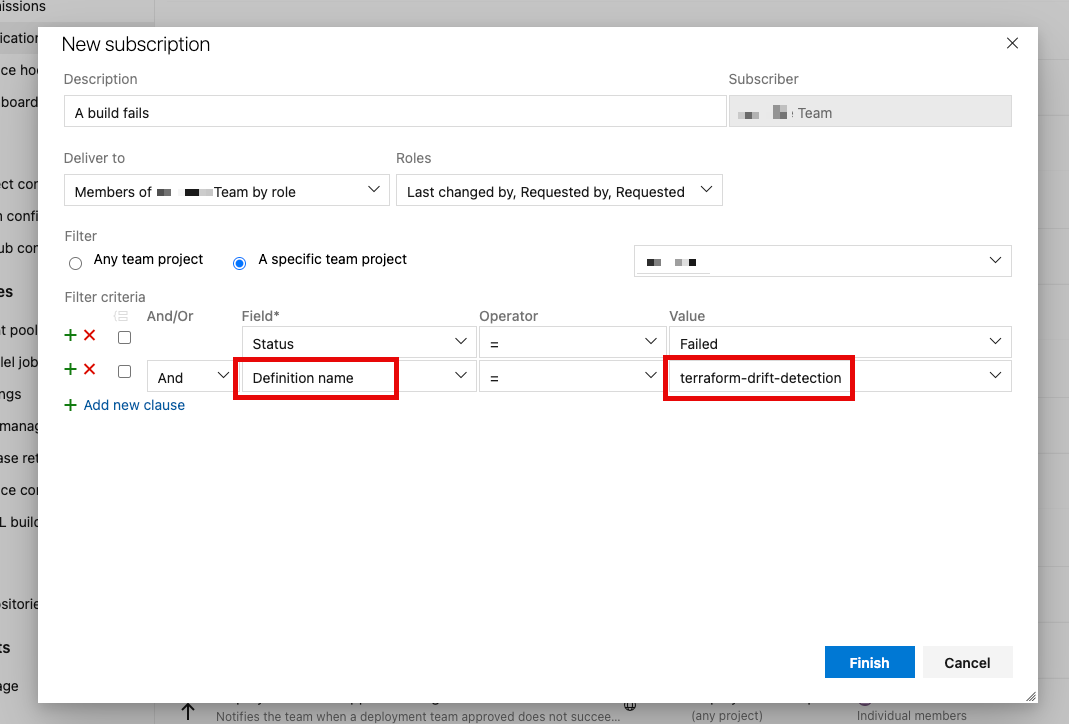
From Project Settings → Notifications, create a new subscription:
•	Event: When a build fails
•	Status: Failed
•	Filter: Definition Name = Drift Detection Pipeline
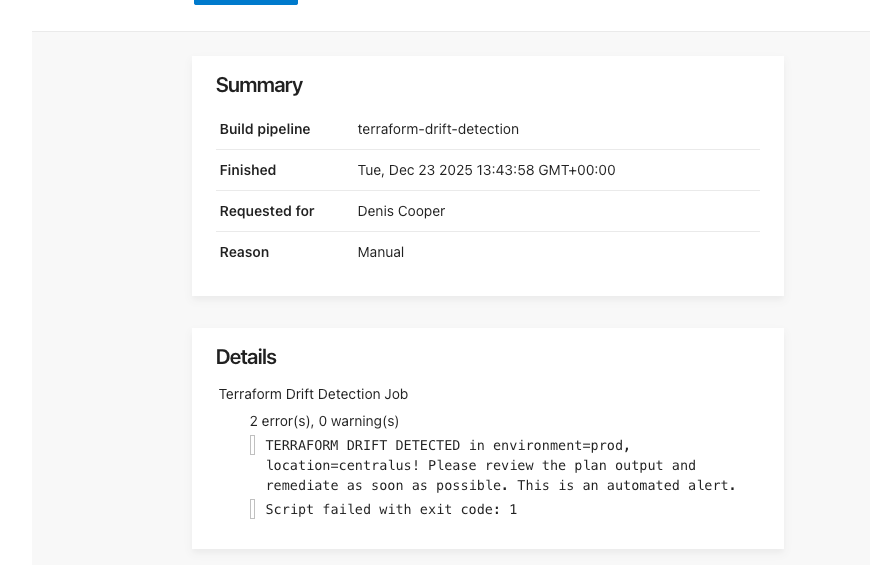
When drift is detected and the pipeline fails, an email notification is automatically sent using the error message defined in the pipeline.
Sending Teams Messages
Drift notifications can also be sent to Microsoft Teams.
Add the Azure Pipelines app to the target Teams channel, then run:
@Azure Pipelines subscribe
Select the Azure DevOps project and pipeline, and choose:
•	Event: Build completed
•	Result: Failed
When drift is detected, a message will be posted directly into the Teams channel.
What to do when Drift is detected?
What to Do When Drift Is Detected
Drift will inevitably happen, and when it does, you must be prepared to respond.
Investigate the cause. There’s generally a reason for drift, and blindly re-applying Terraform code could break something. Understanding why a change was made is critical before deciding on a course of action. Check:
- Who made the change and when?
- Was it part of an incident response?
- Is there a ticket or communication trail?
Make use of the Azure Activity Log to help identify who and when a change was made, and review the terraform plan carefully to understand what has changed.
Decide on the correct resolution. Once you’ve identified the cause, choose the appropriate fix:
- Revert the drift: If the manual change was unauthorized or incorrect, run
terraform applyto restore the intended state - Update the code: If the manual change is the new desired state, update your Terraform configuration to match reality and apply it through your normal pipeline
- Import the resource: If resources were created outside Terraform, use
terraform importto bring them under management and avoid “resource already exists” errors
Prevent recurrence. Once drift is resolved, update your processes:
- Share learnings with the team
- Document the incident and root cause
- Identify gaps in your RBAC or approval processes
- Update runbooks or escalation procedures if the change was incident-related
Summary
This brings the series on integrating IaC with DevOps pipelines to a close.
By building these controls and processes into the platform, we remove cognitive load, reduce mistakes, enforce standards, and prevent accidental changes. Regular drift detection keeps Terraform boring — and boring is exactly what we want in production.
More importantly, it prevents teams from getting into a situation where engineers are afraid to run terraform apply, not really knowing what might break.
For teams starting out with IaC, focus on the governance and controls before advanced features. Taking this approach sets up your deployments with a great footing from the start.