
Table of Contents
This is part 4 of the GitHub Actions for Platform Engineers series. In part 3, we covered OIDC authentication between GitHub Actions and Azure, removing the need for stored credentials entirely. In this post we’re going to tackle one of the most common blockers platform teams hit when moving pipelines to GitHub Actions: private network access.
When GitHub-Hosted Runners Hit a Wall
GitHub-hosted runners are great. For most public-facing or cloud-native workloads, they do exactly what you need without any infrastructure overhead. But the moment you start deploying into a properly secured Azure environment, you run into a problem that will be very familiar if you’ve read my post on Azure DevOps with private endpoints.
The issue is straightforward: GitHub-hosted runners run in GitHub’s infrastructure, outside your network. If your Terraform state is locked down behind a private endpoint on a storage account, your runner can’t reach it. If your container images sit in an ACR instance with public access disabled, your runner can’t pull them. If your workloads deploy into a VNet with no public inbound, your runner can’t touch them.
The workaround that some teams reach for, dynamically adding the runner’s public IP to storage account or SQL firewall rules during pipeline execution, is fragile, difficult to audit, and eventually fails in ways that are painful to diagnose. I covered exactly this problem in the Azure DevOps context. The answer there was Managed DevOps Pools. With GitHub Actions, it’s self-hosted runners.
There’s an important distinction worth making early: GitHub doesn’t have an equivalent to Managed DevOps Pools. Microsoft built that product specifically for Azure DevOps, and it has no GitHub integration. For GitHub Actions, you own and operate your own runner infrastructure. The question is what form that takes, and where it lives.
What a Self-Hosted Runner Actually Is
Before getting into the options, it’s worth being clear on what you’re actually deploying.
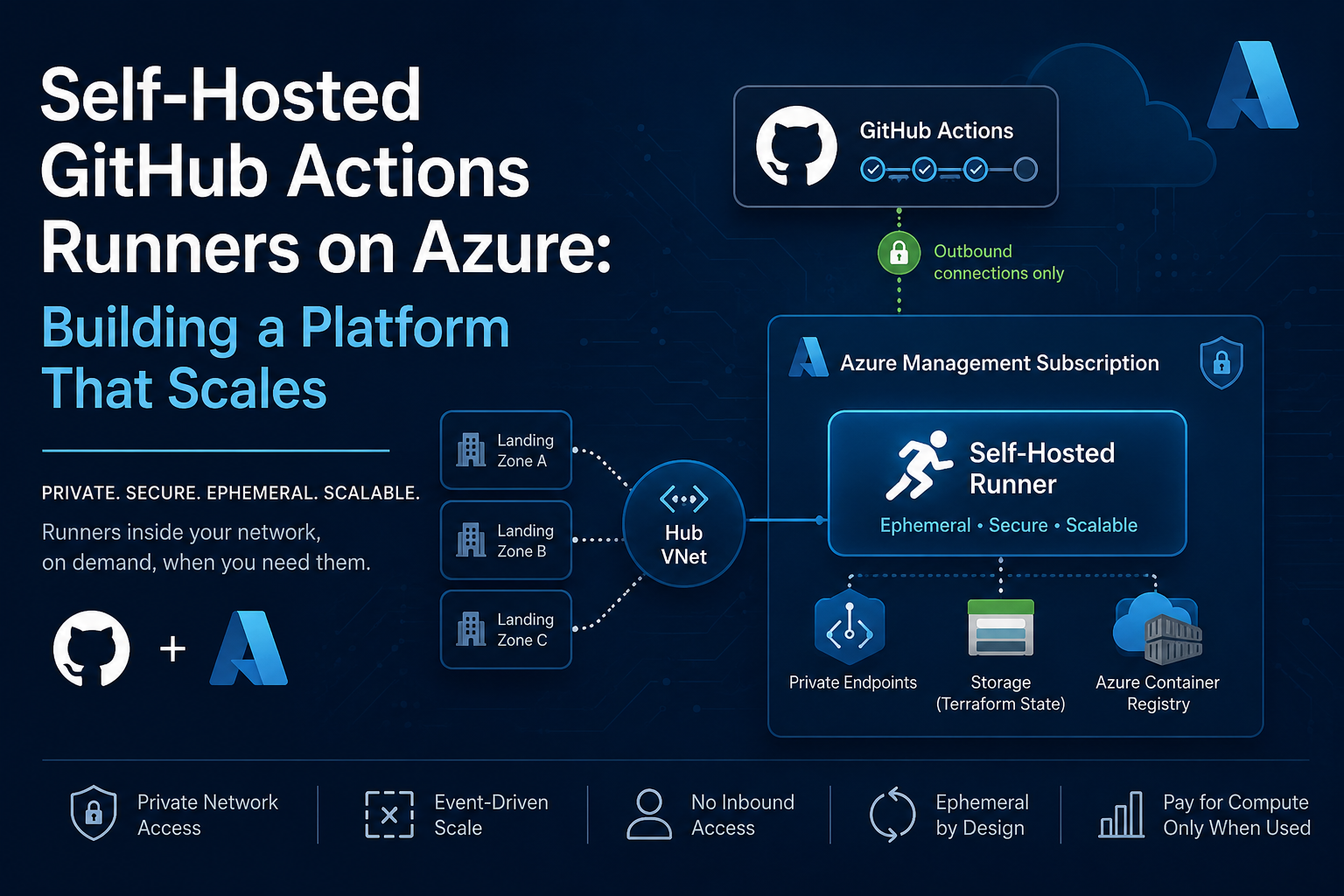
A self-hosted runner is an agent process that runs on your own compute. It registers with GitHub, polls for queued workflow jobs, and executes them. The key thing to understand is that communication is outbound only, the runner connects out to GitHub’s API, there are no inbound connections required. This means you don’t need to open any inbound firewall rules or expose anything publicly. Your runner sits inside your network and calls home to GitHub.
Runners can be registered at three levels: repository, organisation, or enterprise. For a platform team building shared infrastructure, you almost always want organisation-level runners. Repository-level runners make sense for isolated or sensitive projects, but they don’t scale across teams.
The runner picks up workflow jobs that match its labels. In your workflow YAML you declare which runner to target:
jobs:
  deploy:
    runs-on: [self-hosted, azure, linux]
Those labels are how you route jobs to the right runner pool, which becomes particularly important when you have runners in different network segments or with different tooling installed.
Choosing Where to Run Your Runners
This is where the real architectural decision sits, and the right answer depends on your team’s maturity and what’s already running in your environment.
Azure VM
The simplest option. Provision a VM, install the runner agent, register it with GitHub. Done.
It works, and for low-volume pipelines or teams just getting started, it’s completely valid. The downside is that you’re managing a VM: patching, scaling, and the runner process itself. If the VM is running a persistent runner (the same agent picks up multiple jobs sequentially), you also need to think carefully about state left behind by one job affecting the next.
If you go this route, use a VM scale set rather than a single VM so you have some flexibility to scale out, and make sure your runner is configured as ephemeral, each job gets a fresh registration.
Azure Container Instances
A step up from a VM without introducing Kubernetes. You run the runner agent inside a container, and ACI handles the compute. This works well for low-to-medium volume workloads and gives you a cleaner story around ephemeral execution.
The limitation is that ACI doesn’t give you event-driven autoscaling. You either run a persistent container or trigger new instances on demand via the GitHub Actions webhook. It’s manageable, but it’s not as clean as the next option.
Azure Container Apps Jobs
This is the option I’d recommend for most platform teams that don’t already have AKS.
Container Apps Jobs are designed for workloads that run, complete, and exit, which maps exactly to how a GitHub Actions runner should behave. The event-driven trigger type uses KEDA under the hood to watch your GitHub Actions job queue and spin up a new runner container for each queued job. When the job completes, the container exits. You’re paying for compute only when workflows are actually running.
The runner is fully ephemeral by default, each job starts from a clean container image. You get VNet integration so your runners sit inside your private network boundary. And you’re not operating a Kubernetes cluster just to run CI jobs.
The honest caveats: the GitHub Actions runner integration via KEDA is newer and less battle-tested than ARC on AKS. Container Apps also has its own networking model, specifically around the Container Apps Environment, which you need to understand before wiring it into an existing hub-and-spoke topology. More on that shortly.
Actions Runner Controller on AKS
If AKS already exists in your environment, ARC (not to be confused with Azure ARC) is the natural fit. You deploy the controller into an existing cluster, and runners become just another workload. It scales well, integrates cleanly with existing GitOps practices, and has broad community adoption.
If AKS doesn’t exist, spinning it up purely for runners is a significant operational investment. The question is usually whether the organisation needs AKS for other reasons, and if the answer is yes, runners become one workload among many rather than the justification for the cluster.
Runner Images: Getting Parity With GitHub-Hosted
One of the most common issues teams hit when switching to self-hosted runners is workflow failures caused by missing tooling. On GitHub-hosted runners, you get a pre-built image with a large set of tools installed: specific versions of Node, Python, Terraform, the Azure CLI, Docker, and much more. When you move to self-hosted, you start from whatever image you bring.
The good news is that GitHub publishes the build definitions and tooling used to create their hosted runner environments through the actions/runner-images repository.
Several community and Microsoft-maintained container images aim to replicate the hosted runner experience, but most enterprise teams still end up building and maintaining their own curated runner image.
Your practical options are:
Pull GitHub’s published images directly. GitHub publishes the same base images they use for hosted runners. If your runners can reach the public registry, you can reference these directly and get near-identical environments. The simplest path if you’re not working in a fully air-gapped environment.
Host the images in ACR. For most enterprise environments, you’ll want to pull GitHub’s images, push them to your own Azure Container Registry, and reference them from there. Your runners pull from ACR rather than a public registry, which means no public outbound dependency for image pulls and faster cold starts if ACR is in the same region.
Layer your own tooling on top. Use GitHub’s image as a base in your Dockerfile and add organisation-specific tooling on top. This keeps you compatible with the standard image while allowing you to pre-install things like specific Terraform versions, internal CLI tools, or custom certificates.
Build from scratch using the runner-images repo. You run the Packer pipeline yourself and produce an image you control entirely. The most governance-friendly option, but you own the maintenance, including keeping pace with GitHub’s upstream changes.
For most teams, option two or three hits the right balance. Pull GitHub’s image, host it in ACR, layer on your specific requirements.
Landing Zone Placement
This is where the platform engineering context really matters, and it’s the part that gets skipped in most GitHub Actions runner tutorials.
If you’re building runners for a single project or team, placement is straightforward: put the runner in the same VNet as the resources it needs to reach. But if you’re building a shared runner platform for multiple teams and multiple landing zones, you need to think about this more carefully.
The Management Subscription Is the Right Home
In a well-designed Azure Landing Zone, the Management subscription hosts shared platform services: Log Analytics, automation accounts, monitoring infrastructure, and tooling that supports the broader platform. Shared GitHub Actions runners belong here too.
Placing runners in the Management subscription means:
- The runner infrastructure is owned and operated by the platform team, not individual workload teams
- Governance and policy controls applied to the Management management group cover your runner VMs or containers automatically
- Cost is centralised and visible as platform overhead, not buried in workload subscriptions
- A single runner pool can serve multiple landing zones without duplicating infrastructure
Hub-and-Spoke Networking
Your runners need network access to resources across multiple landing zones. In a hub-and-spoke topology, the right approach is to deploy your runners into a dedicated subnet in the Management VNet, which is peered to the hub. From there, routing to spoke VNets flows through the hub as normal.
A few things to be explicit about:
Subnet sizing. For Container Apps Jobs, you need a dedicated subnet delegated to Microsoft.App/environments with a minimum /27. For VMs, size according to your maximum concurrent runner count. Get this right upfront, subnet sizes are painful to change after the fact.
DNS resolution. If your runners need to resolve private endpoints, they need to use the same DNS infrastructure as the rest of your platform. In most hub-and-spoke designs this means forwarding DNS queries through the hub to your Private DNS Zones. If runners are in the Management VNet and that VNet is linked to your Private DNS Zones, resolution should work without additional configuration. Validate this early, DNS failures in pipelines are frustrating to diagnose.
NSG rules. Runners need outbound access to GitHub’s API endpoints (github.com, api.github.com, *.actions.githubusercontent.com) and to any Azure services they interact with. Lock down inbound completely. There’s no reason for inbound traffic to reach a runner.
Firewall. If all egress from your VNets routes through Azure Firewall in the hub, you’ll need Application Rules permitting the GitHub endpoints. Don’t skip this, pipelines will hang silently if the runner registers but can’t poll for jobs.
Per-Team vs Shared Runners
There’s a tension here worth calling out. Shared runners are operationally simpler, but they create trust boundary questions. A runner that can access resources in Landing Zone A should ideally not be used by pipelines in Landing Zone B.
The pragmatic approach for most organisations:
- Use a shared runner pool for platform team pipelines and Terraform deployments that operate across the environment
- Use separate runner pools, potentially in individual workload subscriptions, for application teams that need access to workload-specific private resources
- Never share runners across public and private repositories
That last point is worth expanding on. GitHub themselves recommend only using self-hosted runners with private repositories. The reason is simple: on a public repository, anyone can open a pull request and trigger a workflow. If that workflow runs on your self-hosted runner, which sits inside your network with access to your private resources, you’ve given an anonymous contributor a foothold in your infrastructure. It doesn’t have to be malicious either, a poorly written workflow from a well-intentioned contributor can cause just as much damage.
For enterprise environments this is largely a non-issue because your repositories are private by default. But if you’re working in an organisation that mixes public and private repos, be deliberate about which runners are available to which repositories. A self-hosted runner registered at organisation level is available to all repos in that org by default. Scope it down.
Labels are your routing mechanism. A runner registered with [self-hosted, platform, azure] is clearly distinct from one registered with [self-hosted, team-a, azure]. Your reusable workflow templates (covered in post 2) can reference the appropriate label, keeping the routing logic in one place.
Deploy Your Runners as Infrastructure as Code
Runner infrastructure should be managed as code, sitting in your platform team repository alongside the rest of your landing zone configuration. This isn’t optional, it’s the same principle that applies to every other piece of platform infrastructure.
Clicking through the Azure Portal to deploy a Container Apps Environment and wire up a KEDA scaler might get you running faster on day one, but it creates exactly the kind of undocumented, unrepeatable infrastructure that causes problems when something needs to change or when a second environment needs to be stood up. Your runners are platform infrastructure. Treat them accordingly.
Runner Registration Token Handling
This is where teams frequently get things wrong. Runner registration with GitHub requires a token, and that token is short-lived by default (one hour for a registration token from the API). For KEDA-based scaling, you actually need a PAT or GitHub App credential so the scaler can query the workflow queue.
A few things to be clear on:
- Don’t use a personal PAT tied to an individual’s account. Use a service account or, better, a GitHub App installation token.
- Store the token in Azure Key Vault, not as a plain Terraform variable or pipeline secret you rotate manually.
- Reference it in Container Apps as a secret, which is what the Terraform above does.
- The KEDA scaler needs
read:orgscope at minimum to query the runner queue.
Proper token handling is worth a post of its own. For now, the principle is: treat runner registration credentials with the same discipline as any other service credential.
Ephemeral vs Persistent Runners
Always use ephemeral runners.
A persistent runner picks up multiple jobs sequentially. Leftover files, environment variables, cached credentials, or modified system state from job A can affect job B. In a shared runner environment this is a security concern, not just a hygiene one.
GitHub supports ephemeral mode natively via the --ephemeral flag on the runner agent. In Container Apps Jobs, your runner is ephemeral by design because the container exits after each job.
If you’re using VMs or ACI, configure the runner with --ephemeral and automate re-registration between jobs. It’s a little more complex to set up but worth it.
Log Shipping
This is one area where GitHub is explicit: runner application log files for ephemeral runners must be forwarded to an external log storage solution for troubleshooting and diagnostic purposes. GitHub recommends ensuring runner logs are forwarded and preserved externally before deploying an ephemeral runner autoscaling solution in a production environment. You can read more in GitHub’s own Monitoring and troubleshooting self-hosted runners documentation.
The reason is straightforward: when the container exits, everything inside it is gone, including the runner logs. GitHub captures workflow step output and makes it available in the Actions UI, so for most day-to-day debugging you’re covered. But that’s the application-level output from your workflow steps. The runner agent logs, system-level output, and anything that falls outside the workflow steps themselves don’t make it to GitHub.
For a platform team this matters in a few specific scenarios: diagnosing runner startup failures where the job never reaches the workflow steps, auditing what ran and when for compliance purposes, and correlating runner activity with network or security events in Azure.
If you’re running Container Apps Jobs, the Container Apps Environment is already wired to Log Analytics via the loganalyticsworkspaceid in the Terraform above. Container stdout and stderr are shipped automatically. Make sure your runner image writes meaningful output to stdout, the runner agent does this by default, but any custom entrypoint scripts should follow the same pattern.
For VMs, configure the Azure Monitor Agent and ship runner logs to the same Log Analytics workspace as the rest of your platform. Don’t create a separate workspace just for runners, keep it in the shared Management subscription workspace so you can correlate across platform services.
The practical test: after deploying your runners, trigger a workflow and verify the logs appear in Log Analytics before you hand the platform to other teams. Finding a logging gap after the fact is worse than finding it during your own testing.
Summary
GitHub-hosted runners are fine until the moment private Azure resources enter the picture, you need runners inside your network boundary, and the right time to build that infrastructure is before your pipelines need it, not after.
The key decisions are:
- Where to run: Container Apps Jobs for most teams without existing AKS, ARC on AKS for teams already running Kubernetes
- Where to place it: Management subscription, connected to the hub, with DNS and NSG rules configured properly from the start
- How to build it: A reusable Terraform module that any landing zone can call, passing in the subnet and shared services references
- Images: GitHub’s published base images, hosted in ACR, layered with your own tooling
Built this way, your runner platform is a shared service that any GitHub Actions workflow across your organisation can use, without each team solving the same networking problem independently.
In the next post, we’ll look at custom GitHub Actions, building reusable actions that your platform team maintains and teams consume without needing to understand the implementation details.
This is part of the GitHub Actions for Platform Engineers series. Start with part 1: GitHub Workflow Fundamentals or go back to part 3: OIDC Authentication with Azure.