

Building your Azure Data Center Foundation
Table of Contents
Traditional on-premises data centers are constrained by physical reality-limited space, aging hardware, and long provisioning cycles that drag through change management, multiple teams, and competing priorities across servers, applications, networks, and security. Scaling means racking, stacking, cabling, and hoping there’s still room in the hall.
A modern Azure data center removes almost all of these constraints. As I highlighted in my original post, Azure abstracts the physical world into software. While the hardware still exists, it feels limitless-capacity becomes an API call, not a six-week lead time. Provisioning new applications or PoC environments can drop from months to minutes.
But only if you build Azure the right way.
It’s incredibly easy to replicate your on-premises architecture in the cloud-and doing so eliminates most of the value the cloud offers. Azure isn’t just “another data center.” It’s a platform. To get the agility, scalability, and governance benefits, you need to design your Azure data center intentionally.
In this post, I’m going to give you the key guidelines to follow and the critical questions you must ask to design and implement Azure in a way that truly works for your business.
What is a Landing Zone?
A landing zone can mean many different things to different people. The way I explain it when I’m asked is:
A landing zone is a fully prepared cloud environment that gives your organisation the foundations it needs to deploy, run, and manage workloads safely and consistently. It includes the right governance, security, networking, identity, and automation frameworks from day one, so both IT and non-IT teams can build and innovate without worrying about the underlying setup.
Let’s break down what makes up a landing zone from both technical and resource perspectives.
The Governance Layer
Management Group Hierarchy – Your Organisation Structure in Code
Management Groups let us map out our organisation into logical, structured groupings. They form the backbone of governance in an Azure Landing Zone.
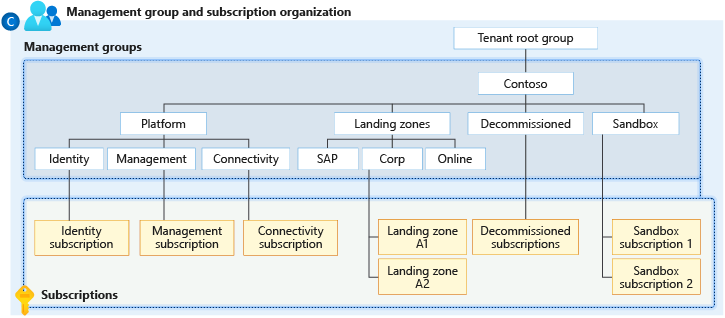
Image originally from Microsoft Learn
The diagram above shows the logical structure recommended for an Enterprise-Scale Landing Zone. Microsoft suggests creating a top-level management group under the Tenant Root Group (the default highest-level scope). This top-level group typically represents your organisation name. If you operate multiple companies, each can have its own top-level group.
Beneath that, the structure fans out into logical areas: platform services, sandbox, decommissioned, and landing zones.
Platform Services
Platform services commonly include one subscription per core platform function:
- Connectivity: hosts the hub network
- Identity: domain controllers, Azure AD Domain Services, or identity-related workloads
- Management: shared monitoring, automation accounts, Log Analytics, and infrastructure services
These provide shared capabilities consumed by your workloads and applications.
Sandbox & Decommissioned
These are straightforward:
- Sandbox is for experimentation-PoCs, trials, learning, isolated testing
- Decommissioned holds subscriptions marked for retirement or pending deletion
Landing Zones – Where Your Workloads Live
This is where the real work happens. Under the Landing Zones group you’ll have the subscriptions used to host your applications and services.
There are many models you can adopt:
- If your organisation has multiple business units, each with its own cost centres and IT teams, a subscription per business unit often works best
- If your organisation grows through mergers and acquisitions, a subscription per acquired company keeps governance clean
- If your organisation has diverse regulatory requirements (e.g., healthcare vs financial), separate subscriptions can enforce different compliance scopes
Key Questions for Your Management Group Structure
Ask these questions early:
- How does your business operate?
- Do you require strict segregation of duties?
- Do business units manage their own budgets, IT teams, or developer groups?
- Do you expect growth through mergers and acquisitions?
- Do parts of the business follow different regulatory requirements (e.g., FIPS, ISO, industry-specific standards)?
- What does your billing model look like-centralised funding or chargeback/showback?
Subscriptions & Management Groups: How They Work Together
Remember: An Azure subscription is the container that holds and organises all your cloud resources-servers, apps, storage, networking, and security. It defines boundaries for billing, access, and governance. Think of it as a dedicated “space” where workloads live and are managed consistently.
A management group lets you organise those subscriptions in a hierarchy. It allows you to apply RBAC and Azure Policy at scale-settings applied at a management group automatically flow down to child subscriptions and their resources.
Together, they form the governance backbone of a well-designed landing zone.
Azure Policy – Your Governance Enforcement Layer
Whilst not directly part of the management group structure, Azure Policy underpins what we allow to happen within our Azure data center. Getting the balance with Azure Policy is critical-too much and we break and restrict innovation, too little and we open ourselves up to security and financial breaches.
I’ve written in depth about designing guard rails for the cloud before (When Guardrails Become Walls), and Microsoft publish their own recommendations for policies to deploy to a landing zone here.
Azure Policy should be deployed at the highest organisational structure that makes sense-the settings propagate down to subscriptions and resources. Consider what settings you need to apply where. For example, the Sandbox Management group may contain policies which prevent any ingress/egress traffic, enforce network security groups, and restrict certain resource types.
We may also want to restrict Log Analytics Workspaces from any subscription that doesn’t fall in the Management Group, or prevent Private DNS Zones from being created in subscriptions other than the connectivity subscription.
Don’t just go with what I or Microsoft recommend though-you have to base policies on what matters to you. Just remember to keep it simple, and use policy as the enforcement layer in conjunction with Azure RBAC controls.
RBAC – Controlling Access at Scale
I will write up a detailed post on Azure RBAC controls and what to look out for and how to design a robust RBAC solution. For now, here are the five key steps in designing an RBAC model for our landing zones:
- Define clear access scopes and segmentation
- Follow a principle of least privilege using built-in roles first
- Implement role assignments through groups, not individuals
- Implement privileged access workflows (PIM and Just-In-Time)
- Continuously audit, review, and monitor access
Security Baseline – Defender for Cloud
Security Baselines should be set at the subscription level through turning on features within the Azure Defender for Cloud solution. I’ll do a full write-up on getting Defender for Cloud setup and working in an operational model. For now, let’s consider what Defender for Cloud is and what it gives us.
Microsoft Defender for Cloud is Azure’s native security management and threat protection service. It provides visibility into the security posture of your resources, offers recommendations for improving security, and detects threats across your workloads-whether they’re running in Azure, on-premises, or even in other clouds. It combines continuous assessment, threat intelligence, and built-in security policies to help organisations identify vulnerabilities and respond to risks before they become serious incidents.
The Reality of Defender for Cloud
Turning it on gives your teams actionable insights and protection across your environment, helping prevent misconfigurations, malware, and attacks. However, it comes with costs, and the alerts it generates require an operational model to review and act on them.
Without the right monitoring processes, alert triage, and response capabilities, you can quickly overwhelm teams or spend on protection that isn’t effectively used. Activating Defender for Cloud works best when paired with clear governance, defined roles for security operations, and a plan to act on recommendations.
Monitoring Foundation – Log Analytics and Azure Monitor
Azure Log Analytics and Azure Monitor are built-in platform level tools which allow teams to capture, process, analyse and alert on key metrics and logs. Each resource deployed into Azure comes with its own set of robust logs that can often be sent to Log Analytics workspaces.
Centralisation Strategy
This workspace is generally best when it’s centralised for the tenant. We may choose to have two workspaces: one for normal logs, and one dedicated for security and defender logs (there are price benefits by doing this).
Cost Management is Critical
A key concern with Log Analytics is the associated running costs. I’ve seen organisations blow their budgets in a matter of days by simply turning all logging on by default for all resources. Each GB of data ingested into Log Analytics is chargeable for both ingestion and retention. It’s pointless turning on all logs unless you are actively using them.
My Recommendation
Turn it on for all key services-bring in the Activity logs, the Security Logs from Signin information, and the audit logs. This allows longer retention than the 90 days and can prove useful in many situations.
For all other logs, turn them on as and when you need to. For example, if you are debugging an issue turn them on for the resources needed then turn them back off once you have what you need. Setup an Azure policy to prevent logs being turned on by teams without going through an approval workflow. And set yourself up either a daily ingestion cap on the workspace, or create an ingestion alert when the threshold is reached.
Create an Alert Rule for Log Ingestion
From the Log Analytics Workspace you can create a new alert rule that gets triggered when a specific threshold of log ingestion is reached. This allows you to monitor closely if costs are potentially growing out of control because someone has turned on or left on some diagnostic log settings.
Create a Custom Log Search Rule, with the type being Aggregated Logs, and use the query:
Usage
| where IsBillable
| summarize DataGB = sum(Quantity / 1000)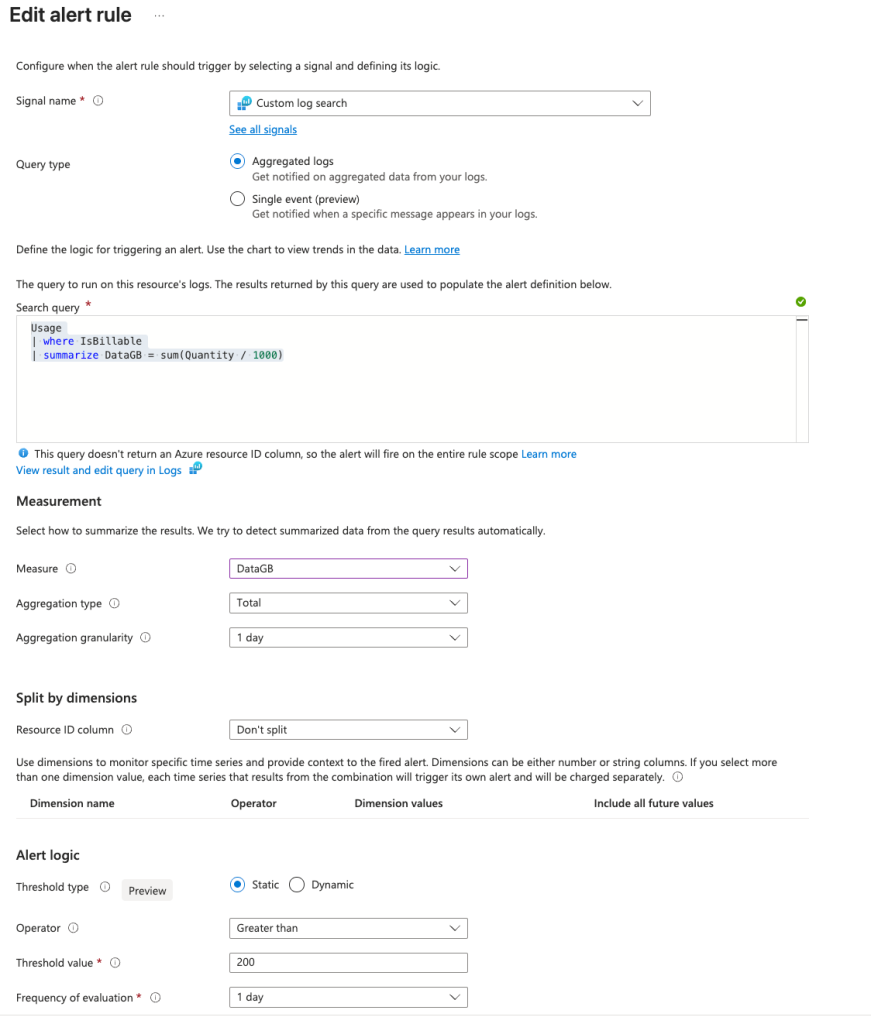
Set the measure to DataGB, aggregation type to total and granularity to 1 day. Then set the threshold value to something that makes sense for your organisation-I would look at current ingestion rate when you know you are only monitoring your defaults, and give yourself a 10% buffer.
Connectivity and Networking
Everything we have talked about so far with Landing Zones has been around the governance model, Management Groups, Subscriptions, Monitoring and Security. There is one other main component that falls into the Landing Zone design: Connectivity and Networking.
Choosing Your Network Topology
There are several different networking topologies for Azure, and time spent upfront designing the right solution is time saved in the future by trying to retrospectively introduce changes.
Most organisations I work with adopt the Hub and Spoke model. It’s well understood, scales well, and fairly simple to implement. Another, similar option, is Azure WAN. Each model uses similar concepts: a centralised ‘Hub’ network which contains a combination of firewalls and network virtual appliances, VPN, express routes. Sometimes we see additional components such as Route Servers or NAT Gateways being deployed in the hub network.
The core concept of the ‘Hub’ network in the Connectivity subscription is to build a platform that our child landing zones can use to get connectivity to other parts of the business and the outside world.
IP Addressing Strategy
Consider your IP addressing for Azure carefully. It shouldn’t overlap with any other on-premises connected IP ranges, and generally think bigger rather than smaller as making changes to networking after the fact can be challenging.
A good approach would be to have a /16 CIDR range for each country. I’ve seen companies use the country code as a prefix: UK is 10.44.0.0/16 and US is 10.1.0.0/16, France 10.33.0.0/16. These are just examples of possible ways to design your IP schema-just ensure it is unique within your environment to reduce complexity in the future.
Azure Bastion
Deploying a centralised Azure Bastion service into our Hub Network allows all peered virtual networks to use it. Bastion provides secure inbound Remote Desktop connectivity to Windows and Linux machines running within the landing zone. Having a single Bastion deployment simplifies the connectivity model to virtual machines for admin support teams. It needs its own dedicated subnet, so remember this when designing your IP addressing schema.
DNS
Private DNS zones are fundamental when it comes to resolving private endpoint IP addresses. Most organisations will operate Azure on a private network and rely heavily on private endpoints. Creating private DNS zones linked to your hub network allows these to be pre-staged ready for when resources are deployed.
Remember, if you are using the portal to do resource deployment, when creating private endpoints, resources will often try to automatically create a private DNS zone. Having a Policy applied that prevents private DNS zone creation outside of the connectivity management group helps prevent unnecessary private DNS zone resource sprawl. You should setup conditional forwarders from your internal DNS servers to be able to resolve private endpoint IP addresses.
Infrastructure as Code – The Game Changer
What is Infrastructure as Code and why does it even matter?
This is a question I hear all the time coming from traditional infrastructure teams who are transitioning to the cloud. Whilst IaC was and is possible in an on-premises environment it’s rarely used in a production capacity. The most we often see in traditional data centres are a few PowerShell or Bash scripts to run deployments, or SCCM Task Sequences to deploy servers and virtual machines.
IaC changes everything from a cloud operational model. We are no longer deploying servers or networking components, we are writing code that defines how we want our servers or networking components and other resources to look and operate.
Documentation That Never Goes Stale
Think about the challenge from an on-premises data centre model when it comes to documenting a solution. Word documents, Wikis, spreadsheets, Visio diagrams are often used to document such solutions. If a solution changes-new servers get provisioned, servers get decommissioned, new firewall rules are needed-we need to go back to the documents and manually update them.
With IaC, our documentation is our code. If we need to include a new server in the mix, we simply change the code and deploy it-our documentation is up to date and our solution matches what we have defined. No configuration drift.
Integration with DevSecOps Model
The real power of IaC comes alive when we integrate our code base into a pipeline and deployment tool such as Azure DevOps or GitHub Actions. Having a deployment pipeline with multiple steps and possibly some approvals along the way can streamline our deployment process, automate change management, and streamline security checks and alerts.
Let’s take a look at a simple workflow:

From one workflow, we validate our code to ensure it is deployable, we do a dry run to see what actions running the deployment step will take, we then validate the code against our security policies and checks, we can then pause the deployment until someone approves it, at which point the code is deployed and our resources are updated or provisioned.
Choosing the IaC Tooling
We have lots of choice when it comes to our IaC tooling and making these decisions upfront sets the standards and prevents configuration and tooling drift later on. My choice is generally Terraform as it offers multi-cloud support, and can also be used with on-premises systems such as VMware.
But the choice to use Terraform, or Bicep or ARM templates-or something different-should be made based on team experience, how complex the environment is, if you are just running on Azure, or if there may be a future state where you use other providers such as AWS or GCP. I’ve written a detailed article on IaC tooling here.
Real World IaC Scenario
Let’s take an example of deploying a simple solution to support a new application that requires network connectivity, a front end web server and backend SQL database as well as a load balancer to front the web services.
Traditional data center Approach
- Business owner submits a request and waits for approval (2-3 weeks)
- Network team provision a load balancer endpoint and create firewall rules (1-2 weeks)
- Server team build out the front end web servers and SQL server (1 week)
- Application Team install and configure the web services (1 week)
- Database Team deploy and provision the database (1 week)
- Developers deploy the application (1 week)
- Security run their scans (1 week)
- Application is handed over to business
Total time: 6-9 weeks
Landing Zone and IaC Approach
- Business owner submits a request and waits for approval (2-3 weeks)
- DevSecOps team create the IaC pipeline using predefined modules and components (1-3 days):
- Load Balancer
- Web Servers
- Firewall Rules
- SQL Database
- Developers setup pipeline to deploy their application code (1-3 days)
- Pipeline for deployment is triggered and resources deployed (1-5 hours):
- Workflow kicks in, code is validated
- Security scans automatically completed
- Resources are deployed
- Environment is ready and handed over to the business
Total time: 3-4 weeks
The timings are just examples to show the differences between the two approaches, but the Landing Zone with IaC model makes use of the blueprints defined by the landing zone, and the pre-defined and written modules for each component the solution needs. Having this module library is critical to quick deployments as the work to define the standards is done once, the calling module just provides configuration specifics such as SKU sizes and region details.
Summary
Keep it simple, and build for scalability and security are the key messages to drive home when designing your landing zone approach. Not every business is the same, and what matters to one may be irrelevant to another. Spend the time upfront to get the governance model well defined. Plan your networking to support growth-making changes after the fact isn’t always straightforward.
Common Mistakes to Avoid
- Starting too complex – Begin with Microsoft’s CAF landing zones, customise later
- Forgetting Day 2 operations – Your landing zone needs updating too (treat it like production)
- Policy overload – Too restrictive = teams work around it; too loose = chaos
- Not planning for exceptions – Build in a process for legitimate policy exemptions
- Ignoring the human element – Teams need training on the new model
Next in the Series
In the next part in the Azure as a data center series we will cover the burning question about the cultural shift to a cloud based model. How does it impact traditional IT Infrastructure roles, how do teams and processes need to adapt.
Thanks for sharing your experience.
Any thoughts on backup and restoration of Landing Zones using third party products ?
Hi Neil,
Thanks for the great question! It really depends on which parts of the landing zone you’re looking to protect.
In an ideal model, the entire landing zone configuration (policy, RBAC, networking, platform components, etc.) should be defined and version-controlled in IaC such as Terraform or Bicep. That IaC becomes both your documentation and your backup, especially when stored in a repo like GitHub or Azure DevOps with proper branching and retention.
Most third-party backup products focus on the workload layer rather than the platform layer, so their value depends on what you’re trying to safeguard.
Were there specific resources or parts of the landing zone you’re thinking about backing up?