
Table of Contents
In the self-hosted runners post, I described a problem most platform teams eventually hit: the pipeline works until the resources it needs are private. The answer I gave was to put a runner inside your network and operate it yourself.
That needs a qualification. GitHub also supports hosted runners connected to an Azure VNet. You still own the network design, but you don’t necessarily have to own the runner infrastructure.
If you’ve read my Azure DevOps with private endpoints post, the shape will feel familiar. Managed DevOps Pools solve this problem for Azure DevOps. This is the GitHub equivalent, and I should have given it the same airtime.
In this post I’ll explain what actually changes when a GitHub-hosted runner joins your VNet, walk through an example where a runner reads from a storage account with public access disabled, and give you a workflow that proves it works layer by layer. Then I’ll come back to the question that matters: when would I still choose to run my own?
What actually changes with VNet-connected hosted runners?
There are three models worth separating:
| Runner model | Who operates the runner? | Private Azure connectivity |
|---|---|---|
| Standard GitHub-hosted | GitHub | Requires an additional connectivity solution |
| GitHub-hosted with Azure VNet networking | GitHub | Through the configured Azure subnet |
| Self-hosted | Your team | Through the network where you deploy it |
The middle option works through VNet injection. The runner VM still lives in GitHub’s infrastructure, but its network attachment takes an IP address from a subnet you’ve delegated to GitHub. From that point, the runner’s traffic behaves as if it originated in your VNet. It uses your DNS, your routes, your NSGs and your outbound path.
That gives you a clean split of responsibility. GitHub provisions, patches, scales and retires the runner. Your team still designs the network access, DNS resolution, outbound controls and Azure permissions. The hard part of private connectivity was never really the VM, and it doesn’t go away here.
One thing to be clear about early: changing nothing and hoping runs-on: ubuntu-latest will reach your private endpoint won’t work. Azure private networking only applies to larger runners, which you create explicitly, place in a runner group and target by name. The standard runners your workflows use today are not VNet-connected and can’t be.
Check the prerequisites before designing around it
A few requirements can rule this option in or out before you draw a single subnet. These change over time, so treat the current GitHub documentation as the source of truth.
- Plan. You need GitHub Team or GitHub Enterprise Cloud. Organisation owners can configure it at organisation level, and enterprise owners at enterprise level.
- Runner types. Ubuntu and Windows larger runners from 2 to 64 vCPU are supported. arm64 and GPU runners are supported in a smaller set of US regions only.
- Region. The subnet must sit in a supported Azure region. For UK readers, UK South, UK West and North Europe are all on the list today. If your private endpoints live elsewhere, global VNet peering is the documented route.
- Azure permissions. The account doing the setup needs Subscription Contributor and Network Contributor so it can register the
GitHub.Networkresource provider and delegate the subnet. The networking resource must be in the same subscription and region as the VNet. - Subnet capacity. Every concurrent job consumes an IP address. GitHub recommends sizing for maximum concurrency plus a 30% buffer.
- Cost. Larger runners never draw from your plan’s included minutes, even in public repositories. Every minute is billed. Add the Azure side too: your outbound path (NAT gateway or firewall), private endpoints and DNS all carry their own charges.
There are also a couple of design constraints worth knowing now rather than later. Outbound traffic from the runner subnet can’t be subject to TLS inspection, and static public IPs aren’t available for VNet-connected larger runners.
The example architecture
To keep this concrete, the example has one goal: a GitHub-hosted runner lists blobs in an Azure Storage account that has public network access disabled and is only reachable through a private endpoint.
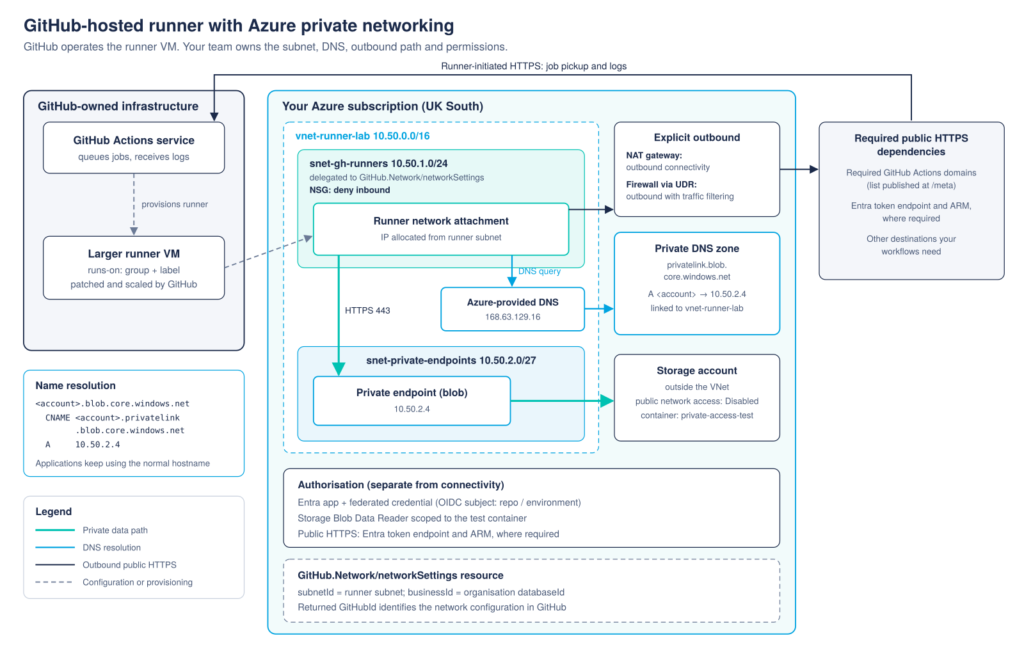
There are two independent requirements here, and it’s worth keeping them separate in your head because they fail in different ways:
- Connectivity. Can the runner resolve the storage account’s name to the private endpoint, and can it reach that address on 443?
- Authorisation. Does the workflow’s identity have permission to perform the data operation it’s attempting?
You can have perfect connectivity and still be denied, or a valid identity with no route to the data. It’s easy to treat them as one problem, and debugging gets much slower when you do. If DNS and routing in hub and spoke are new territory, Part 1 of the networking series covers them in more depth than I will here.
Connect the runner to the network
Here’s the minimum setup, in the order I’d do it. I’m using the Azure CLI so each step is visible. GitHub also publishes a Terraform module for the Azure side, which is what I’d use for anything beyond a proof of concept.
1. Prepare the subnet
Register the resource provider, then create a subnet delegated to GitHub.Network/networkSettings. I’m creating it as a private subnet with a NAT gateway attached, because the runner still needs to reach GitHub and Entra ID.
az provider register --namespace GitHub.Network

az network vnet subnet create \
  --resource-group rg-gh-runners \
  --vnet-name vnet-gh-runners \
  --name snet-gh-runners \
  --address-prefixes 10.50.1.0/24 \
  --delegations GitHub.Network/networkSettings \
  --network-security-group nsg-gh-runners \
  --nat-gateway natgw-gh-runners \
  --default-outbound false
The outbound path deserves a moment. Azure no longer gives new VNets implicit internet access by default, so a runner subnet without an explicit outbound path simply can’t reach GitHub, and the job will never pick up. A NAT gateway gives you outbound connectivity. Routing through a firewall with a UDR gives you outbound connectivity with traffic filtering. GitHub also recommends explicitly blocking all inbound traffic to the runner subnet in your NSG, since the runner’s address is in your network and GitHub can’t do that for you.
For outbound filtering, GitHub originally published an NSG template built on IP ranges. That approach has been retired. The current guidance is to allow-list the Actions domains published by the GitHub meta API using whatever domain filtering you already run, such as Azure Firewall application rules.
2. Configure DNS and the private endpoint
The runner uses your VNet’s DNS configuration, so the private endpoint’s record has to be resolvable from the runner VNet. The zone holds the records, but the runner queries a resolver. In this example, that’s Azure-provided DNS, which answers from a private DNS zone linked directly to the VNet:
az network private-dns zone create \
  --resource-group rg-gh-runners \
  --name privatelink.blob.core.windows.net

az network private-dns link vnet create \
  --resource-group rg-gh-runners \
  --zone-name privatelink.blob.core.windows.net \
  --name link-vnet-gh-runners \
  --virtual-network vnet-gh-runners \
  --registration-enabled false
The private endpoint for the blob sub-resource then sits in snet-private-endpoints, with a DNS zone group so the A record is created and maintained for you. In a hub and spoke design, the zone is usually linked to the hub, with spokes resolving through a DNS Private Resolver or custom DNS servers. The principle is the same: whatever the runner VNet uses for DNS has to return the private address.
3. Create the network settings resource
This is the resource that joins the Azure side to GitHub. It needs the subnet ID and your organisation’s databaseId, which you can fetch with the GitHub CLI:
gh api graphql \
  -f query='query($login: String!) { organization(login: $login) { login databaseId } }' \
  -f login=YOUR_ORG
Then create the resource:
SUBNET_ID=$(az network vnet subnet show \
  --resource-group rg-gh-runners \
  --vnet-name vnet-gh-runners \
  --name snet-gh-runners \
  --query id -o tsv)

az resource create \
  --resource-group rg-gh-runners \
  --name ns-gh-runners-uksouth \
  --resource-type GitHub.Network/networkSettings \
  --api-version 2024-04-02 \
  --is-full-object \
  --properties "{ \"location\": \"uksouth\", \"properties\": { \"subnetId\": \"$SUBNET_ID\", \"businessId\": \"$DATABASE_ID\" } }" \
  --query "tags.GitHubId" -o tsv
The GitHubId it returns is what you’ll paste into GitHub. Creating this resource also places a service association link on the subnet, which stops anyone deleting it while GitHub is using it. If you need to tear down, remove the configuration in GitHub first, then the network settings resource, then the subnet.
4. Create the network configuration and runner
In your organisation settings, go to Hosted compute networking, choose New network configuration, then Azure private network, and add the GitHubId from the previous step.
Next, create a runner group and select that network configuration for it. Then create a larger runner (in this example, a 2-core Ubuntu runner called ubuntu-vnet-2core) inside that group. Any runner in the group now takes its IP address from your runner subnet.
5. Restrict which repositories can use it
When creating the runner group, set repository access to selected repositories only. This is the step that’s easy to skip in a proof of concept and painful to retrofit later. A runner with a network path to private resources is a privileged asset, and the runner group is the boundary that decides which workflows can sit on that network.
Targeting the runner
Workflows target the runner by group and label:
runs-on:
  group: azure-vnet-uksouth
  labels: ubuntu-vnet-2core
Prove private access works
This is the part I care most about. “The pipeline went green” isn’t evidence that traffic took the private path. A short workflow that checks each layer in turn is.
name: verify-private-storage-access
on:
workflow_dispatch:
permissions:
id-token: write
contents: read
env:
STORAGE_ACCOUNT: stghrunnersdemo01
CONTAINER: private-access-test
EXPECTED_PREFIX: "10.50.2."
jobs:
verify:
runs-on:
  group: azure-vnet-uksouth
  labels: ubuntu-vnet-2core
environment: ci
steps:
- name: 1. Resolve the normal service hostname
run: dig "${STORAGE_ACCOUNT}.blob.core.windows.net" +noall +answer
- name: 2. Assert it resolved to the private endpoint
run: |
IP=$(dig +short "${STORAGE_ACCOUNT}.blob.core.windows.net" | tail -n1)
echo "Resolved to: $IP"
if [[ "$IP" != ${EXPECTED_PREFIX}* ]]; then
echo "::error::Expected an address in ${EXPECTED_PREFIX}x, got $IP"
exit 1
fi
- name: 3. Check HTTPS connectivity
run: |
curl -s -o /dev/null --connect-timeout 10 \
-w "HTTP %{http_code} from %{remote_ip}\n" \
"https://${STORAGE_ACCOUNT}.blob.core.windows.net/"
- name: 4. Authenticate to Azure with OIDC
uses: azure/login@v2
with:
client-id: ${{ vars.AZURE_CLIENT_ID }}
tenant-id: ${{ vars.AZURE_TENANT_ID }}
subscription-id: ${{ vars.AZURE_SUBSCRIPTION_ID }}
- name: 5. List blobs in the test container
run: |
az storage blob list \
--account-name "$STORAGE_ACCOUNT" \
--container-name "$CONTAINER" \
--auth-mode login \
--query "[].name" -o tsv
A few notes on why each step is there.
Steps 1 and 2 query the normal hostname, not the privatelink one. That’s what your tools will use, so that’s what needs to resolve privately. From inside the VNet, the answer should be a CNAME to the privatelink name followed by an A record in your private endpoint subnet (TTLs will differ):
stghrunnersdemo01.blob.core.windows.net.             IN CNAME stghrunnersdemo01.privatelink.blob.core.windows.net.
stghrunnersdemo01.privatelink.blob.core.windows.net. IN A     10.50.2.4
Run the same query from your laptop and you’ll see the same CNAME, but it resolves on to a public address instead. That difference is the whole point of the private DNS zone.
Step 3 is deliberately unauthenticated. An anonymous request to the account root will come back with a 4xx, and that’s fine. Any HTTP status code proves that the TLS handshake completed and the request reached the storage service. A status of 000 means no connection was made at all. The value that matters is the remote IP. If it’s 10.50.2.4, the request went through the private endpoint. If it’s a public address, DNS is wrong, whatever the status code says.
Step 4 uses OIDC, so there’s no secret stored in the repository. I’ve covered the federated credential setup in the OIDC guide, so I won’t repeat it here. In this example, the federated credential’s subject is scoped to the ci environment, which matches the environment set on the job.
Step 5 is the only step that proves data access. The identity should have Storage Blob Data Reader assigned at the container scope and nothing else. Upload a single test file to the container before running the workflow, so a successful run prints its name rather than an empty result that’s harder to interpret.
Why a successful login proves less than you’d think
It’s tempting to treat a green azure/login step as proof that everything works. It isn’t. The login exchanges the GitHub token with Entra ID and talks to Azure Resource Manager, and both of those are public endpoints reached through your outbound path, not through the private endpoint. A successful login tells you the federated credential matches. It tells you nothing about whether the runner can reach the storage data plane, or whether the identity holds a data role.
The same applies to control plane roles. An identity with Contributor on the storage account can manage it but, without a data role, can’t list a single blob using --auth-mode login. That’s why step 5 has to exist.
When it fails, identify which layer failed
Because each step tests one layer, a failure points you at the right place:
| Symptom | Investigate |
|---|---|
| Job never starts | Runner availability, group access and workflow selection |
| Service resolves to a public address | DNS configuration and private zone resolution |
| Connection times out | Routing, NSGs, firewall rules and outbound access |
| Azure login fails | OIDC configuration and federated credential matching |
| Connection succeeds but the operation is denied | Data permissions and service access configuration |
Some specifics that make these quicker to diagnose:
- Job never starts. Check that the repository is allowed to use the runner group, that the group is linked to the network configuration, and that
runs-onnames the group and label correctly. If those are fine, check outbound. A runner that can’t reach GitHub can’t pick up the job, and from the workflow’s point of view that just looks like waiting. - Public address. If step 2 fails with a public IP, the private DNS zone isn’t linked to the VNet the runner is using, or the VNet’s custom DNS servers don’t forward to Azure DNS for the
privatelinkzone. - Login fails. An
AADSTS70021error means no federated credential matched the token’s subject. The usual cause is a credential scoped to a branch while the job runs in an environment, or the other way around. - Denied after connecting. Read the error code rather than assuming RBAC.
AuthorizationPermissionMismatchmeans the request reached the service and the identity lacks a data role.AuthorizationFailureusually means the request was blocked by the storage account’s network rules, which suggests it didn’t arrive through the private endpoint at all.
When I’d still choose self-hosted runners
None of this makes self-hosted runners obsolete. It narrows the set of reasons to run them.
I’d still lean towards self-hosted when:
- The tooling or machine needs are specialist. Larger runners support custom images, which covers a lot of tooling requirements. But if you need hardware access, kernel-level changes or long-lived machine state, you need machines you control.
- The workload doesn’t fit the supported envelope. Unsupported regions, runner types outside what’s offered for VNet injection, or a requirement for TLS inspection on runner egress all push you back towards your own compute.
- Isolation requirements go beyond the network. Some regulated environments need to demonstrate control over the compute itself, not just its network path.
- You already run it well. If your team operates ARC on an existing AKS platform, or runs Container Apps Jobs as runners, and that’s working, swapping it out has a cost too.
On cost, I’d resist the urge to declare a winner. Larger runner minutes, Container Apps Jobs consumption and an AKS cluster with ARC all scale differently. Calculate it against your actual job volume and duration. And include the engineering time spent patching images and keeping the scaler healthy, because that’s the cost that rarely makes it into the spreadsheet.
Choose who operates the compute
Private access is a requirement. Operating runner infrastructure is a separate decision.
For some teams, self-hosted runners remain the right choice. For others, VNet-connected hosted runners remove infrastructure they would otherwise have to patch, scale and support. Either way, the DNS, routing and permissions still need designing.
If you take one thing from this post, make it the verification workflow. Whichever runner model you choose, a job that proves resolution, connectivity, identity and data access separately will save you hours the first time something breaks.