
Table of Contents
Most teams building on Azure are made up of multiple disciplines, infrastructure engineers, developers, security specialists, and governance functions, all working against a shared set of standards. In any cloud environment, Terraform modules are often the common language. They encapsulate how resources should be deployed: opinionated, consistent, and reusable across teams and environments.
But reusability comes with a risk. The more teams that consume a module, the more likely it is that someone will change it. A lookup table gets tweaked, a default gets removed, a new variable gets added without accounting for existing consumers. Without a safety net, those changes can go unnoticed until something breaks in production.
That safety net is testing.
Historically, the go-to option was Terratest — a Go-based testing framework that is powerful but comes with a significant barrier to entry. Asking an infrastructure team to write and maintain Go code is often where testing adoption stalls. The tooling doesn’t fit the team, so testing doesn’t happen.
That changed with Terraform 1.6, which introduced native test support directly in HCL. No new languages, no additional frameworks — just test files sitting alongside your module code. It’s not as feature-rich as Terratest yet, but Terraform is actively evolving the capability and each new version builds on the foundations laid in 1.6. For example, 1.7 introduced mock providers, 1.9 added parallel runs, and 1.14 added better error messages.
In this post, I’ll introduce Terraform’s built-in testing framework and show how it can be used to validate that your modules always behave the way they were intended to – across environments, across teams, and across time. We’ll cover variable validation, configuration testing across environments, and how to wire it all into your existing Azure DevOps pipelines and pull requests.
What is Terraform Test
Terraform test is built into Terraform from version 1.6 onwards. It allows you to run tests against your modules, helping prevent introducing breaking changes. Tests can run in ‘plan’ mode or against short-lived resources, without risking any existing infrastructure or state.
Apply vs Plan
By default terraform test runs in apply mode, but this can be overridden to run in plan mode. Apply mode creates real resources using an isolated state using an ephemeral state file. Terraform automatically destroys those resources at the end of the test run. Terraform test plan mode does not deploy any resources and allows you to run validation against logical operations and custom conditions. In plan mode, assertions are evaluated against the planned configuration, so attributes that are only known after apply cannot be validated unless running in apply mode. Plan mode will be the focus of this initial post.
Syntax
Tests are defined within their own file type, .tftest.hcl or .tftest.json'. I tend to put test files within their own folder with the modules structure, normally called ‘tests’. Terraform automatically discovers any files with these extension types within the module directory tree.
Each test file has to contain certain blocks. This quick reference table shows you the requirements for these blocks.
| Block Type | Minimum Required | Maximum Required |
|---|---|---|
| test | 0 | 1 |
| run | 1 | Many |
| variables | 0 | 1 |
| provider | 0 | Many |
The block types will make more sense in the examples later on in the post.
Run Block
A run block simulates a series of terraform commands for the specific test. By default, Terraform processes run blocks sequentially. You can alter this behaviour by configuring parallel execution. For this post we will focus on the default sequential run type.
The run block supports the following fields:
| Field or Block Name | Description | Default Value |
|---|---|---|
| command | An optional attribute, which is either apply or plan. | apply |
| plan_options.mode | An optional attribute, which is either normal or refresh-only. | Normal |
| plan_options.refresh | An optional boolean attribute. | True |
| plan_options.replace | An optional attribute containing a list of resource addresses referencing resources within the configuration under test. | |
| plan_options.target | An optional attribute containing a list of resource addresses referencing resources within the configuration under test. | |
| Variables | An optional variables block. | |
| Module | An optional module block. | |
| Providers | An optional providers attribute. | |
| Assert | Optional assert blocks. | |
| expect_failures | An optional attribute. | |
| state_key | An optional attribute. | |
| Parallel | An optional boolean attribute. | False |
This table was extracted from the HCL website .
Variables Block
Use the variables block to pass in variables you want the test to reference. The variable block can be anywhere within the run block, the general approach is to place it at the top of the run block.
Provider Block
Use the provider block to define any test specific provider settings you want to use. The same as the variable block, this can go anywhere within the run, but the general approach is to place it near the start.
Test block
The test block is optional, but allows you to define configuration for the test. This is where you define the parallel run by setting it to true.
test {
	parallel = true
}
Expect_Failures
Whilst not a separate block, I wanted to call out the expect_failures field that can be used within the test. The default behaviour is that if any test fails its checks, the test fails. However, there are several circumstances when we expect failures to occur. For example in validation tests, if a variable doesn’t meet the variable validation tests, the test would fail.
Validation Testing
In this example, i want to show how we can validate our modules perform in the way they were intended. I’ll use a module to deploy a storage account, the module supports deployments for different environments, dev, uat and prod, and we always want to ensure prod deploys the storage account with GRS replication as this is what our company policy defines. We also want to ensure that a storage account always enforces only HTTPS connections.
I’ve provided the full code in this repo, below are the key callouts from the code.
Variables
variable "environment" {
  type        = string
  default     = "dev"
  description = "The deployment environment"

  validation {
    condition     = contains(["dev", "uat", "prod"], var.environment)
    error_message = "The environment must be one of 'dev', 'uat', 'prod'"
  }
}
Our module accepts a variable for the environment and runs validation to make sure it’s set to dev, uat or prod.
Locals
locals {
  replication_type = {
    dev = "LRS"
    uat = "LRS"
    prod = "GRS"
  }

  account_name = "st${var.environment}${var.name_suffix}"
}
We use locals to create a lookup table for the replication type. If the environment provided in the variable is dev or uat, the replication type should be LRS, whereas if its prod it will be GRS.
Resource
resource "azurerm_storage_account" "staccount" {
  name                = local.account_name
  resource_group_name = var.resource_group_name
  location            = var.location

  #account type
  account_tier             = "Standard"
  account_replication_type = local.replication_type[var.environment]

  #account security
  https_traffic_only_enabled = true

  blob_properties {
    versioning_enabled = var.enable_versioning
  }

  tags = {

  }
}
The resource here is for a simplified deployment of an Azure storage account. You will see we use the lookup table for replication type from the variables, to get the replication value for the specified environment.
All of this is standard terraform code.
The test file
Within the modules folder structure, I’ve created a subfolder called tests and create a file called storage.tftest.hcl
#Test 1 - Validate that the correct replication type is used for each environment
#dev environment should always be LRS
run "dev_uses_lrs_replication" {
  command = plan

  variables {
    environment         = "dev"
    name_suffix         = "testing"
    location            = "eastus"
    resource_group_name = "rg-testing"
    enable_versioning   = true
  }

  assert {
    condition     = azurerm_storage_account.staccount.account_replication_type == "LRS"
    error_message = "Expected replication type to be LRS for dev environment"
  }
}

#uat environment should always be LRS
run "uat_uses_lrs_replication" {
  command = plan

  variables {
    environment         = "uat"
    name_suffix         = "testing"
    location            = "eastus"
    resource_group_name = "rg-testing"
    enable_versioning   = true
  }

  assert {
    condition     = azurerm_storage_account.staccount.account_replication_type == "LRS"
    error_message = "Expected replication type to be LRS for uat environment"
  }
}

#prod environment should always be GRS
run "prod_uses_grs_replication" {
  command = plan

  variables {
    environment         = "prod"
    name_suffix         = "testing"
    location            = "eastus"
    resource_group_name = "rg-testing"
    enable_versioning   = true
  }

  assert {
    condition     = azurerm_storage_account.staccount.account_replication_type == "GRS"
    error_message = "Expected replication type to be GRS for prod environment"
  }
}
Within the file, you can see I’ve created multiple tests to validate the replication type meets the requirements we’ve defined.
There are three separate run blocks, each configured to use plan mode rather than apply, and each using the same set of variables, just updating the environment within each test.
We then use the assert block to define our condition, you will notice this looks the same as standard terraform validation.
We can run any number of tests in this way, for example, if we want to ensure our module only accepts HTTPS we can create an additional test.
#Test 2 - Validate that HTTPS traffic only is enabled for all environments
#https only should be enabled for all environments
run "https_only_enabled" {
  command = plan
  variables {
    environment         = "dev"
    name_suffix         = "testing"
    location            = "eastus"
    resource_group_name = "rg-testing"
    enable_versioning   = true
  }

  assert {
    condition     = azurerm_storage_account.staccount.https_traffic_only_enabled == true
    error_message = "Expected HTTPS traffic only to be enabled for all environments"
  }
}
Or if we want to check our environment variable validation logic is working as expected, we can pass an invalid environment type and also specify the expect_failures block on the environment variable – if the test fails, we know the environment variable condition is working as expected. expect_failures must reference the specific expression or input expected to fail. In this case, we reference var.environment because the failure is triggered by variable validation.
#Test 3 - Validate bad environment value is rejected
run "invalid_environment_rejected" {
  command = plan
  variables {
    environment         = "production"
    name_suffix         = "testing"
    location            = "eastus"
    resource_group_name = "rg-testing"
    enable_versioning   = true
  }

  expect_failures = [var.environment]

}
Running the test – from DevOps
To run the test we simply need to run terraform test. But rather then run it at the command line, we want to incorporate this into our pull request pipeline.
Here is the workflow.
Developer Updates Module —> Developer submits a Pull Request to merge the changes to main —> Terraform test runs and validates the changes don’t break the modules intended use.
We use a couple of steps within the pipeline, the first to run terraform test, and export the test rules using the junit-xml function. We then publish the generated xml to the test results which become visible in the pull request pipeline run.
 # Run terraform test and output JUnit XML
          - task: AzureCLI@2
            inputs:
              azureSubscription: "Federated-Azure-Connection-$(System.TeamProject)"
              scriptType: bash
              scriptLocation: inlineScript
              inlineScript: |
                echo "Running terraform test..."
                terraform test -junit-xml=terraform-test-results.xml
            displayName: "Run terraform test and generate JUnit XML"
            continueOnError: true # Continue even if tests fail to publish results

          # Publish test results to Azure DevOps
          - task: PublishTestResults@2
            displayName: "Publish Terraform Test Results"
            inputs:
              testResultsFormat: "JUnit"
              testResultsFiles: "terraform-test-results.xml"
              failTaskOnFailedTests: true
              testRunTitle: "Terraform Test Results"
I’ve talked about creating a pull request pipeline in my Level Up Your Terraform Pipelines post.
The result
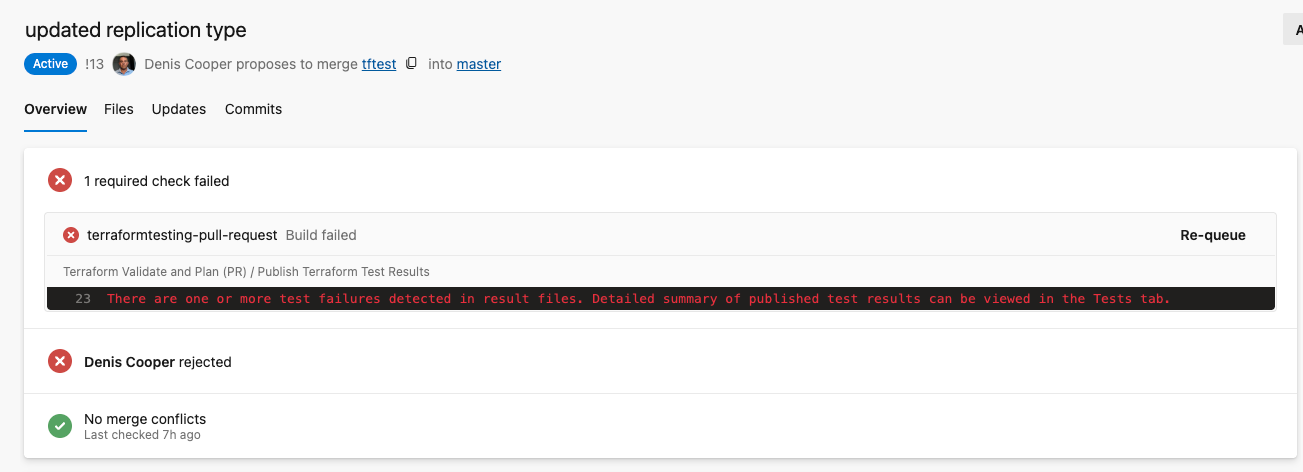
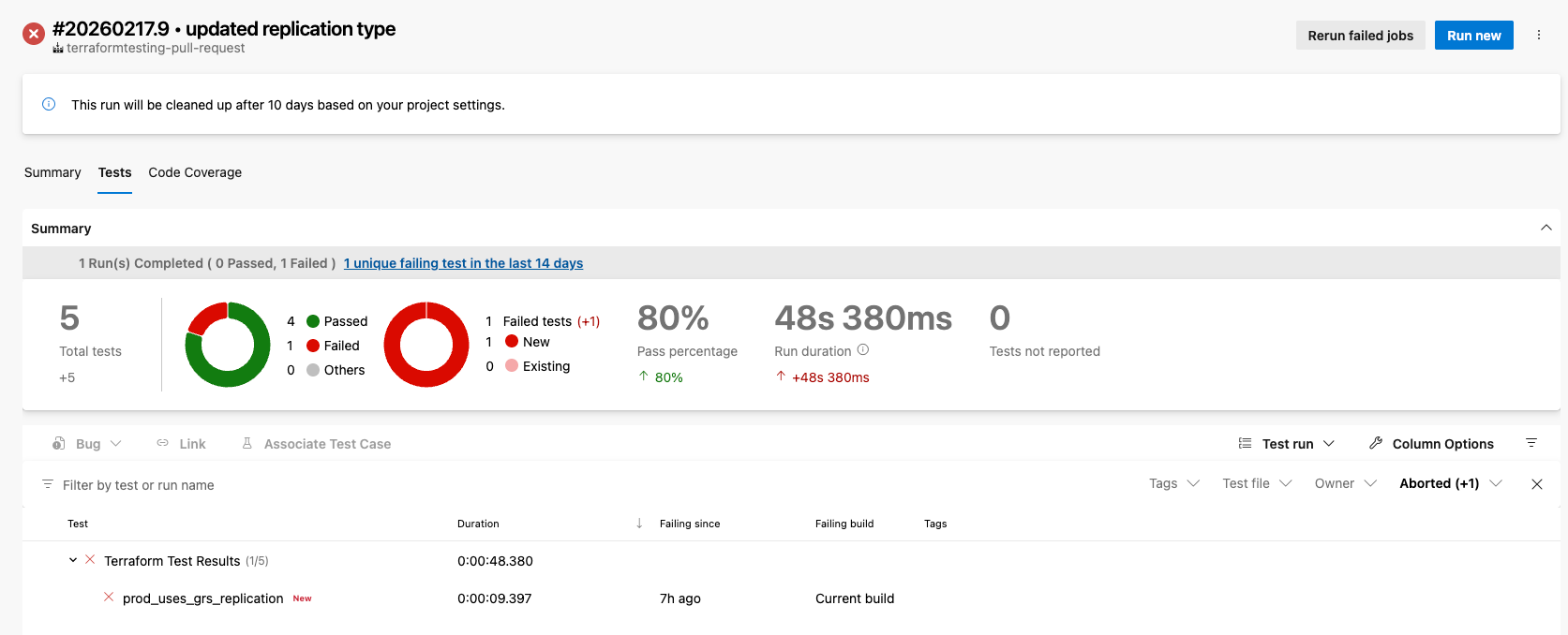
When the pull request pipeline is triggered, the terraform tests will automatically run, and if any of the tests fail, the pull request validation fails too.
You can see exactly which test failed along with other useful test statistics.
Protecting tests
As we are using Azure DevOps in our examples, we can’t use the Github functionality of CODEOWNERS to protect certain elements of code. But we can use Azure Branch Policies in tandem with our pull request pipeline to prevent changes being made to our tests without our governance team approval.
- Go to Repos → Branches → Branch Policies on your main branch
- Add a Automatically Included Reviewers policy
- Set the path filter to */tests/.tftest.hcl (or whatever pattern matches your test files)
- Add your governance team group as required reviewers
- Enable “Reset reviewer votes when there are new changes” so they can’t approve and then someone sneaks in edits
This enforces our governance team to approve pull requests before they are merged with main.
What terraform test is not
Lets be clear, Terraform test is a great addition to introduce testing for our terraform modules,
Terraform Test does not do:
- full integration testing
- security scanning
- policy enforcements
Terraform test is not a replacement for policy-as-code or security scanning. It validates module behaviour, not compliance posture. We still want to use tools such as CheckOv for security testing and Azure Policy for policy enforcement.
For example, if we wanted to ensure that an NSG didn’t allow wide open rules such as Allow 0.0.0.0/0, we would need to use something like CheckOv – not Terraform test.
Summary
Terraform test provides us with a simple to use test framework that we can use to carry out unit and validation tests. It’s not as robust as other platforms or tools, but it does give us an easy way to introduce tests and integrate them within Azure DevOps.